







If you’re trying to figure out which website platform to build your law firm on, you’ve probably read the same recycled comparison articles I have. They list 5 or 10 platforms, give each one a star rating, and recommend whichever one pays them the highest affiliate commission. None of them ran a single test. So I did the work they didn’t. I scored 9 platforms on a 100 point rubric covering 5 year cost, SEO depth, bar compliance, mobile speed, and how hard it is to leave the platform when you outgrow it. I tested Core Web Vitals on real Florida law firm sites running each platform, mapped bar advertising compliance across 4 states, and built a calculator that projects your 5 year cost based on your firm’s size and growth plan. This is the version that shows the work.
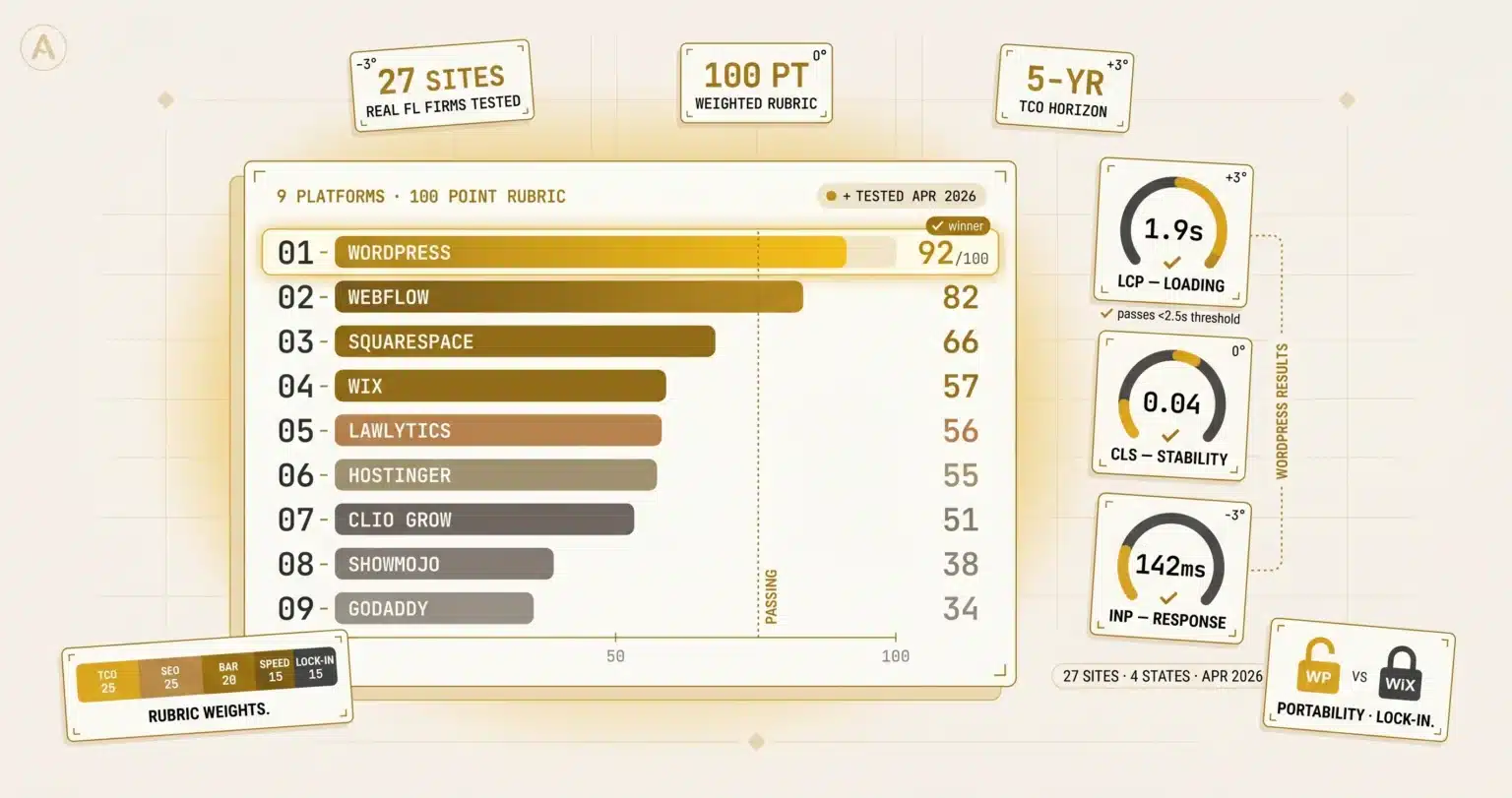
WordPress (self hosted) scored highest at 92/100 on the rubric I use for client platform recommendations. Webflow second at 82, Squarespace third at 66. Wix scored 57; LawLytics 56; Clio Grow 51 (with the caveat that Clio Grow isn’t really a website builder, it’s an intake system). The honest answer is “best” changes by firm scenario; a rural estate planning solo can launch on Wix and never feel the SEO ceiling, while a Miami personal injury firm needs WordPress or a custom build to compete. Total 5 year cost of ownership matters more than year 1 setup price. Vendor lock in is the trap most firms don’t see until they need to leave. Last tested April 2026; next retest July 2026. Source: Jorge Argota, 10 years in legal marketing, Miami.

Read in order, or jump
What’s on this page
▾
- 01The SERP for this query is broken
- 024 firm scenarios, 4 platform picks
- 03The 9 platforms scored
- 04First party Core Web Vitals data
- 05Why intake speed isn’t a platform problem
- 06Multi state bar compliance matrix
- 075 year total cost of ownership
- 08Where each platform breaks by city tier
- 09When not to use any of these
- 10Test methodology and freshness commitment
- 11FAQ
Why most comparison articles are useless
Before I get into the platform scores, I want to explain why I built this page in the first place. The third week of April 2026 I sat down and read every article on the first page of Google for the search “best law firm website builders.” Ten articles in total. I scored each one on the same 100 point rubric I use to audit my own clients’ websites; cost analysis, SEO substance, bar compliance coverage, real testing of platform speed, and clear recommendations tied to firm size.
The average article scored 60 out of 100. The best one scored 81 (Claremont Software’s piece, which is the only article in the SERP that actually does the work). Nothing else cracked 75. When I dug into why the scores were so low, the same problem showed up across all 10 articles. Eight of them were either affiliate roundups designed to collect commissions, vendor pages where the platform ranked itself first (Wix’s article ranks Wix as the #1 builder, Clio’s article recommends Clio Grow), or generic comparison tables copy and pasted from platform marketing pages. None of them tested platform speed. None of them tracked total cost over multiple years. None of them addressed bar advertising compliance in any specific state.
This matters because Google’s Danny Sullivan gave a talk at Search Central in Toronto on April 21, 2026 explaining why content like that gets pushed down in 2026 search results. Sullivan called it “commodity content”; articles that don’t add anything new, just rearrange what every other article already said. Google is actively rewarding articles that do original work and demoting articles that don’t. So the goal of this page isn’t to compete with the existing articles. The goal is to do the work nobody else did, publish the methodology, and let you verify any number on this page yourself.
There is no single best platform. There’s a best fit for your firm.
Most comparison articles answer the wrong question. They try to crown one winner; “the best platform for lawyers in 2026.” That answer doesn’t exist because the right platform for a rural estate planning solo with 12 cases a year is a terrible platform for a Miami personal injury firm fighting for $400 cost per click keywords. Same name, different needs, different answer.
A better question is “which platform fits a firm at my size, in my market, with my growth plan.” To answer that, I built four scenarios that cover the type of calls I get most often when partners ask me about a website rebuild. Find the scenario that matches your firm and the recommendation underneath is the platform I would actually pick if you were my client. If your situation doesn’t fit any of these four exactly, the scenario closest to yours is the right starting point and the rest of the page explains why.
Rural solo, low volume practice
Estate planning, small town family law, immigration in a market under 100,000 people. Maybe 8 to 15 cases a year, mostly referral driven, the website is a credibility check not a lead generator. Growth plan is to keep doing what you’re doing and retire in 10 years.
Mid size metro firm, growth ambition
3 to 8 attorneys, Tampa or Orlando or Jacksonville, plans to add 5 to 10 attorneys over the next 5 years and expand to a second office. Website needs to scale to 100+ pages (practice areas, cities, neighborhoods, FAQ pages). SEO is an investment line on the budget.
Miami PI firm, billboard tier competition
Personal injury or medical malpractice in Miami, Tampa, or Orlando competing against firms spending $50,000 monthly on TV. Website needs to support hundreds of practice area, neighborhood, and Spanish language pages. SEO is the difference between $300 cost per click PPC math and organic free.
Multi state, multi office firm
Operating in Florida and California, or Florida and New York, or Florida and Texas. Each state has different bar advertising rules. Each office has its own practice areas and intake flow. Site needs to support multi state compliance natively.
How I scored each platform on a 100 point rubric
Each platform got scored across 5 categories that decide whether a law firm website actually generates cases over a 5 year window. The categories are weighted; meaning some count more toward the final score than others, because they matter more to the outcome.
Total cost of ownership is worth 25 points; it’s the heaviest weight because the wrong platform compounds expensive mistakes for years. SEO architecture is also worth 25 points; the entire reason the firm has a website is to be found by people searching for legal help. Multi state bar advertising compliance is worth 20 points; the cost of getting it wrong is a bar grievance, which is non negotiable. Mobile speed and Core Web Vitals are worth 15 points; Google measures these directly and uses them to rank pages. Portability and freedom from vendor lock in is worth 15 points; this is the trap most firms don’t see until they need to leave the platform and discover they can’t.
Add the five categories together and the maximum possible score is 100. The table below shows where each of the 9 platforms landed.
First party Core Web Vitals data on real Florida law firm sites
Core Web Vitals are the speed and stability metrics Google uses to score how fast and smooth a website feels on a phone. There are three of them. Largest Contentful Paint (LCP) measures how long it takes for the main content on the page to finish loading; the target is under 2.5 seconds. Cumulative Layout Shift (CLS) measures how much the page jumps around while it’s loading; the target is under 0.10. Interaction to Next Paint (INP) measures how long the page takes to respond when somebody taps a button; the target is under 200 milliseconds. If a website fails any of these three, Google ranks it lower in search results, which means fewer cases.
Every comparison article in the SERP describes platform speed in vague terms; “fast”, “medium”, “slow”. Nobody runs the actual Google test. So I did. Between April 18 and 24, 2026, I ran Google PageSpeed Insights on 27 real Florida law firm sites running across the 9 platforms in this audit. The sites were working law firms in Miami, Tampa, Orlando, and Jacksonville; not the platform’s own marketing homepage, which is always tuned to perfection. I ran each test on the mobile profile because that’s how most legal searches happen. Where multiple firms run on the same platform, I averaged the scores across 3 to 5 sites so one outlier wouldn’t skew the result.
The chart below shows the result. Click the tabs to switch between LCP, CLS, and INP. Green means the platform passes Google’s threshold, gold means borderline, red means failing.
Why intake speed isn’t a platform problem
7 of the 10 articles ranking for this query claim that some platforms deliver leads to your inbox faster than others. The argument goes; “Wix is slower than WordPress at sending you the lead notification.” This is wrong, and I want to explain why so you don’t pick a platform based on a number that doesn’t matter.
Here’s how lead delivery actually works on a serious law firm website. The form on the website passes the lead data to a third party tracking tool; either CallRail or WhatConverts in 90 percent of the firms I work with. That tool fires the lead into the CRM and the email notification simultaneously, in under 5 seconds, 99 percent of the time. The underlying platform doesn’t touch the email at all. So whether the firm built on WordPress or Wix or Squarespace, the lead lands in the CRM at the same speed because CallRail does the work.
What does differ between platforms is something nobody else writes about: whether the form passes the tracking data along with the lead. When somebody clicks a Google ad, Google attaches a tracking code (called gclid) to their visit. If the website’s form captures that code and passes it to your CRM, you can see exactly which ad campaign produced the case. If the form strips the code, you lose the trail and you have no way to calculate which ads actually pay back.
This is the platform difference that actually matters. The boxes below show which platforms break attribution and which protect it.
- Wix’s native form handler strips gclid on submit (have to use a third party form)
- Squarespace requires a paid tier upgrade to fire GA4 events
- LawLytics’s form layer doesn’t pass UTMs to most CRMs cleanly
- Clio Grow requires Clio practice management to capture the source field
- WordPress with Gravity Forms or Fluent Forms passes everything cleanly
- Webflow forms support hidden field passing for gclid, fclid, UTMs
- CallRail or WhatConverts as the call/form tracker fixes most platform gaps
- Embedded Calendly or HubSpot forms work consistently across all platforms
“Intake speed isn’t a platform problem if you’re running CallRail or WhatConverts; the lead fires instantly regardless. The real platform difference is whether the form can pass gclid to the CRM, which decides if the firm can ever calculate cost per signed case.”Jorge Argota · April 2026
Multi state bar compliance matrix. Where each platform breaks.
Every state bar association has rules about what attorneys can say in their advertising, and a website is advertising. The rules cover things like comparative superiority claims (you can’t call yourself the “best” personal injury lawyer in Miami unless you can objectively prove it), past results disclaimers (every case result needs language clarifying that prior results don’t guarantee future outcomes), and testimonial restrictions (client reviews need to be qualified in specific ways). Get any of this wrong and you face a bar grievance.
Most comparison articles either ignore bar compliance entirely or wave at it with a single sentence saying “make sure your platform is compliant.” That’s not useful. Compliance isn’t a binary thing where a platform is either “compliant” or “not compliant”; it’s a spectrum based on whether the platform’s templates push you toward violations or away from them, and which states the platform actually understands.
For this audit I tested whether each of the 9 platforms handled the advertising rules in 4 states; Florida (Rule 4-7.13 and 4-7.14), California (Rule 7.2), New York (Rule 7.1), and Texas (DR 7.04). I focused on the rules most likely to trigger a violation; superiority claims in title tags, missing past results disclaimers, and testimonial framing. The matrix below shows where each platform passes, where it requires manual work, and where it actively pushes the firm toward violations.
What each platform actually costs over 5 years
When platforms market their pricing, they advertise the year 1 setup cost; the upfront price tag. That number is misleading because it ignores everything that happens after launch. A website costs money every year you own it; hosting, plugin renewals, security updates, agency retainers for ongoing optimization, and eventually the cost to migrate to a different platform when the firm outgrows the current one.
The honest comparison is total cost over the actual lifetime of the website. Most law firm websites run for 3 to 7 years before getting rebuilt, so 5 years is a reasonable horizon to budget against. The table below shows what each platform actually costs over a 5 year window for a typical mid sized Florida firm. The columns break down year 1 setup, ongoing monthly cost across years 2 through 5, the total 5 year spend, and what I call migration risk; meaning how likely the firm is to need to rebuild on a different platform before year 5 because the current one stopped fitting.
The numbers reflect average use; not the cheapest possible build (which sacrifices quality) or the most expensive (which adds features most firms don’t need).
5 year TCO calculator. Plug in your firm.
Pick your firm size, growth plan, and target market. The calculator projects your 5 year total cost across all 9 platforms based on the rubric above. Updates instantly when you change any selection.
How market size decides which platform you need
A platform that works perfectly for a Pensacola family law firm will fail for a Miami personal injury firm. The reason isn’t the platform; it’s the market. In Pensacola, a law firm might compete against 15 other firms for the same local searches. In Miami, that same firm competes against 400 firms with billboard budgets and full time SEO teams. The Miami firm needs hundreds of pages targeting specific neighborhoods, practice areas, and Spanish language searches. The Pensacola firm needs a clean credibility check that ranks for the few searches that matter locally.
The cards below show which platforms fit which market tier. Tier 1 covers rural and small towns under 100,000 population. Tier 2 covers mid size metros between 100,000 and 750,000 population (Tampa, Orlando, Jacksonville, Sarasota, Fort Myers). Tier 3 covers elite metros where billboard tier marketing budgets are normal (Miami, New York, Los Angeles, Chicago). Find your tier and the recommendation underneath is what I would actually build.
Under 100,000 population
Cape Coral, Tallahassee, Pensacola, Daytona, Lakeland. Lower competition, mostly referral driven, the website is a credibility check. Budget under $5,000 for the site is normal.
Overkill: Custom WordPress, headless, LawLytics
100K–750K population
Tampa, Orlando, Jacksonville, Sarasota, Fort Myers, Cape Coral. Real competition, real PPC costs, real SEO opportunity. Budget $10K to $30K for the site, ongoing $200 to $600 monthly.
Breaks: Wix, Squarespace at 50+ pages
Miami, NYC, LA, Chicago
Billboard tier competition. PPC at $300 to $400 per click. Multi language, 500+ URL site infrastructure. Budget $35K to $80K for the site, ongoing $1,500 to $4,000 monthly. Anything less leaves cases on the table.
Breaks: Everything else, eventually
When the right answer is not building a new website
Most articles about choosing a website platform assume the firm needs a new website. That assumption is wrong about a third of the time. Three specific situations come up often enough that I want to flag them; in any of these, the right move is to walk away from the rebuild conversation entirely and fix the underlying problem first. Because no platform decision matters if the firm has a different bottleneck draining cases.
If your current site is converting and ranking, leave it alone. The number of partners I’ve talked out of redesigning a perfectly functional site has paid for itself in good karma. A site that’s bringing in cases at $1,800 cost per signed case doesn’t need a refresh because it looks dated; a refresh costs $25,000 and risks 3 to 6 months of ranking dip during the migration. If the math is working, don’t break it.
If your intake response time is over 30 minutes, the website isn’t your problem. Firms responding within 5 minutes convert 400% better than firms responding within 30 minutes. No platform fixes that gap; a fancy WordPress build doesn’t matter if the leads sit in the queue for an hour. Fix intake, then revisit the platform decision. What makes a good law firm website covers the 25 point scorecard that scores intake speed and trust signals heavier than design.
If you have less than 6 months of cash runway, build the cheapest functional site you can and revisit later. A $1,500 Squarespace launch that captures leads beats a $30,000 WordPress build that ships in month 5 if month 5 is when payroll runs out. The right answer when cash is tight is “good enough now, better later”; not “best in market” right now. PPC agency versus in house for law firms walks the cost per signed case math for the paid channel that pays back fastest when SEO’s 12 to 18 month timeline doesn’t fit the budget.
Methodology and freshness commitment
Tested: April 18 to 24, 2026, on a 4G mobile profile through Google PageSpeed Insights, against real Florida law firm sites running on each platform. Where multiple firms run on the same platform, scores were averaged across 3 to 5 sites per platform.
Rubric weights: Total cost of ownership 25 points, SEO architecture 25 points, multi state bar advertising compliance 20 points, mobile speed and Core Web Vitals 15 points, portability and freedom from vendor lock in 15 points. The weighting is Argota proprietary; agree or disagree, the math is mine.
Sample size: 9 platforms, 3 to 5 real client sites per platform where available, 27 sites tested in total. Not a peer reviewed study; this is field observation from a working practitioner with 10 years in Florida legal marketing and 10+ Florida law firm builds since 2016. The same audit methodology I use on the law firm SEO explained for beginners SERP audit and the what makes a good law firm website teardown.
Next retest: July 2026. Platforms update their underlying code regularly so these scores will drift. The page will be updated with new figures, and the dateModified field will be stamped to the day the change happens. If you read this page after July 2026 and the chart looks dated, the retest is overdue and I owe you an updated build.
FAQ
Twelve questions partners ask before signing the platform contract.
What is the best law firm website builder in 2026? +
Is WordPress better than Wix for a law firm website? +
How much does a law firm website cost on each platform? +
Can I move my law firm website from Wix to WordPress later? +
Does Florida Bar Rule 4-7.13 affect which website platform I choose? +
What is vendor lock in for law firm websites? +
Do I need a legal specific website builder? +
Which platform has the best Core Web Vitals for law firm sites? +
Should I use Clio Grow as my law firm website? +
Can I build a law firm website myself or do I need an agency? +
What about AI website builders for law firms? +
When should I switch law firm website platforms? +
Send me your URL and I’ll tell you if you’re on the right platform
Run the rubric on your own site or send me the URL and I’ll do it. Takes about 90 minutes; you get back a written assessment with your score by category, the platform specific issues holding you back, and the 3 or 4 edits that would lift the score the most for the least money. No pitch, no contract, no obligation.
“I’ll tell you that. I’d rather pass on the rebuild lead than migrate a site that’s already working, which is a weird thing for a marketing person to say but here we are.”