








Most Google Ads guides for lawyers cover the same ground: cost, setup, keywords, landing pages, tracking, ship. They skip the part where the average law firm wastes $5,000 to $50,000 figuring out what works.
This guide is the operating system, not the explainer.
Every step answers a beginner’s real question: will this produce signed cases at a cost the practice can sustain? The framework uses cost per signed case (not cost per click) as the only number that matters, market tiering to set realistic budgets, and a launch sequence built so beginners avoid the architecture mistakes that take 6 months to undo.
All compliance notes reference Florida Bar Rule 4-7.13 and 4-7.14. Out of state firms map to their own state bar rules before launching.

12 free downloads that ship with this guide
Every step in this manual references a downloadable artifact. They’re free, no email required, and built to be filled in or pasted directly into Google Ads. Open them, edit them, send them to your developer or agency. The full toolkit:
- 01Quick answer + who this is for
- 02SERP anatomy: LSAs vs Ads vs Map vs Organic
- 03Do Google Ads work for law firms?
- 04Costs that matter: CPC to signed case
- 05Most competitive cities (tier map)
- 06Beginner campaign architecture
- 07Keyword research by intent
- 08Match types + negative keyword fortress
- 09Ad copy that converts and stays compliant
- 10Landing page wireframe
- 11Tracking stack: call + offline conversions
- 1230/60/90 day optimization plan
- 13Common revenue leaks
- 14DIY vs hire an agency
- 15FAQ
- 16Audit + next steps
01 · Quick answer + who this is for
AwarenessGoogle Ads work for law firms when 3 conditions are met: the practice area produces enough case value to absorb $200 to $800 per qualified lead, intake handles inbound calls within 5 minutes, and the firm tracks signed cases back to specific keywords. Without all 3, ads burn budget. This guide is for solo and small firm attorneys deciding whether to spend, what to spend, and how to spend it without making the structural mistakes that take months to undo.
High case value practice areas (PI, mass tort, med mal, complex business litigation) have headroom for paid ads. Low case value practice areas (uncontested divorce, simple wills, traffic tickets) rarely pencil out without volume tactics outside Google Ads. Run the cost per signed case worksheet later in this guide before spending a dollar.
The 8 questions to answer before opening Google Ads: What’s our average case value? What case acquisition cost can we sustain (10 to 25 percent of case value)? Do we have a dedicated landing page or a homepage? How fast does intake answer the phone? Can we track form submissions back to a specific ad? Are we on Local Services Ads already? What’s our state’s bar advertising rule for paid digital placements? What’s the worst case month if the first 30 days produce zero signed cases? If you can’t answer all 8, the answer to “should we run Google Ads” is “not yet.”
02 · SERP anatomy: LSAs vs Ads vs Map vs Organic
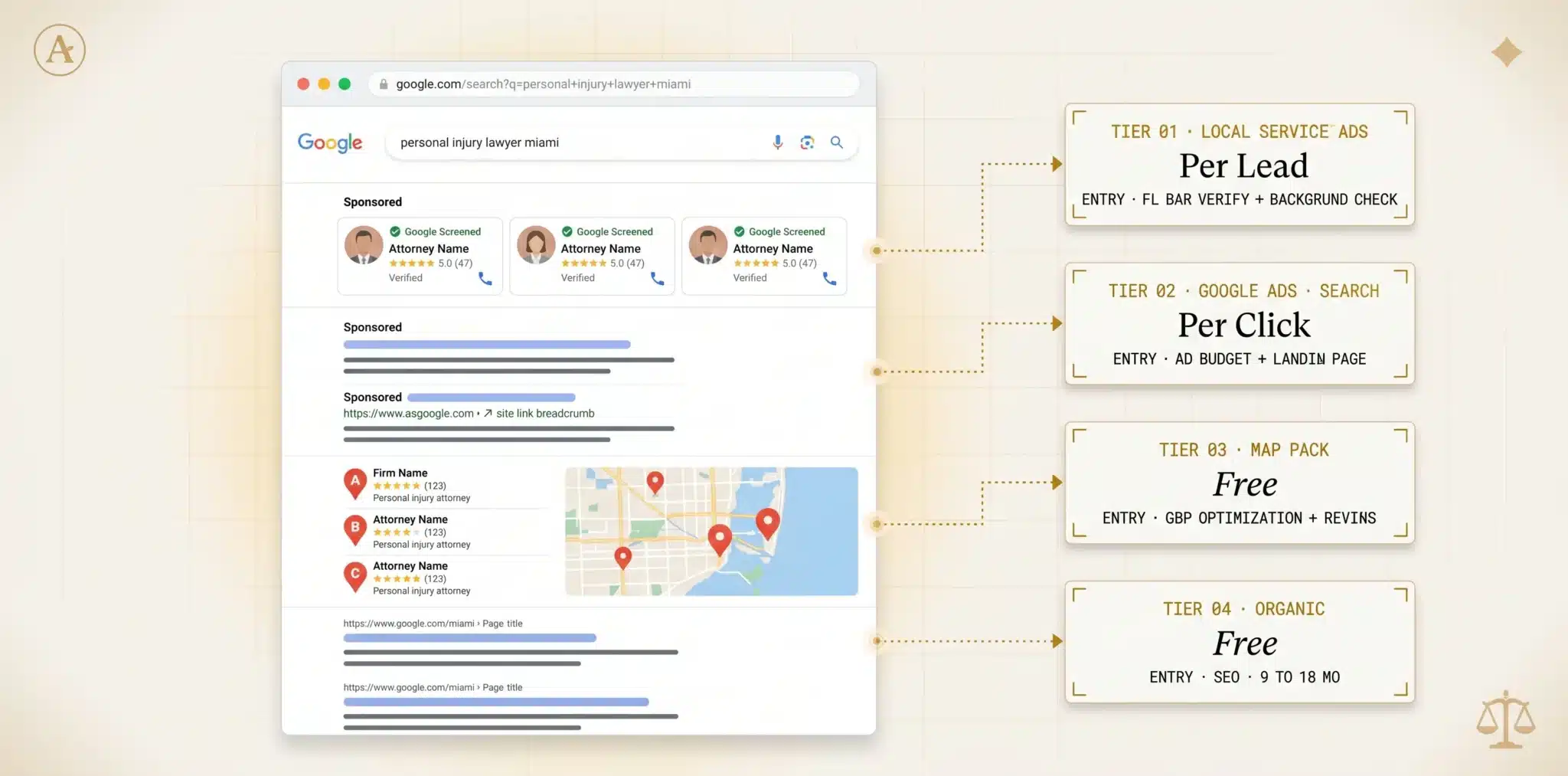
AwarenessBefore running ads, understand what shows on a legal SERP and where your money goes. A query like “personal injury lawyer Miami” returns 4 distinct ad and listing types stacked top to bottom. Each charges differently and reaches a different stage of intent.
A real “personal injury lawyer Miami” SERP with each placement tagged. LSAs, Google Ads, Map Pack, Organic stacked top to bottom; what each costs, what gets you in. Beginners who misread the SERP chase the wrong placement first.
03 · Do Google Ads work for law firms?
ProblemHonest answer: sometimes. The 3 conditions named at the top of this guide each have a specific failure mode. Here’s how each one breaks campaigns when missing.
Condition 1 is case value. If your average case is worth $50,000 and your acquisition cost target is 15 percent, you can absorb $7,500 per case. That’s roughly 9 to 25 qualified leads at $300 to $800 cost per lead, with a 4 to 10 percent qualified lead to signed case rate. Math works. If your average case is worth $2,500, the same lead costs don’t pencil and you need a different channel.
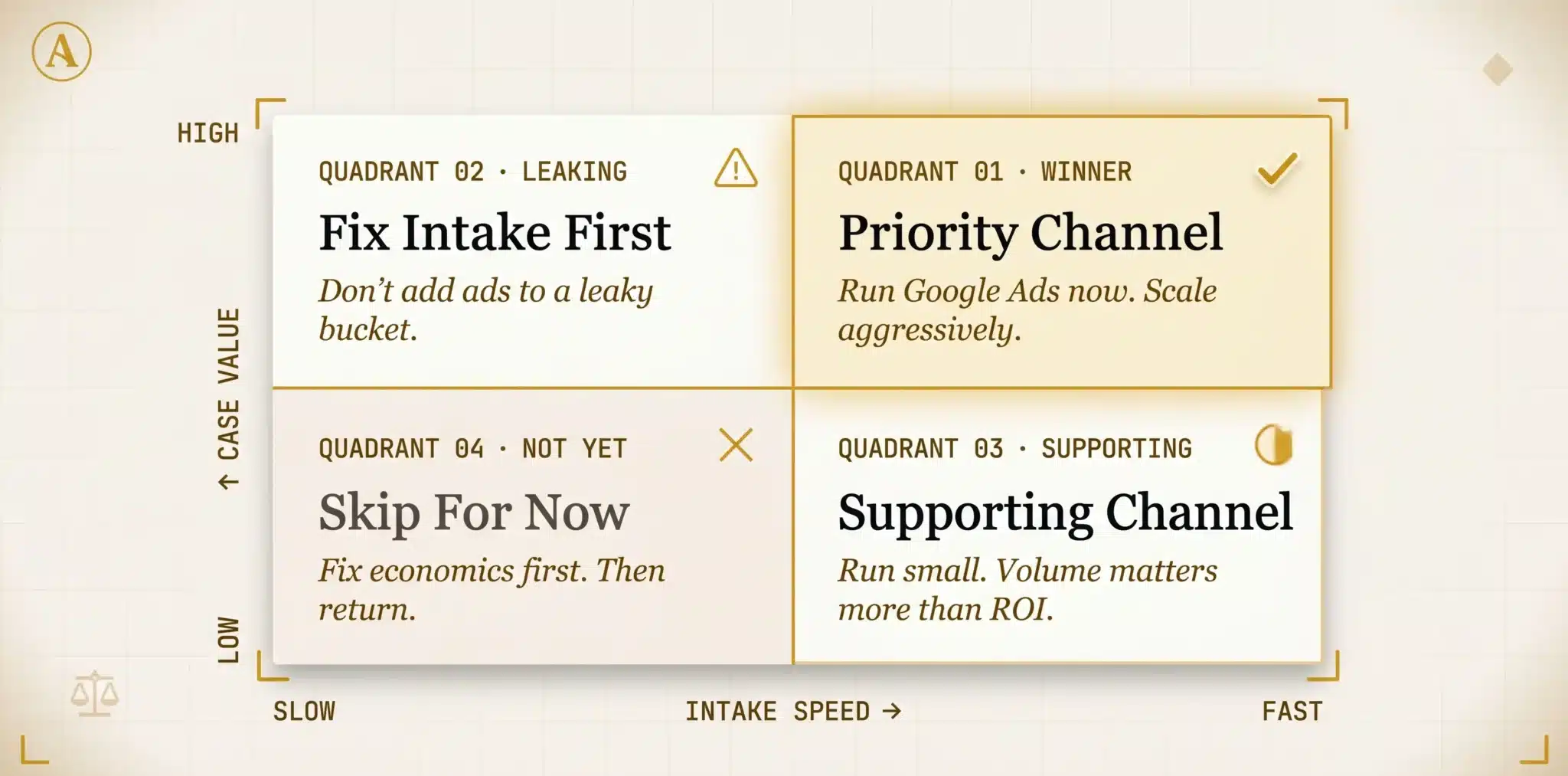
Condition 2 is intake speed. Google Ads bring inbound calls and form submissions. Callbacks delayed 30 minutes lose 60 to 80 percent of interest. Firms with strong intake convert ad leads at 4 to 10x the rate of firms with weak intake. Fixing intake before increasing ad spend is the highest impact move you can make.
Condition 3 is signed case tracking. Without offline conversion import (covered in step 11), Google’s bidding optimizes for cheap leads (often unqualified) instead of leads that sign. Every campaign optimizes toward the wrong outcome.
A 2×2 that scores your firm on case value (high / low) and intake speed (fast / slow). Tells you whether Google Ads should be the priority channel, a supporting channel, or skipped entirely until intake is fixed. Most “we tried it, it didn’t work” failures map to the bottom-left quadrant.
04 · Costs that matter: CPC to signed case
ProblemMost beginner guides obsess over cost per click. CPC is the dashboard headline; it’s also the least useful number on the page. The metric that decides profitability sits 3 conversion steps after the click: cost per signed case. Here’s the ladder.
A campaign with $800 CPC can be profitable if the qualified lead rate is high and the lead to sign rate is high. A campaign with $5 CPC can be unprofitable if 95 percent of clicks are out of jurisdiction or DIY traffic. The platform shows CPC and CPL in the dashboard automatically; CPQL and CPSC require you to build them. Most firms running Google Ads have never computed CPSC. They’re optimizing toward a number that doesn’t tell them whether they’re making money.
A spreadsheet that takes 4 inputs (average case value, target case acquisition cost percentage, qualified lead to signed case rate, target signed cases per month) and outputs the maximum CPC, CPL, and CPQL the firm can sustain. Run it in 5 minutes before launching. If the numbers don’t pencil out on paper at expected conversion rates, no Google Ads optimization will fix it.
“The cheapest CPC and the highest CPSC often live in the same campaign. CPC tells you what you paid for traffic. Cost per signed case tells you what you paid for revenue.”Jorge Argota · April 2026
05 · Most competitive cities (tier map)
ProblemGoogle Ads costs vary 30 to 50x across markets for the same query. Most beginner guides only mention the obvious mega metros. Two separate cost drivers exist: population density (Tier 1 metros) and injury economics (oilfield, port, high accident corridors regardless of population). Firms that lose money on Google Ads first usually didn’t tier their market correctly when setting budget expectations.
The matrix below is directional, not exact; CPCs change weekly. Tier 1 markets are highest auction pressure for personal injury and mass tort. Tier 2 sits in the middle. Tier 3 markets often produce the best CPSC numbers because competition is thinner relative to case value.
| Market | Tier | PI / Mass Tort | Med Mal | Criminal | Family | Estate |
|---|---|---|---|---|---|---|
| NYC | Tier 1 | $300 to $800 | $200 to $500 | $60 to $140 | $25 to $80 | $15 to $40 |
| Los Angeles | Tier 1 | $280 to $700 | $180 to $450 | $50 to $120 | $20 to $70 | $15 to $40 |
| Houston | Tier 1 | $350 to $900 | $200 to $500 | $45 to $110 | $20 to $60 | $12 to $35 |
| Miami | Tier 1 | $200 to $550 | $150 to $380 | $35 to $90 | $18 to $55 | $10 to $30 |
| Chicago | Tier 1 | $220 to $580 | $150 to $400 | $35 to $95 | $18 to $55 | $10 to $30 |
| Houston (oilfield) | Tier 1+ | $400 to $1,000+ | $150 to $350 | $35 to $90 | $15 to $45 | $10 to $25 |
| New Orleans | Tier 1+ | $300 to $800 | $120 to $300 | $30 to $75 | $15 to $40 | $8 to $22 |
| Tampa / Orlando | Tier 2 | $120 to $350 | $80 to $250 | $25 to $65 | $12 to $40 | $8 to $22 |
| Mid market US (general) | Tier 3 | $60 to $200 | $50 to $150 | $15 to $50 | $8 to $30 | $5 to $18 |
Source: Argota observation across client accounts and public Google Ads benchmarks, 2024 to 2026. Live CPCs vary by week, ad copy, and quality score.
Beginners in Tier 1 markets routinely set $1,500 monthly budgets and wonder why they got 4 clicks. That’s correct math: $1,500 / $400 CPC = 3.75 clicks. The matrix above lets you sanity check whether your budget can produce a viable test in your market before launch. If the math says you’ll get fewer than 50 clicks per month, the test isn’t statistically meaningful and the budget needs to scale up or the strategy needs to change.
06 · Beginner campaign architecture
SolutionThe structure you set up in the first hour determines whether you can read the data 60 days later. Beginner accounts make 3 architecture mistakes: one campaign with everything dumped in, ad groups mixing branded and non branded, naming conventions that don’t survive past 5 campaigns. Fix the architecture upfront or every optimization decision after week 4 is unreliable.
Standard beginner safe structure: one campaign per practice area, ad groups split by query intent (hire now / research / branded), match types tight (phrase and exact, no broad in week 1), naming convention applied consistently. Practice area separation is non negotiable because budgets, CPCs, and conversion rates differ enough that mixing them invalidates the data.
Campaign naming: [Brand] – [Practice area] – [Geo] – [Match type]. Example: “Argota – Personal Injury – Miami – Phrase”. Ad group naming: [Intent] – [Sub topic]. Example: “Hire Now – Car Accident”, “Research – Settlement Timeline”, “Branded – Firm Name”. Keyword separation: Hire now intent in their own ad groups (best, top, near me, hire), research intent separated (what is, how does, average cost), branded keywords always isolated. Account structure templates that follow this naming pattern are filterable, sortable, and survive growth from 1 campaign to 30.
07 · Keyword research by intent
SolutionMost law firm keyword lists confuse hire now intent with research intent. Both convert, but at very different rates and costs. Mixing them in the same ad group gives one combined number that doesn’t tell you which set is profitable.
Hire now intent means the searcher is ready to call: “best personal injury lawyer Miami”, “car accident attorney near me”, “DUI lawyer Tampa”. Highest CPCs, highest conversion rates, highest signed case rates. Research intent means information gathering: “average car accident settlement”, “do I need a lawyer for a fender bender”, “how long does a personal injury case take”. Lower CPCs but much lower lead quality; many never call. Branded intent is people searching for your firm by name: cheapest, highest convert rate, and competitors will bid on your brand if you don’t.
A 3 column matrix per practice area. Column 1: hire now keywords (best, top, hire, near me, attorney, lawyer + practice area + city). Column 2: research keywords (what, how, average, cost, free, advice). Column 3: branded keywords (firm name + variants, attorney names). Beginners ship with hire now keywords only in week 1, add branded protection in week 2, and decide whether research keywords pencil out after 60 days of data.
08 · Match types + negative keyword fortress
SolutionMatch types control how loosely Google interprets your keyword. Broad means Google can show your ad for almost anything related; phrase means the search must contain your phrase in roughly that order; exact means the search must match your keyword closely. Beginner default: phrase + exact, never broad in week 1. Broad without negatives burns budget on irrelevant searches faster than any other single mistake.
The negative keyword fortress is the second half of match type discipline. Without negatives, 30 to 50 percent of clicks are non viable: job seekers, DIY users, students, out of jurisdiction searchers, definition lookups. Built in 4 categories.
A downloadable CSV with 200 to 500 negative keywords pre organized by category and ready to paste into Google Ads at the campaign level. Refresh weekly during the first 90 days based on the search terms report; remove false positives, add new garbage queries. Most firms see qualified lead rate jump 30 to 50 percent within 14 days of adding a proper negative list.
09 · Ad copy that converts and stays compliant
SolutionLegal ad copy walks a narrow path. Aggressive enough to get clicked, compliant enough to not trigger a Bar grievance. Beginner ads err in one direction: either generic (“Experienced Attorneys, Free Consultation”) or overreaching into superlative claims that violate state advertising rules.
The compliant high converting pattern: lead with a specific benefit (“Recover compensation for medical bills”), include a real differentiator (“Trial attorneys, no junior associates”), end with a clear next step (“Free 15 minute consultation”). Avoid: “best”, “top rated”, “specialist” without certification, “guaranteed”, “highest settlement” without context, and any past results without proper disclaimers.
A swipe file with 40+ ad copy combinations across 5 practice areas, each labeled compliant or non compliant against FL Bar 4-7.13 / 4-7.14 with specific subsection references. Out of state firms get a parallel file mapping the same patterns to other state bar rules. Beginners spend 2 hours customizing instead of 2 weeks rewriting after a Bar grievance.
10 · Landing page wireframe (don’t send to homepage)
SolutionThe most expensive Google Ads mistake beginner law firms make is sending paid traffic to the homepage. Homepages convert at 1 to 2 percent for legal queries. Dedicated landing pages built correctly convert at 8 to 14 percent. That’s 5 to 10x more signed cases per dollar. The wireframe isn’t complicated; the discipline to use it is.
A wireframe that lays out the 5 elements in their correct vertical order, plus a 12 point pre launch checklist (page loads under 2.5s on mobile, click to call button visible on mobile, no homepage nav, form has 5 fields max, headline mirrors keyword, etc.). Builders or in house developers can ship a compliant landing page in 4 to 8 hours from this template.
11 · Tracking stack: call + offline conversions
DecisionTracking is the one step where shortcuts cost the most money. The 4 layer stack covers click, call, form, and signed case. Skip any layer and the data above it becomes unreliable.
Layer 4 is the one beginner accounts skip. Setup takes 2 to 4 hours of CRM and ad account configuration. ROI is typically 20 to 40 percent better cost per signed case within 90 days.
A flowchart that shows how a click flows through the 4 layers: ad click triggers GTM event, lands on tracked landing page, fires call tracking dynamic number, generates qualified lead in CRM, marked as signed when the case is signed, exported back to Google Ads. The flowchart includes the integration points (Google Tag Manager, CallRail, CRM, Google Ads offline conversion import) so a developer or agency can implement it without ambiguity.
12 · The 30/60/90 day optimization plan
DecisionMost firms make optimization decisions too early on too little data. Pausing keywords at day 7 because CPCs look high. Expanding budget at day 14 because one campaign got 3 leads. Switching bid strategies at day 21. None of those decisions can be reliably made yet. The 30/60/90 plan sequences when each kind of decision is reliable.
A week by week checklist with specific actions per week (week 1: verify tracking, add initial negatives. Week 4: review search terms report, refine match types. Week 8: import first batch of signed case data. Week 12: decide expansion or contraction). Beginners stop guessing what to do next; the checklist tells them.
13 · Common revenue leaks
ProblemWhen a campaign isn’t producing signed cases, the leak is one of 8 specific failures. The diagnostic table below lets a beginner self troubleshoot before concluding “Google Ads doesn’t work for us.” Six of these eight patterns explain almost every “we tried it, it didn’t work” complaint.
A 20 row diagnostic table with the most common law firm Google Ads failures. Each row maps a symptom to the first 3 things to check, an estimated fix cost, and a severity rating. Most “Google Ads doesn’t work for us” complaints map directly to one of these 20 rows; the diagnostic gets you from “something is wrong” to a specific hypothesis to test in 5 minutes.
14 · DIY vs hire an agency
DecisionDIY works for solo and small firms with 5 to 8 hours per week available, working offline conversion import, and a practice area where a single mistake won’t burn $5,000 in a week. Outside those conditions, the agency markup pays for itself. The scorecard below separates green flags from red flags when evaluating an agency.
- Reports cost per signed case, not just cost per lead
- Has examples of offline conversion import setups they’ve shipped
- Owns the negative keyword list (theirs, refined over time)
- Has a written 30/60/90 plan they can show before signing
- Names the senior person who actually touches your account
- Comfortable with “we won’t run broad match in week 1”
- Cites your state bar advertising rules unprompted
- Reviews call recordings for lead quality, not just click data
- Reports only impressions, clicks, and CTR (no lead or case data)
- Promises a guaranteed CPL or guaranteed signed cases
- Won’t share the actual keyword list or negative list
- Account managed by 5 different people during the sales process
- Pushes Performance Max in week 1 (low control, no diagnostics)
- Doesn’t ask about your intake speed or callback process
- Generic landing pages built once, reused across all clients
- Refuses to set up offline conversion import “because it’s complex”
A 25 question scorecard you can send to any prospective agency before signing. Questions cover reporting depth (do they report cost per signed case?), tracking sophistication (offline conversion import experience), bar advertising rules awareness, and account ownership transparency. An agency that scores below 18 of 25 is taking shortcuts that will cost you more than the markup.
15 · Frequently asked questions
Are Google Ads worth it for lawyers in 2026?
How much do Google Ads cost for lawyers per click?
What is the difference between Google Ads and Local Services Ads (LSAs) for lawyers?
Can I run Google Ads for my law firm myself or do I need an agency?
What landing page should I send Google Ads traffic to?
What are the most important negative keywords for law firm Google Ads?
How long does it take to know if Google Ads are working for my law firm?
Do Google Ads have to follow Bar advertising rules?
Nothing on this page promises specific lead volume, cost per signed case outcomes, or campaign ROI. The cost ladder, market tier matrix, and conversion rate ranges reflect Argota observation across client accounts and public benchmarks. Your numbers will vary based on practice area, market, intake quality, and tracking sophistication.
Florida attorneys: see the inline compliance notes throughout this guide for specific rule references. Out of state firms should evaluate every section against their own state bar advertising rules. Any agency claiming “guaranteed signed cases” or specific lead volume is making claims that violate Bar advertising rules in most states.
Want me to score your Google Ads against this framework?
I’ll audit your account against the 16 step manual: cost per signed case math, campaign architecture, negative keyword fortress, landing page wireframe, tracking stack, 30/60/90 plan. You get a written audit with specific fixes ranked by dollar impact.
- Cost per signed case calculation for your practice
- Campaign architecture review
- Negative keyword gap analysis
- Landing page conversion audit
- Tracking stack verification