

Written by Jorge Argota · HIPAA Compliant Intake · United States
If your med mal intake form collects medical records, provider names, or treatment details through a standard contact form plugin, you have a HIPAA violation on your live website right now. Most firms don’t realize this because the form “works.” It collects the data and emails it to the paralegal. But that email isn’t encrypted, the form vendor hasn’t signed a Business Associate Agreement (BAA), and most plugins also store a copy of every submission in your WordPress database unencrypted. That means Protected Health Information (PHI) is sitting on your web server 24/7, accessible to anyone who breaches the hosting account.
Since only 9% of hospitals tell patients what went wrong, your prospective clients arrive already suspicious and exhausted. They’ve been dismissed by doctors, ignored by administrators, and they’re not in the mood for a 20 question interrogation on your website. The firms that win these cases capture the lead with 3 fields and collect the medical data later in a secure environment.
TL;DR
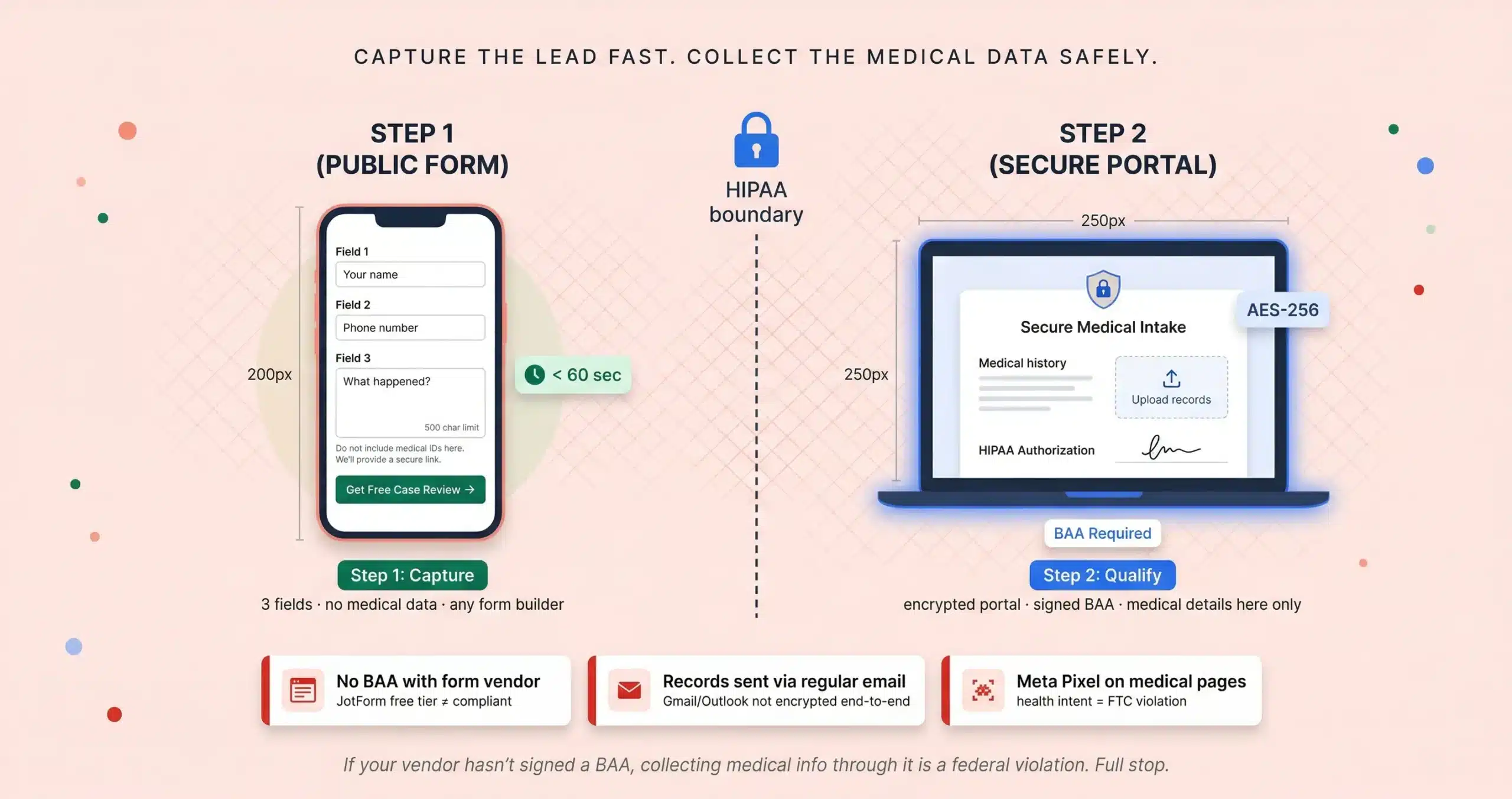
Step 1: your public website form asks only name, phone, and “what happened?” with zero medical details collected. Automated text goes out in 60 seconds.
Step 2: after the initial call, send them a secure link to an encrypted portal where they upload records and sign the HIPAA authorization digitally.
The rule: if the software vendor hasn’t signed a Business Associate Agreement, collecting medical information through it is a federal violation. Full stop. Source: Jorge Argota, 10 years HIPAA-compliant legal intake.
HOW TO BUILD A HIPAA COMPLIANT MED MAL INTAKE FORM IN TWO STEPS
You don’t need to rebuild your website. You need to separate the marketing capture from the medical data collection. The public form stays simple and fast. The medical detail moves behind an encrypted wall. Here’s what that looks like in practice.
Your public website (no medical details)
Three fields: name, phone, and “tell us what happened” with a 500 character limit so no one accidentally pastes their entire medical history into an unencrypted text box. Place a compliance disclaimer directly under the text box: “Please do not include medical IDs or social security numbers here. We will provide a secure encrypted link for medical records during our follow-up.” This prevents data spillage and signals to both the user and the algorithm that you take privacy seriously. When they hit send, an automated text goes out within 60 seconds.
The secure portal (after the first call)
After you’ve talked to them and confirmed there’s no conflict, send a secure link to an encrypted form where they enter their medical history, upload records, and sign a HIPAA authorization digitally. The software vendor must have signed a BAA with your firm. The portal auto-generates the authorization form from the provider name and date of service they entered so they sign once and you can request records the same day.
MEDICAL MALPRACTICE SCREENING QUESTIONS FOR CASE VIABILITY
Med mal cases are expensive before you even file. Expert reports run $10,000 to $50,000 and in Texas you have to serve one within 120 days of the defendant’s answer (Section 74.351) or the case gets dismissed with prejudice. This isn’t a medical summary; it’s a formal expert report that must address the specific standard of care that was breached and how that breach caused the injury. Your secure portal needs to ask the right questions so you know whether to invest before you spend a dollar on records retrieval.
“When did this happen?”
Date of incident and date they first realized something was wrong. The discovery rule means the clock often starts when the injury could reasonably have been discovered, not when it occurred. If it’s past the statute (2 years in Texas), the case may still be alive. A Chapter 74 pre-suit notice tolls the statute by 75 days. Your form should flag these borderline cases for attorney review instead of auto-rejecting them.
“Was it a public or private hospital?”
Government facilities require a Notice of Claim within 6 months in many states (90 days in some). If they select “VA facility,” the case falls under the Federal Tort Claims Act (FTCA) which requires administrative exhaustion through a Standard Form 95 before any lawsuit can be filed. Your form should use conditional logic: if “VA” is selected, ask whether they’ve already filed the SF-95. This one question tells you immediately whether the case is procedurally viable or needs pre-suit work first.
“What exactly did the doctor do or fail to do?”
This forces specificity. “The hospital was rude” is not a case. “The surgeon left a sponge inside me” is a case. Include a medical specialty dropdown (Cardiology, OBGYN, Orthopedics, Emergency Medicine) so you can immediately identify which expert witness you’ll need for the review.
“Did a second doctor say the first one was wrong?”
This is the suspicion trigger. Since only 9% of hospitals disclose errors, most clients arrive based on something a second physician told them. A “yes” here dramatically increases case viability. Also ask about current employment status and ongoing treatment; economic damages (lost wages, future care) are uncapped in most states while non-economic damages are capped at $750K in Texas.
⚡ These people are in pain. Design for that.
Use conditional branching: don’t show “death certificate upload” unless wrongful death is selected. Offer “save and resume” because medical histories are long and 70% of legal searches start on mobile, often from a hospital waiting room. If someone clicks save, send an automated email: “We know this is difficult. We’ve saved your progress so you can return when you’re ready.” That one sentence recovers leads your competitors lose to form fatigue.
HIPAA VIOLATIONS ON LAW FIRM WEBSITES AND HOW TO FIX THEM
Most med mal firms have at least one of these. The problem is that nothing breaks visibly. The form works, the emails arrive, the paralegal processes the lead. But the data pipeline underneath is non-compliant and it stays that way until someone audits it or someone files a complaint.
⚠ This is what enforcement looks like
In late 2025, a mid-sized personal injury firm faced a $150,000 OCR settlement not because they were hacked but because a routine audit revealed their standard WordPress form plugin was storing unencrypted PHI in the site’s SQL database without a BAA. The firm had used the form for 3 years with no incident. No breach. No complaint. The violation was structural: the data existed unprotected on a shared hosting server the entire time.
No signed BAA with your form vendor
JotForm only offers a BAA on Enterprise tier; the Free, Bronze, and Silver plans are not compliant even though they use encryption. Typeform’s standard plan has no BAA. Gravity Forms has no BAA at all. If you’re collecting any medical detail through these tools on their default plans, your firm assumes total vicarious liability for any breach at the vendor level; under the HIPAA Omnibus Rule there is no safe harbor without a signed BAA. The best vendors offer zero-knowledge architecture where even the software company cannot decrypt your data. Ask your vendor: “Do we have a signed BAA on file?” If the answer is no or “I don’t know,” stop collecting medical data through that form today.
Medical records sent via regular email
Standard Gmail and Outlook are not encrypted end-to-end; unless you’ve configured Force TLS, your emails are as private as a postcard. Use a secure file drop in your portal that bypasses the inbox entirely and deposits records directly into your practice management system (Clio or Filevine). If a client insists on email, obtain an Informed Consent Waiver acknowledging the risks of unencrypted transmission before proceeding. ProtonMail offers encrypted email as a safer alternative.
Tracking pixels on pages that collect health data
If a lead selects “Surgical Error” on a page running Meta Pixel, you’ve shared their “health intent” with an advertiser. The FTC now classifies health intent as protected data. BetterHelp and GoodRx paid over $100M in fines for exactly this. Strip all tracking from your secure portal and from any page where a user discloses a medical condition. If you need to track conversions, place the pixel on the Stage 1 success page (the “thank you” confirmation) before any medical data is entered.
📋 What to tell your IT team Monday morning
Public form: any builder works (Gravity Forms, Typeform) since no medical data touches it. Secure portal: JotForm Enterprise or Formstack with BAA activated before you go live. The connector: Zapier pushes the public form data into Clio or Filevine; never route medical data through Zapier unless you have an Enterprise BAA with Zapier itself. Encryption: AES-256 at rest, TLS 1.2+ in transit. Require multi-factor authentication on every account that accesses patient data; OCR now classifies missing MFA as willful neglect. Data residency: confirm your vendor stores data on US-based servers to comply with federal jurisdiction requirements. Logs: retain audit trails for 6 years minimum.
HIPAA COMPLIANT INTAKE FAQ
Get Your HIPAA Intake Audit
I’ll check your current form for violations, tell you exactly which vendor tier and BAA you need, and set up the two-step system that captures leads in 30 seconds and collects the medical data in a compliant portal.
About Jorge Argota · 10 years building intake systems for med mal and PI firms. Every portal I set up uses encrypted file uploads with a signed BAA and conditional branching that respects the client’s emotional state. Full bio.
Related: Form Conversion Guide · Intake Process · Med Mal Marketing · Ethics Rules · Website Design