

Written by Jorge Argota · Website Migration Recovery · United States
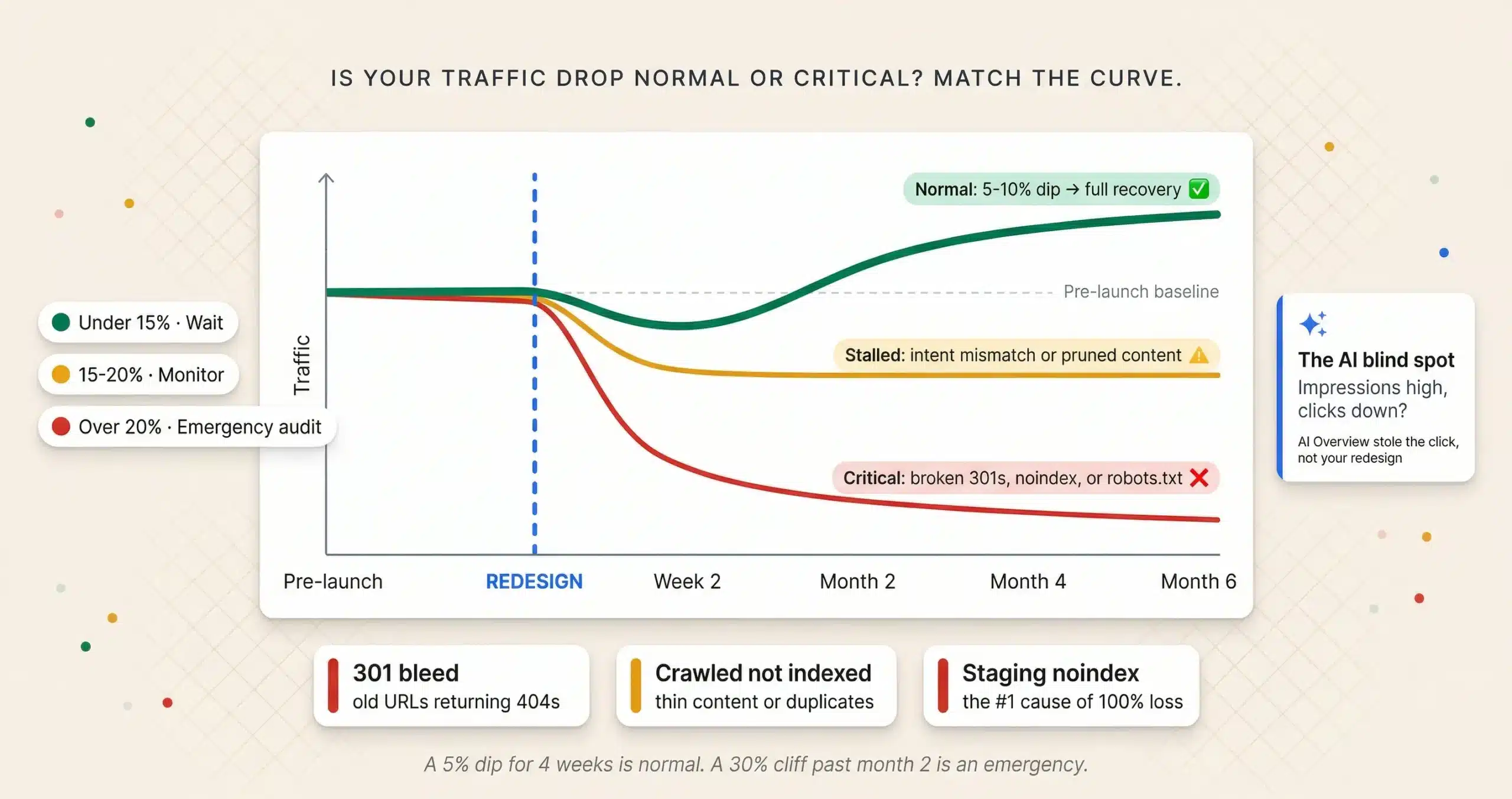
A 5 to 10% traffic drop in the first 2 to 4 weeks after a redesign is normal re-crawling volatility. A 30%+ drop that persists past month 2 is not volatility; it’s a technical failure. The difference between “wait it out” and “emergency audit” depends entirely on the shape of the decline and how long it’s been happening.
TL;DR
Match your website traffic drop to a zone. The zone determines whether you wait, monitor, or audit.
Source: Jorge Argota, 10 years managing site migrations.
THE TRIAGE TABLE: IS YOUR TRAFFIC DROP NORMAL OR CRITICAL
Before you change anything, classify your drop. Most post-redesign traffic losses fall into one of three categories and the correct response for each is completely different. Panic-changing content during a normal shakeout makes the problem worse because Google is still processing the new URLs.
THE RECOVERY TIMELINE: WHAT TO EXPECT MONTH BY MONTH
⚡ The AI Overview blind spot (the “110” differentiator)
In 2026, a “traffic drop” might actually be an “impression shift.” If your Search Console shows impressions stayed high but clicks dropped, you likely didn’t lose rankings; you lost the click to an AI Overview.
The fix isn’t technical; it’s content: optimize for direct answers and distinctive value (proprietary data, original analysis) that the AI can’t summarize away. If the drop aligns with AI Overview expansion in your practice area, no amount of redirect mapping will fix it because the problem isn’t your site; it’s the search interface.
THE THREE TECHNICAL FAILURES THAT CAUSE 30%+ DROPS
The 301 redirect bleed
The most common cause of 30%+ drops. Old URLs returning 404s instead of 301 redirects to their new counterparts. Every old URL must map to the most relevant new page. Crawl the old URL list; any status code other than 301 is a leak draining your authority into dead pages.
The “crawled; not indexed” trap
Google sees the page but refuses to index it because the new version looks like thin content or a duplicate. Check GSC’s “Pages” report for “Crawled; currently not indexed” errors. Ensure new pages have unique H1s and updated meta descriptions compared to the old site. Also check if you pruned “low traffic” pages that held backlinks supporting your money pages; when those disappear, the pages they linked to lose their authority signal. Restore pruned content or 301 it to the relevant parent page.
The staging site noindex
Accidentally leaving noindex tags on the production site after migrating from staging. This is the number one cause of 100% traffic loss. Check your page source code immediately for <meta name=”robots” content=”noindex”>. One missed tag can de-index your entire site within days.
⚠ The March 2026 core update context
In high-volatility YMYL sectors like legal and finance, the March 2026 core update (rolled out over 14 days starting March 27) hit particularly hard: 55% of sites in the legal vertical lost organic traffic. Sites with 50+ template-driven pages saw the steepest drops. If your redesign coincided with a core update, separate the two causes: run a Search Console comparison for the exact update dates before attributing the loss to your redesign. The update targeted thin content and scaled AI-generated pages; if your redesign improved content quality, the timing may have actually helped.
💡 Recovery case study: 14 office FL firm, 142% traffic increase
A 14 office Florida law firm experienced a 45% drop in month 2 after their redesign. We mapped 180 broken 301s from their old blog structure where the agency had changed URL patterns without redirect mapping. Traffic fully recovered and exceeded baseline by 142% within 4 months of the redirect fix and content architecture rebuild.
WEBSITE REDESIGN TRAFFIC RECOVERY FAQ
The Forensic Migration Recovery Protocol
Forensic Crawl
Top 1,000 pre-launch URLs mapped to live status codes
AI Blind Spot Check
Queries where impressions held but clicks died
The Verdict
Normal shakeout (wait) or technical failure (fix)
We map every pre-launch URL to its post-launch status code to find the silent 404s. We isolate the queries where the AI Overview stole the click. You get a definitive answer and a prioritized fix list, not a “wait and see.”
About Jorge Argota · 10 years managing website migrations for professional service firms. Every redesign I oversee includes a full 301 redirect map, noindex audit, and 6 month recovery monitoring. Full bio.
Related: Website Design · First Year SEO Timeline · AI Overviews Impact · Marketing Timeline · SEO for Lawyers