
Written by Jorge Argota · Legal Marketing · United States
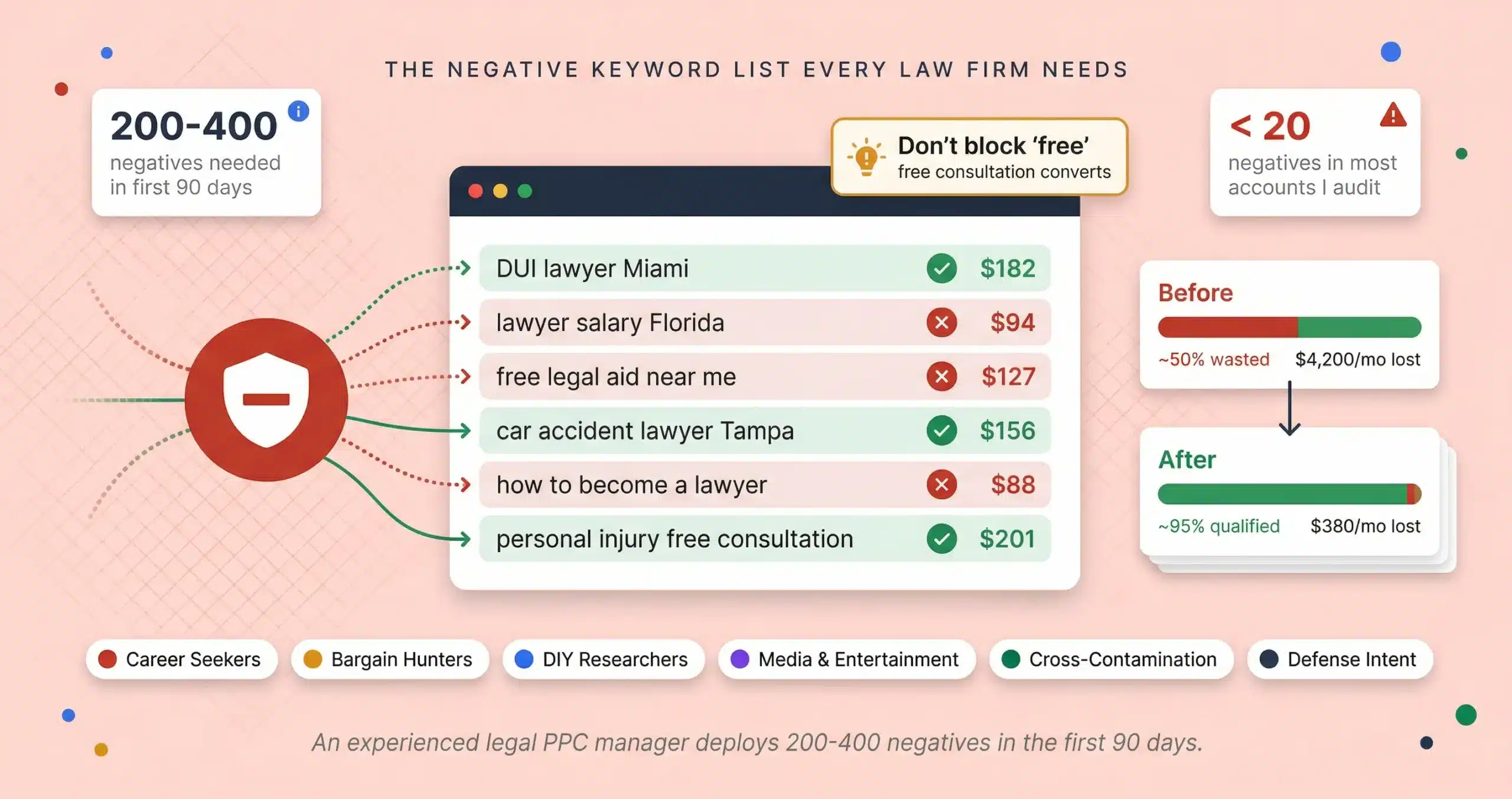
So if your law firm is paying $50 per click for someone searching “pro bono lawyer” or $200 for someone Googling “personal injury lawyer salary,” the problem isn’t Google Ads. The problem is that your campaign doesn’t have a negative keyword list, or the one it has was built for an e-commerce store and doesn’t account for how legal searches actually work. An experienced legal PPC manager deploys 200 to 400 negative keywords in the first 90 days of a campaign just to stabilize it, and most accounts I audit have fewer than 20.
TL;DR
This is the negative keywords list for law firm Google Ads accounts. Not a blog post explaining why negative keywords matter; a copy-paste resource organized by category so you can drop it into your Google Ads account today. It covers career seekers, bargain hunters, DIY researchers, media and entertainment, geographic bleed, practice area cross-contamination, plaintiff versus defense intent, and the “free consultation” exception that most lists get wrong. The keyword taxonomy page explains the strategy behind why these lists exist. This page gives you the words.
UNIVERSAL ACCOUNT-LEVEL NEGATIVES: THE BASELINE EVERY LAW FIRM NEEDS
These go on every campaign regardless of practice area. They filter out people who will never hire a retained attorney. Google now allows up to 10,000 negative keywords at the Performance Max campaign level (up from 100) and 1,000 at the account level, so capacity is not the issue; the issue is that most agencies don’t build the lists. When copying these into Google Ads, paste single words as-is (Google treats them as broad match negatives which is fine for one word) but wrap multi-word phrases in quotes to make them phrase match negatives. For example paste “law school” with quotes so it blocks “law school rankings” without accidentally blocking a legitimate search that just happens to contain the word “law” or “school” on its own.
Career and education seekers
Bargain hunters and free services (with the “free consultation” exception)
Do not add “free” as a broad match negative. Every competitor list tells you to block “free” but that kills “free consultation” searches, which are some of the highest converting queries in legal PPC. Instead add “free” as an exact match negative and then add specific phrases like “free lawyer,” “free legal advice,” and “free legal help” as phrase match negatives. This blocks the bargain hunters while keeping your free consultation traffic alive.
DIY researchers and template seekers
Media, entertainment, and pop culture
This category requires constant updates because every time a public figure faces legal trouble, the searches spike and your ads trigger for people following the story. Add new names as they trend.
Insurance and claims (for non-insurance firms)
PI plaintiff firms need to be careful here; “insurance” by itself is too broad because people do search “car accident insurance lawyer.” But the specific insurance company names and industry terms above attract people shopping for coverage, not people who were injured.
Government and regulatory (blocks non-client searches)
PRACTICE AREA CROSS-CONTAMINATION FILTERS: STOP YOUR CAMPAIGNS FROM CANNIBALIZING EACH OTHER
If you run campaigns for multiple practice areas, your family law campaign will bleed budget into PI searches and your criminal defense campaign will eat clicks meant for immigration unless you build inverse negative lists for each one. This is called cross-contamination and it’s one of the biggest budget drains I see in multi-practice firm accounts.
If running a family law campaign, negate these
If running a criminal defense campaign, negate these
If running a PI plaintiff campaign, negate these
PLAINTIFF VS DEFENSE INTENT: THE SPLIT MOST AGENCIES MISS ENTIRELY
“Car accident lawyer” matches both victims and at-fault drivers. If your firm only represents plaintiffs, you’re paying hundreds per click for the person who caused the accident and they’re going to bounce the second they realize you don’t defend.
The “lawyer” vs “attorney” split: Behavioral data from 2025 shows these attract entirely different search patterns. “Attorney” skews toward legal professionals researching opposing counsel, law students, and B2B searches, which inflates click costs without producing consumer cases. “Lawyer” is the standard word the general public types when they need help. Don’t treat them as synonyms. Test them in separate ad groups and track conversion rates independently; you may find that “car accident lawyer” converts 30% higher than “car accident attorney” for consumer-facing PI cases.
Plaintiff-Only Firms: Add These Defense-Intent Negatives
THE GEOGRAPHIC FIREWALL: STOPPING ADS FROM SHOWING 500 MILES AWAY
Google’s default location setting bleeds your ads into markets you don’t serve. Fix it in two steps.
Step 1: Fix the location setting
Go to Campaign Settings, then Locations, then Location Options. Change it from “Presence or interest: People in, regularly in, or who’ve shown interest in your targeted locations” to “Presence: People in or regularly in your targeted locations.” The default shows your ads to anyone who recently Googled anything related to your city, even if they’re 500 miles away.
Step 2: Build the state exclusion list
Even with the correct setting, Google bleeds into neighboring states. If you’re a Florida firm, explicitly exclude every other state in your location targeting. Copy the full state list below, delete only the states you practice in, and add the rest as location exclusions.
PERFORMANCE MAX NEGATIVE KEYWORDS: WHY ACCOUNT-LEVEL IS THE ONLY WAY
Performance Max campaigns don’t respect the negative keyword lists you add to your Search campaigns. If you just add negatives to Search and assume PMax is covered, it’s running wide open.
Path 1: Account-level negatives (recommended)
Go to Account Settings, then Negative Keywords. Add your universal and bargain hunter lists here. This applies a safety net to all campaigns including PMax and YouTube. Google expanded account-level capacity to 1,000 terms and PMax campaign-level to 10,000 terms in 2025.
Path 2: Campaign-level exclusion (the rep request)
If you need to block keywords only on PMax but keep them eligible for Search, contact your Google rep to enable campaign-level brand exclusions or use the 2025 interface option if it’s available in your account. Not every account has self-serve access to this yet.
The competitor brand question: Should you negate competitor firm names? If you have a small budget, yes; paying $40 per click for someone who already chose a specific firm is wasted spend. If you have a larger budget and want to run a dedicated conquesting campaign with custom landing pages, keep them eligible but in a separate campaign with its own budget. The conquesting compliance page covers the legal and ethical framework for bidding on competitor names.
Want to know how much of your budget is going to junk clicks?
Send me your last 30 days of search terms from Google Ads. I’ll flag every query that should have been blocked, calculate how much you spent on searches that were never going to sign, and send you back a custom negative keyword list built for your practice areas and market. If your lists are already tight I’ll tell you that too.
About Jorge Argota · 10 years in legal marketing. Built Percy Martinez P.A.’s digital operation from a $500 budget to 287 leads in 5 weeks. Manages Google Ads campaigns for PI, med-mal, and family law firms across Florida. Google Ads certified. Tracks every campaign to signed cases, not dashboards. Full bio.
Related: Keyword Intent Taxonomy (4 Tiers) · Long-Tail Profit Paradox (PI Negatives) · Competitor Keyword Bidding Compliance · PPC Campaign Management · Google Ads ROI