

Written by Jorge Argota · Legal Marketing · United States
Originally published from website audits and vendor pricing data. Refreshed as benchmarks change.
I audited a firm last year that spent $20,000 on a website redesign. Beautiful on a desktop monitor. Custom photography, nice color palette, the managing partner loved how it looked. It had generated two leads in six months. When I checked the site on my phone, the pages took four seconds to load, the phone number was buried inside a menu, and the contact form had seven fields. And when I asked who owned the site, the attorney didn’t know because the agency never brought it up.
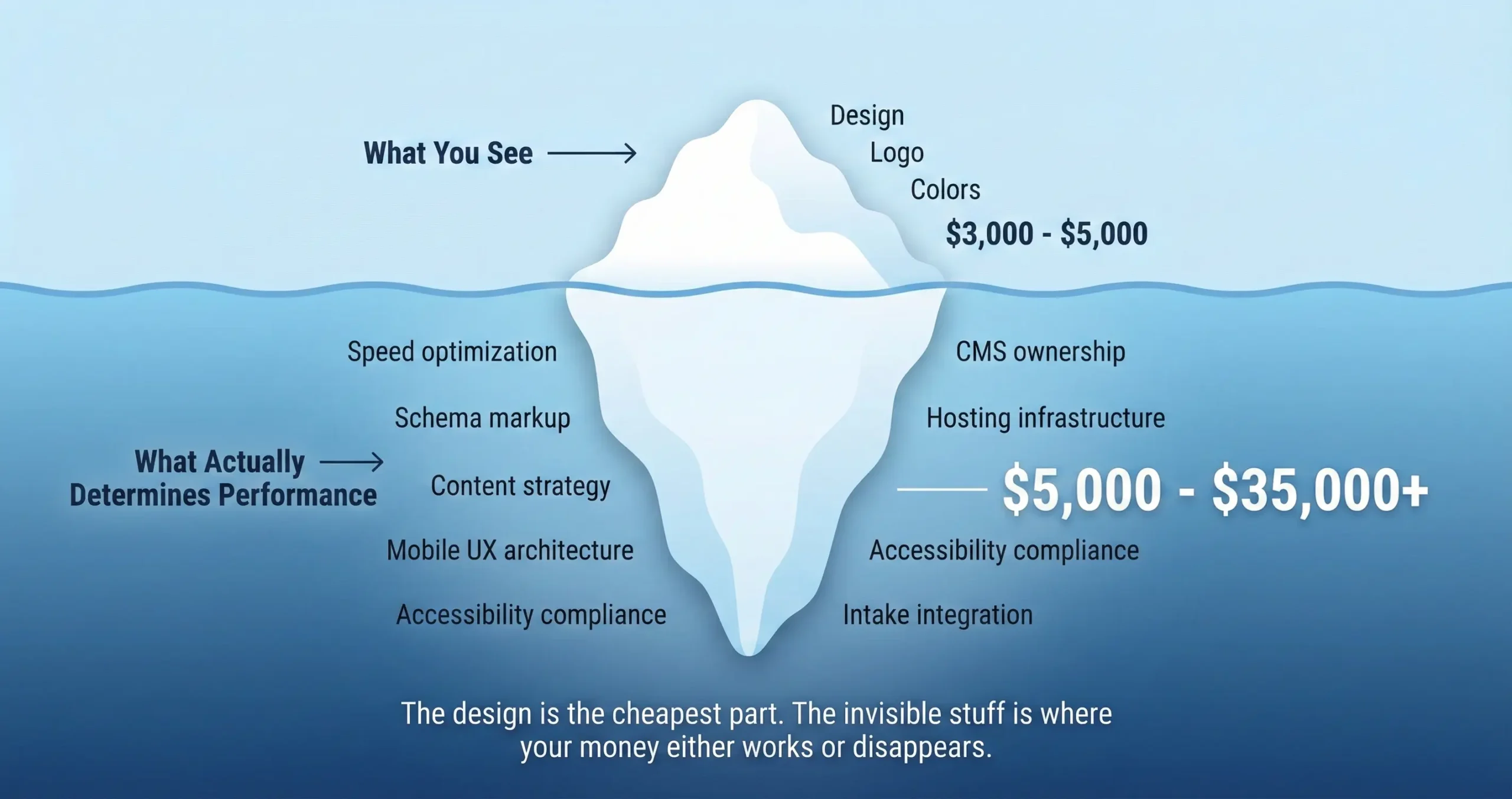
The contract matters more than the design. A $5,000 site built right will outperform a $20,000 site built wrong every time because the things that generate cases; speed, mobile experience, phone number placement, and who owns the site when you want to leave; have nothing to do with how the homepage looks in a design presentation.
WHAT THE MARKET ACTUALLY CHARGES IN 2026
I’m naming specific companies and prices because every other article on this topic is written by one of these companies and they conveniently leave out what everyone else charges.
THE NUMBER EVERYONE IGNORES: WHAT IT ACTUALLY COSTS OVER THREE YEARS
The question every attorney asks is “how much does the website cost” and the question they should be asking is “how much does the website cost over three years.” The build price is the smaller number. A $10,000 site with proper hosting, maintenance, and a modest content program costs $60,000 to $130,000 over three years. That means the initial design was maybe 8 to 15% of the total investment.
THREE-YEAR TOTAL COST CALCULATOR
Drag sliders to match your situation. Most firms are shocked at how small the build cost is relative to the total.
Hosting runs $25 to $100 a month for most firms on managed providers. If you’re still on cheap $10 a month shared hosting, you’re sharing a server with hundreds of other sites and your speed penalty is real. Maintenance runs $200 to $1,000 a month because the software underneath needs constant updates; skip this for six months and the site starts degrading quietly in ways you don’t see until something breaks. Content is the biggest recurring cost at $1,500 to $10,000 a month because a site that stops publishing becomes invisible to Google within a year.
THE OWNERSHIP TRAP NOBODY DISCUSSES DURING THE SALES PROCESS
This is the part that makes me the most frustrated because I’ve talked to attorneys who spent five years building content and earning search authority on a website they thought they owned, and then they try to leave the agency and discover the site stays behind. The agency built it on their own private platform and the attorney was licensing access the entire time without knowing it.
If You Own Your Site (Open Platform)
You fire the agency tomorrow morning. Nothing happens to your website. You revoke their login, hire someone else, and the site keeps running because the technology underneath belongs to the global community, not to any single company. Your content, your design, your search authority all stay with you.
If the Agency Owns Your Site (Their Platform)
You fire the agency tomorrow morning. Your website disappears. They offer to send you a file with your text and images, but the design, the page addresses, and the functional code stay behind. You rebuild from scratch. If the page addresses change and the redirects aren’t handled perfectly, you lose years of search authority overnight.
I’ve seen firms lose 60 to 70% of their organic traffic after a bad move away from a locked platform, and that translates directly into lost cases for months while the new site rebuilds authority. One agency’s client complaint to the Better Business Bureau put it directly: “Once the contract ended they left us with no website.” That’s the scenario you’re preventing by asking the right questions before signing.
Some of the largest legal marketing companies build on platforms they own and control. Subscription models starting at $80 to $100 a month look convenient until you realize you’re renting, not buying. Others build on open platforms where you own everything from day one. The agency evaluation guide has the full ownership comparison showing which agencies pass this test and which don’t, and the agency comparison page shows the specific platforms each one uses.
The Four Questions That Prevent the Hostage Scenario
1. If I leave, do I get a full backup of the website in a format that works on any standard hosting provider? The answer has to be yes without qualifications. 2. Is the website built on your own private platform or on an open platform like WordPress? Open is always safer. 3. Who owns the website address registration account? You must be the registrant, not the agency. 4. Are there termination fees or penalties if I leave before the contract ends? Any agency that gets defensive about these questions is telling you exactly what would happen if you tried to leave.
THE SPEED TAX YOU’RE PAYING WITHOUT KNOWING IT
I’ve seen firms spend $5,000 on a homepage image carousel that looks impressive in a design presentation and then the data shows less than 1% of visitors ever click past the first slide, and meanwhile the carousel slowed the page down by 2 seconds which means roughly 14% of visitors left before they saw anything. That’s a negative return on a feature the agency presented as a selling point.
Those numbers come from a Google and Deloitte study of over 30 million website visits; not an agency estimate, not a marketing claim, actual measured data from real users. When you’re paying $150 to $500 per click on injury keywords, every second of delay is burning money you already spent to get that person to your site.
And here’s something most agencies won’t mention during the sales process. The most popular platform for law firm websites has the lowest speed scores of any major website builder. That doesn’t mean you shouldn’t use it; it means whoever builds your site on that platform needs to know what they’re doing with hosting choices, file management, and code optimization. A well-built site on that platform performs beautifully. A poorly built one on the same platform is the reason your $20,000 redesign loads in 4 seconds on a phone.
WHAT MAKES MONEY VS WHAT LOOKS GOOD IN A PITCH
Features That Waste Money
Image carousels (less than 1% click past the first slide and they slow the page). Stock photos of gavels and handshakes (signals “we couldn’t be bothered”). Social media feeds on the homepage (sends visitors away from your site). Intro animations (adds seconds to load time). Seven-field contact forms (every extra field drops completions by about 11%).
Features That Sign Cases
Page loads under 2.5 seconds on a phone. Phone number tappable without scrolling. Attorney bio pages with real photos, credentials, and reviews (the second most visited pages on every law firm site). Three-field contact form (name, phone, what happened). Accessibility compliance built into the code (over 3,000 website lawsuits filed last year; the quick-fix widgets don’t work).
The attorney bio page deserves its own mention because it’s the most undervalued page on every law firm website. Visitors hit the homepage, then immediately go to the attorney bios to decide whether they trust the person they’d be hiring. If that bio page is a paragraph and a stock headshot with no reviews, no case results, and no way to call or fill out a form without navigating to a different page, you’re losing people at the exact moment they’re deciding whether to pick up the phone.
THE PART ABOUT AI THAT YOUR WEB DESIGNER PROBABLY HASN’T MENTIONED
Google now shows AI-generated answers at the top of roughly a quarter of legal searches and that number is growing. When your website shows up in those AI answers, the clicks go up. When it doesn’t, traffic drops. An independent study from Pew Research found that people click regular search results about half as often when an AI summary is present.
What this means practically is that your website needs invisible code underneath the content; called Schema Markup or Structured Data in the industry; that tells search engines and AI tools exactly what your firm does, who your attorneys are, and what they specialize in. Specifically:
- LegalService and LocalBusiness Schema: tells AI exactly where your firm is located and what types of cases you handle
- FAQPage Schema: feeds your answers directly into Google’s AI summaries so your firm gets cited as the source
- Person/Attorney Schema: validates your individual lawyers’ credentials, bar admissions, and practice areas to AI engines
- BreadcrumbList Schema: maps your site structure so AI tools understand how your practice areas connect to each other
Template-tier websites almost never include this. Most mid-tier builds include the basics at best. Getting it right is really a higher-tier deliverable that requires someone who understands both the technical code and the legal concepts being mapped. The firms doing this now are showing up in ChatGPT recommendations and Google AI answers. The firms that aren’t are becoming invisible to a growing share of people searching for a lawyer.
HOW TO SPLIT THE BUDGET (THE MISTAKE MOST FIRMS MAKE)
The most common mistake is spending 80% on making the site look beautiful and 20% on everything else. The firms I’ve seen get the most out of their investment do roughly the opposite.
THE 40/40/10/10 FRAMEWORK
On a $25,000 total budget: $10,000 build, $10,000 content/SEO, $2,500 photo/video, $2,500 hosting + security + accessibility.
The design is honestly the cheapest component of a website that works. The invisible work underneath; the speed optimization, the content strategy, the accessibility compliance, the code that feeds AI search; is where the money either builds something that compounds in value or disappears into a pretty shell that sits there generating nothing.
Not sure what your website is actually built on? Send it to me through the contact page and I’ll tell you whether you own it, whether the speed is costing you leads, and whether a rebuild makes sense or if targeted fixes are the smarter move. If your current site is working and generating the cases you need, I’ll tell you not to touch it.
Related: How to Choose an Agency · Best Agencies · SEO for Lawyers · Conversion Optimization · The 5-Channel Growth Engine · Google Ads Cost and ROI