

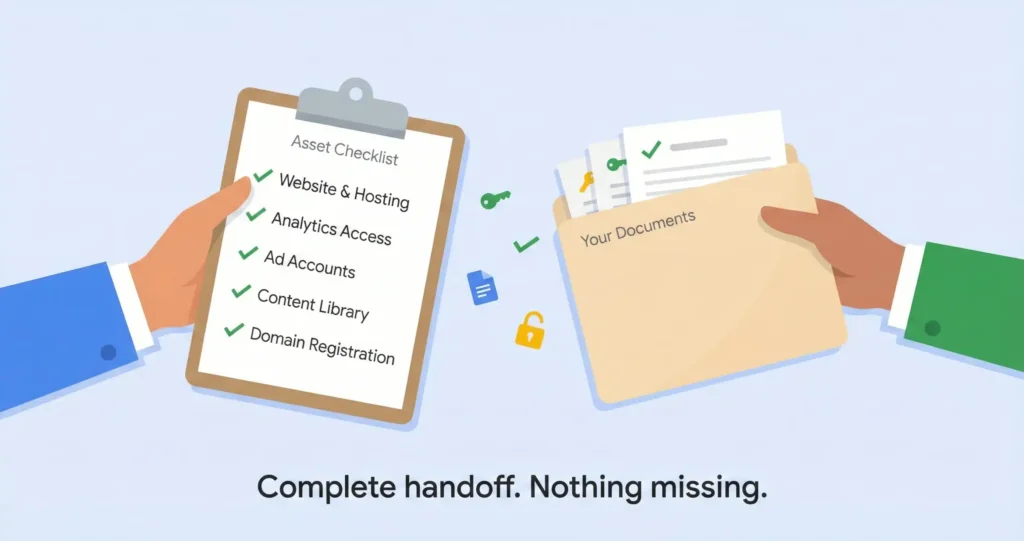

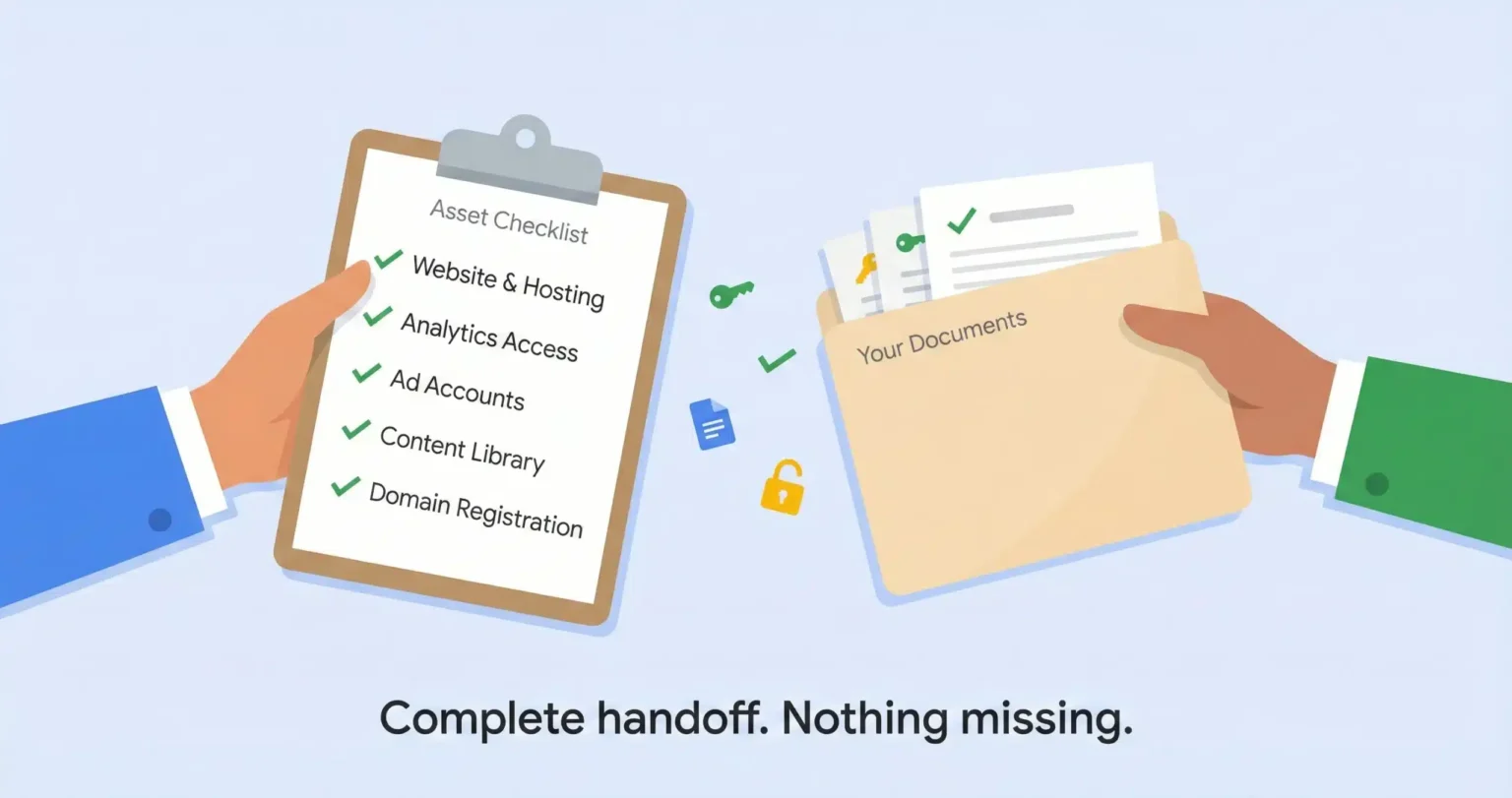




How do law firms switch marketing agencies without losing SEO rankings? Before sending termination notice, secure admin access to your domain registrar, Google Analytics, Google Ads, Google Business Profile, and call tracking accounts. Export your full site content and URL structure. Build the replacement site on a staging server while the old one is still live. On launch day, implement 301 redirects mapping every old URL to its new location and lower your DNS TTL to 300 seconds 48 hours before the cutover. Monitor Google Search Console for 404 errors daily for the first two weeks. Expect 10-15% organic traffic volatility in weeks one through four; anything beyond that signals a redirect problem, not normal migration behavior.
So a firm in Jacksonville switched agencies last year and within about three weeks they’d lost access to their domain, their Google Ads account was frozen inside the old agency’s billing system, and their main intake number was ringing to a dead line because nobody ported it before the contract ended. The managing partner called me in a panic and I remember thinking this didn’t have to happen, like none of it, because every one of those problems has a fix but the fixes only work if you do them before you send the termination letter and not after.
And that’s the part most firms get backwards. They decide to leave, they fire the agency, and then they start figuring out what they own. But by that point the cooperative relationship is gone and everything gets harder and slower and more expensive, which is exactly what the contract was designed to make happen.
I’ve walked maybe fifteen firms through this process at this point and it’s basically the same sequence every time. You secure everything first and you say nothing to the agency until it’s locked down. And the whole thing has to happen in a specific order because the steps depend on each other in ways that aren’t obvious until something breaks, which is usually too late.
The Stealth Phase
The transition starts weeks before anyone sends a termination letter, and the agency can’t know you’re doing it. I’ve seen it go sideways enough times to know that once an agency realizes you’re leaving, the dynamic shifts. Admin access gets “temporarily restricted for security.” Login credentials stop working. The account rep who used to respond in an hour suddenly needs a week. Not every agency does this but enough of them do that you should plan as if yours will, which I know sounds paranoid but it’s not.
The first thing you need is basically a spreadsheet that answers one question for every platform your marketing touches; do you own it, or does the agency own it? I think of it as a digital property ledger and it covers five things.
TL;DR: The five assets on the ledger: domain name (WHOIS lookup), website platform (WordPress or proprietary), Google accounts (Analytics, Search Console, GBP, Ads), ad accounts (who owns the billing), and call tracking numbers (who owns the master account). If the agency controls any of these, that’s what you fix first.
Your domain name. Go to a WHOIS lookup site and search your firm’s domain. The registrant field tells you who owns it. If the agency’s name is there instead of yours, that’s the first thing you fix because the domain is the one asset you absolutely cannot lose. Everything else can be rebuilt but a domain with ten years of backlink authority and brand recognition is not something you can just recreate, and I’ve seen agencies hold domains as leverage during ugly exits which honestly shouldn’t be legal but apparently it is.
Your website platform. Install a browser extension called Wappalyzer or use BuiltWith and visit your own site. It’ll tell you whether you’re on WordPress or a proprietary system. If it says WordPress you’re in a much better position because the whole site can be packed up and moved to a new server.
If it says something you’ve never heard of or it shows the agency’s name, you’re probably on their proprietary CMS and the site can’t be migrated; it has to be rebuilt, which changes your timeline from weeks to months and that’s a pretty big difference when you’re trying to leave.
Your Google accounts. Log into Google Analytics, Google Search Console, Google Business Profile, and Google Ads with your email. If you can’t get in, or if you get in but only see “Viewer” or “Manager” access, the agency holds the keys. You need Admin or Owner level on every single one before you do anything else.
Honest moment: most firms I talk to have never checked their access levels on any of these platforms. They’ve been logging in through a link the agency sent them and never thought to ask whether they were an Admin or just a Viewer. It takes maybe ten minutes to check all four and it might be the most important ten minutes before a transition.
Your call tracking numbers. If your agency set up tracking through CallRail or something similar, find out whose name is on the master account. Those numbers are on your business cards, your directory listings, your Google Business Profile, and years of old marketing material. If the agency cancels the account before you port those numbers out, they go back to the carrier pool and you might never get them back, which is a bigger deal than most people realize until it happens to them.
The Domain Transfer
Your domain connects everything; your email, your website, your search rankings, your ad landing pages all route through it. Losing control even temporarily can take down your firm’s entire digital presence, and I don’t say that to be dramatic; I say it because I watched it happen to that Jacksonville firm I mentioned earlier where the intake team was fielding calls from clients asking why their emails were bouncing for eleven days.
The transfer has a specific sequence and a couple of traps most people don’t know about.
Open a registrar account in your firm’s name. Not a partner’s personal email, not the office manager’s; the firm entity. Namecheap or Cloudflare are fine. This prevents succession issues if someone leaves the firm later, which happens more often than you’d think and suddenly nobody knows the password to the account that controls the domain.
Then ask the agency to unlock the domain and provide the EPP authorization code. This is basically the key that lets the domain move between registrars and they’re required to give it to you. If they stall on this, that tells you everything about how the rest of the exit is going to go.
Before you transfer, check what email address is listed as the registrant contact. The transfer confirmation goes to that email. If it’s the agency’s email, they can silently ignore the confirmation and the transfer just dies. But here’s the trap; ICANN imposes a 60-day lock after any registrant contact change. So if you change the email today, you can’t transfer for 60 days. Either have the agency initiate the transfer before you update the contact, or plan your timeline around that lock.
Once the transfer completes, apply a registrar lock immediately. This prevents anyone from transferring it away from you without manual verification, which is basically the digital version of a deadbolt.
Building the Replacement Before You Tear Down the Old One
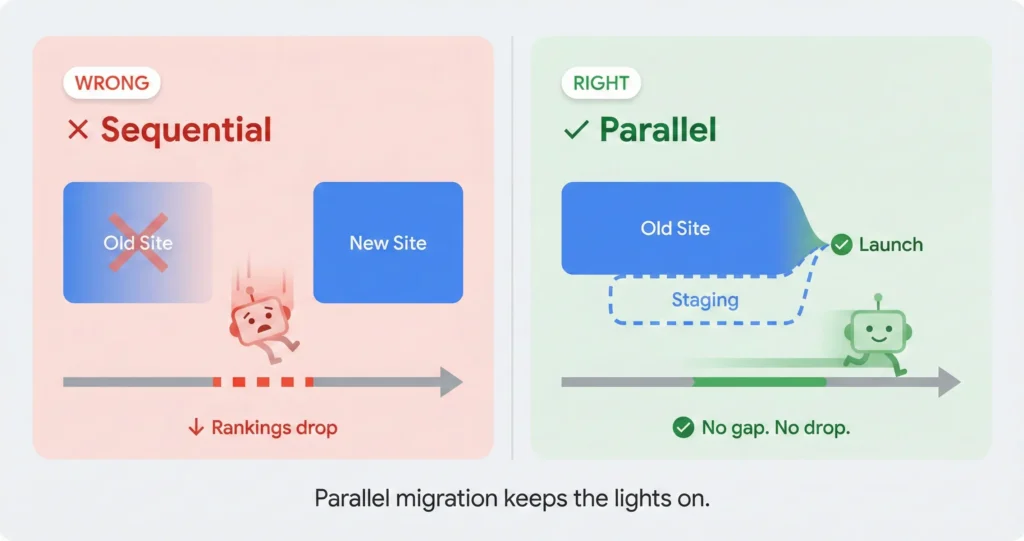
The biggest mistake firms make is killing the old site before the new one is ready, which creates a gap where you have no website at all and Google is crawling a dead address. This is where most of the ranking damage happens and the frustrating part is it’s entirely preventable.
The right approach is to build the new site on a staging server while the old one is still live and serving traffic. Nobody outside your team sees the staging site. The old agency doesn’t know it exists. You’re basically building the replacement car in the garage while still driving the old one to work every day.
During this phase, your new agency or dev team needs to crawl the old site with a tool like Screaming Frog and capture every URL, every title tag, every meta description, every heading, and every image. That’s the extraction, and if your site is on WordPress you can just export the database. If it’s on a proprietary platform you’re scraping the front end because the agency won’t give you backend access, and that scrape becomes the blueprint for the rebuild.
The content itself; every blog post, every practice area page, every attorney bio; that’s yours if you paid for it. The code that displays it probably isn’t. But the words are yours, and those words are what Google has been indexing and ranking for however long you’ve been with that agency, which is why getting them out matters so much.
The Redirect Map That Saves Your Rankings
If the URL structure changes during the migration and nobody sets up redirects, Google treats every old page as dead and drops it from the index. I’ve seen firms lose months of organic traffic not because the content changed but because the address it lived at changed and nobody told Google where it went.
The fix is a redirect map. It’s a two-column spreadsheet:
| Old URL | New URL |
|---|---|
| firm.com/practice-areas/car-accidents/ | firm.com/car-accident-lawyer/ |
| firm.com/attorneys/jane-smith | firm.com/team/jane-smith/ |
| firm.com/blog/what-to-do-after-accident | firm.com/blog/what-to-do-after-car-accident/ |
Every old URL gets mapped to its new location. If the old site had 200 pages, this spreadsheet has 200 rows. Your dev team implements these as 301 permanent redirects at the server level, which tells Google the content moved permanently and to transfer the ranking authority to the new address.
301 redirect = 90-99% of link authority transferred. Missing redirect = zero. That’s the difference between a two week fluctuation and a six month recovery, and I’ve seen firms learn that the hard way.
The day the new site goes live, your team should be watching Google Search Console like a patient monitor. Every 404 error that shows up is a missed redirect, which means a page Google tried to visit and couldn’t find. The first 48 hours matter the most because that’s when Google’s crawlers hit the new site hardest.
Ad Accounts and the Data You Already Paid For
Your Google Ads campaign history; the keywords, the negative lists, the ad copy, the conversion data, the Quality Scores; that represents months or years of paid learning about what works in your market. Losing it means your new agency starts from zero and you pay for the same education twice, which is probably the single most expensive hidden cost of switching law firm marketing agencies that nobody talks about.
The agency will sometimes tell you the account can’t be transferred because it’s inside their master billing system. That’s a half-truth at best. The account itself can be separated if you have Admin access and switch the payment profile to your firm’s credit card.
You get added as an Admin user to the specific Google Ads account ID; that’s the ten-digit number in the upper right corner of the dashboard. Then you create a new payment profile inside that account linked to your card. Switch the billing from the agency’s profile to yours, and the account is functionally yours. The agency gets removed as a user and the campaign history stays intact, which honestly should be straightforward but agencies make it sound way more complicated than it is.
~~They can’t transfer the account because it’s in their billing system~~ → You switch the payment profile and the account stays with you
If they flat-out refuse the transfer, have them export the account through Google Ads Editor as an AEA file. This file contains the entire campaign structure; keywords, ad copy, bid settings, negative lists. Your new agency uploads it into a fresh account and the setup replicates instantly. You lose the historical Quality Scores, which means slightly higher costs per click for a few weeks while Google re-evaluates, but the structural knowledge is preserved and that’s what actually matters.
Google Analytics is where firms lose the most data during a switch. If your GA4 property is a sub-property of the agency’s master account, you can’t just transfer it; you need a bulk data export to BigQuery before you lose access. That raw data is the only way to preserve historical performance benchmarks, and without it your new agency is guessing at what “normal” looks like.
The Phone Numbers Nobody Thinks About
Firms remember the website. They remember the ad accounts. They almost always forget the call tracking numbers, and those might be the most operationally critical asset in the entire transition. The phone number on your Google Business Profile, on every directory listing, on every old mailer and business card your firm has ever printed; if that number dies, every lead that dials it hits a dead line.
Under FCC regulations you have the right to port your numbers to a new carrier. The agency can’t legally hold them, though they can drag the process out by being slow with paperwork which I’ve seen happen more than once.
The sequence works like this: you set up a new account with a call tracking provider, sign a Letter of Agency authorizing the transfer, and the new carrier requests the numbers from the old one. The whole thing takes two to four weeks.
And here is the part that trips people up; you cannot cancel the agency contract until the port is confirmed complete. If the agency cancels the account and releases the numbers before the port finishes, those numbers go back into the carrier’s pool and you may not be able to recover them.
Port first. Terminate second. There is no third option.
I had a firm in Tampa lose their main intake number exactly this way because they gave notice before the port was done. The agency closed the CallRail account as part of standard offboarding and the number vanished. That number was on three years of print advertising, twelve directory listings, and their Google Business Profile. Took about six weeks to update everything and they’ll never know how many leads they lost in the gap, which is why I tell every firm the same thing; port first, terminate second, no exceptions.
Launch Day and the First 90 Days
The cutover has a specific technical sequence and the order matters because getting it wrong means downtime, and downtime on a law firm site means lost intake during the hours or days when nobody can find you.
48 hours before launch, your dev team lowers the DNS TTL to 300 seconds. This is a technical setting that controls how long internet providers cache your site’s address. Lowering it means when you flip the switch, the change spreads across the internet in minutes instead of hours or sometimes days.
On launch day: update the nameservers to point to the new host, make sure the SSL certificate is issued immediately so the site shows the secure padlock, test every contact form and phone number on the new site to confirm leads are flowing to your inbox and not the old agency’s, and then start monitoring.
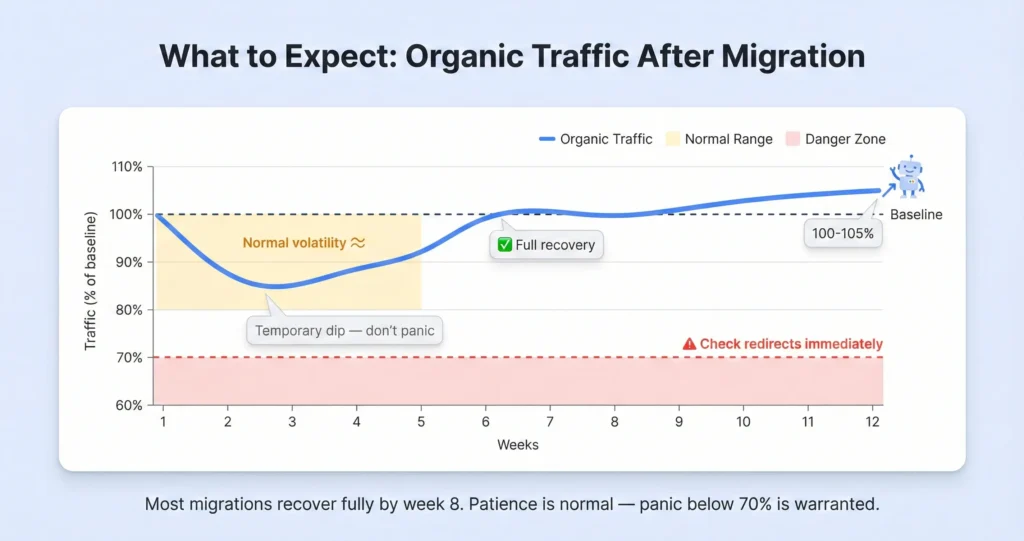
That 10 to 15 percent dip in the first month is normal migration behavior. Google is re-crawling, re-indexing, and re-evaluating your site at the new address. That’s not a crisis and it doesn’t mean anything is broken.
What is a crisis is a 30 or 40 percent drop that doesn’t recover by week three, because that usually means broken redirects or missing pages or something structural that’s confusing Google. And the only way to tell the difference between normal volatility and a real problem is the baseline you documented during the stealth phase. That’s why the pre-transition documentation matters so much; without it you’re flying blind and so is the new agency.
The Part Nobody Covers
After the technical transition there’s a compliance step that most guides skip because it doesn’t involve dashboards or DNS settings, but for law firms it might be the most important one.
Your old agency has form submissions, call recordings, intake data, and case details sitting in their systems. That’s client information protected by confidentiality rules, and when the relationship ends the agency has no ongoing right to hold it.
Send a written request for a data destruction certificate; a signed letter confirming they’ve scrubbed all client data from their servers, their backups, their CRM, and any third-party tools they used to manage your account. Model Rule 1.6 doesn’t stop applying just because you switched vendors, and if that data gets misused or leaked after the relationship ends the liability question gets ugly for everyone.
Nobody ever thinks about this until I bring it up, but your old agency probably has hundreds of form submissions with client names, case details, phone numbers, and sometimes medical information sitting in a dashboard somewhere. That data doesn’t automatically delete when the contract ends. You have to ask for it, in writing, and you should probably keep a copy of the request.
And while you’re at it, search for any orphan sites the agency may have created. Microsites, city-specific landing pages, lead gen domains; anything with your firm’s name or practice area that lives outside your main website. If those stay live and unmanaged they can violate advertising rules in ways that put the firm’s bar standing at risk, and the agency has no reason to take them down on their own because they probably don’t even remember they exist at this point.
Planning a switch and not sure what you actually own?
Send me your domain, your Google accounts, and the name of your current agency and I’ll tell you which assets are at risk and what to secure first. I’ve done this prep call before and it takes about twenty minutes, and honestly it might be the most useful twenty minutes before a transition because it tells you what you don’t know yet. And if it turns out your agency actually set things up right and you can leave cleanly, I’ll tell you that too.
What to check before you sign with the next agency →