How Much Does a Law Firm Website Cost in 2026 (And What Are You Actually Paying For)
I've audited maybe 200 law firm websites at this point and the ones that cost $15,000 often perform worse than the ones that cost $5,000, and the reason is almost always the same thing nobody told the attorney before they signed the contract.
Home/Blog/How Much Does a Law Firm Website Cost in 2026
Last updated April 21, 2026
Website Design · Legal Marketing
Every other article on this topic is written by an agency selling websites. Here is the independent version, with named prices, city-by-city comparisons, and the one cost number nobody tells you about.
Pricing scorecard · 2026
Build cost, ongoing cost, and 3-year total
Firm type
Build
Monthly
3-year total
Solo attorney, template
Low-competition market
$2-4K
$50-150
$3.8-9.4K
Solo attorney, custom
Secondary market
$4-8K
$100-300
$7.6-18.8K
Small firm, 2 to 5 attorneys
Most common bracket
$5-15K
$200-600
$12.2-36.6K
Mid-size firm, 6 to 15 attorneys
Competitive market
$10-25K
$400-1K
$24.4-61K
Large / multi-office
Tier-1 metro
$20-75K+
$750-2.5K
$47-165K+
The build cost is 5 to 15% of your 3-year total. Most attorneys pick a vendor based on build price, not realizing the vendor they choose will control the other 85 to 95%.
Independent auditor of legal marketing agencies. Not selling websites.
The Short Answer
Budget $5,000 to $15,000 if you are a small firm in a secondary market. $15,000 to $30,000 if you are competing in NYC, LA, Miami, or Chicago. $2,000 to $6,000 if you are a solo attorney who needs a validation site. The build cost is the smallest number in your three-year marketing budget. The vendor you pick for the build will control the $100,000 plus you spend on content and SEO after that. That is the number that matters, and that is the decision this post is actually about.
TL;DR for scanners
›
Price: $3K-30K+ depending on firm size and city
›
Key drivers: market competition, content depth, practice area, platform choice
›
3-year total: $50K-210K+ (build is only 5-15% of it)
›
Must-ask: “If I leave, do I get a full backup that works on any standard hosting?”
On This Page
Twelve sections. Skim the tables, read the ownership section twice.
The five things that drive cost up, and the things that don’t
I audited a firm last year that spent $20,000 on a website redesign. Beautiful on a desktop monitor. Custom photography. The managing partner loved how it looked. It had generated two leads in six months. When I checked the site on my phone, the pages took four seconds to load, the phone number was buried inside a menu, and the contact form had seven fields. When I asked who owned the site, the attorney didn’t know.
A $5,000 site built correctly will outperform a $20,000 site built incorrectly. That is not a rhetorical flourish. It is what the data shows. A Google and Deloitte study of 30 million website visits found a 0.1-second speed improvement lifts conversions by 8-10%. The things that generate cases (speed, mobile experience, phone placement, and ownership) have nothing to do with how the homepage looks in a design presentation.
Wrong way
$20K build, 2 leads in 6 months
Custom photography, nice color palette, managing partner approved it. 4-second load time on mobile. Phone number buried in a menu. Seven-field contact form. Agency-owned platform. No SEO strategy.
Right way
$9K build + $2K/mo SEO, 47 calls/mo by month 12
Tampa PI firm. WordPress, attorney-owned. 1.8-second load time. Tappable phone number, three-field form. 12 deep practice area pages, FAQPage schema, monthly content. Ranked top 3 for primary keywords by month 9.
Drives cost up (real)
Market competition
The same build in NYC costs 2 to 3x what it does in Nashville because the SEO infrastructure required to compete is different. Not because the design work is harder. ABA data puts NYC at 177,000+ active attorneys versus roughly 9,400 in the entire state of Tennessee. That density is what your site has to outrank.
Content and copywriting
The single most underfunded line item. Professional legal content runs $300 to $700 per page. Most firms pay for design and fill the pages with stock copy.
Practice area
Personal injury in a competitive metro needs content infrastructure that adds $5,000 to $15,000 to the effective cost versus estate planning in the same market.
Platform choice
WordPress and Webflow are roughly equivalent on build cost. Proprietary platforms from legal-specific vendors lock you in and the switching cost shows up when you leave, not when you sign.
Custom vs template
Custom design adds $2,000 to $8,000. For most small firms, a well-built template outperforms a custom build because the custom design budget usually comes out of the content budget.
Doesn’t drive cost (myths)
×
Expensive design equals more leads. Pages that load under 2.5 seconds with a visible phone number outperform $20,000 custom sites with carousel animations. Measured data, not opinion.
×
More pages equals better SEO. Thin 40-page sites underperform focused 8-page sites with deep original content on each page.
×
Premium hosting equals better rankings. Clean code and managed updates matter more than the hosting brand. Most firms overpay for hosting and underpay for content.
Geographic Pricing
Pricing by US market (the section every competitor skips)
The same mid-tier custom build costs nearly 3x more in Manhattan than in rural Tennessee. Every other article ranking for this query treats pricing as uniform across the country. It is not.
Market
Build range
Tier
Key cost driver
NYC (Manhattan)
$15-30K
T1
Highest PI CPC in the country, 177K+ attorney density
Los Angeles / Bay Area
$15-30K
T1
PI and entertainment law competition, 58K+ attorneys
Third-largest state bar, energy and commercial law
Boston
$12-22K
T1
IP and life sciences premium, 25K+ attorneys
Atlanta
$8-20K
T1-2
Southeast hub, Fortune 500 concentration
Seattle / Denver
$12-25K
T1-2
Tech-forward, high GEO optimization demand
Austin
$10-20K
T1-2
Fastest-growing major market, up 22% since 2020
Phoenix / Las Vegas
$10-20K
T2
Emerging competitive markets
Tampa / Jacksonville / Orlando
$7-20K
T2
Growing FL secondary markets
Nashville / Charlotte
$7-18K
T2
Fast-growing, early-mover advantage still possible
Small or rural markets
$3-8K
T3
Minimal local competition, reduced agency premium
Miami-specific premium
Miami, Tampa, and South Florida sites require genuine bilingual architecture because 60% of Miami-Dade is Spanish-speaking. Google Translate does not pass client quality standards. Real bilingual design, bilingual content, and bilingual SEO add $2,000 to $8,000 to the build cost. This is not optional in Florida.
Cross-Vertical
Law vs medical vs dental vs CPA website pricing
Law firm websites are the second-most expensive professional service vertical in the country, behind only multi-specialty medical practices. Not because the design is harder. Because the SEO competition premium on legal keywords is the highest of any industry. According to Clio’s Legal Trends Report, legal PPC costs remain among the top three most expensive verticals globally, which directly feeds the SEO infrastructure required to compete organically.
Vertical
Solo
Small practice
Mid-size
Law firm
Second most expensive
$2-6K
$5-15K
$15-35K
Medical practice
HIPAA + patient portal
$5-12K
$8-18K
$25-50K+
Dental practice
Galleries + financing
$4-8K
$6-15K
$15-40K
Accounting / CPA
Tax and doc portals
$2.5-10K
$5-20K
$20-100K+
The price premium on law firm websites versus dental or CPA is not driven by design complexity. It is driven by search market competition. A personal injury lawyer in Los Angeles competes in one of the most expensive search markets on earth. “Car accident lawyer Los Angeles” carries a CPC exceeding $150 per click. No dental or accounting keyword approaches this. That means a law firm website must be built to carry a heavier SEO burden from day one, and that raises the total cost of ownership above every comparable vertical.
The Real Number
3-year total cost of ownership
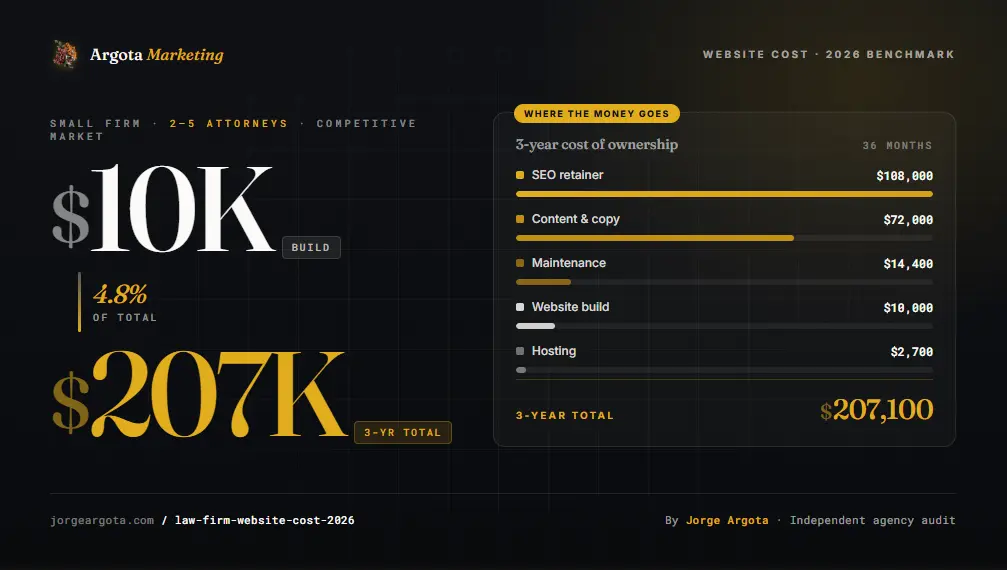
Here is a realistic 3-year model for a small firm with a $10,000 build in a competitive market. This is the calculation every attorney should make before signing anything.
Line item
Year 1
Year 2
Year 3
3-year total
Website build (one-time)
$10,000
$10,000
Hosting (managed)
$900
$900
$900
$2,700
Maintenance
$4,800
$4,800
$4,800
$14,400
Content ($2K / mo)
$24,000
$24,000
$24,000
$72,000
SEO retainer ($3K / mo)
$36,000
$36,000
$36,000
$108,000
Total
$75,700
$65,700
$65,700
$207,100
The $10,000 build is 4.8% of the $207,100 total. The vendor you hire manages the remaining $197,000 of your marketing spend over those three years. Pick for trust and ownership, not design aesthetics.
Practice Area
Cost multipliers by practice area
A solo estate planning attorney in Nashville and a solo personal injury attorney in Los Angeles face fundamentally different cost realities even at the same firm size. The estate planner competes for keywords at $4-8 CPC. The PI attorney competes for keywords at $150-300 CPC. Same build quality, same content volume, same design time. The PI firm still needs 3-4x the site because the content depth, schema architecture, and authority signals required to rank organically are in a different league.
Practice area
Multiplier
Why
Estate planning
1x baseline
Lowest competition. Content authority wins over infrastructure spend.
Family law
1.2-1.5x
Volume-based. Local competition is the primary cost driver.
Immigration
1.2-1.5x
Bilingual content required in most markets adds to the build.
Criminal defense
1.5-2x
High urgency search behavior, strong local competition.
Business / corporate
1.5-2x
Sophisticated client research behavior. More depth required.
Personal injury (major metro)
2.5-4x
Most competitive SEO market in legal. Content infrastructure costs dominate.
Mass tort / mesothelioma
4-6x
National competition, extreme CPC ($300 to $500+). National SEO scale.
The Ownership Trap
The section every agency hopes you skip
This is the most important section in this entire post. I have talked to attorneys who spent five years building content and earning search authority on a website they thought they owned. They tried to leave the agency. They discovered the site stayed behind.
If you own your site
Open platform. You control it.
Fire the agency tomorrow. Nothing happens to your website. You revoke their login, hire someone else, the site keeps running.
Your content, your design, your search authority all stay with you.
If the agency owns your site
Proprietary platform. They control it.
Fire the agency tomorrow. Your website disappears. They send you a file with your text. The design, URLs, and SEO authority stay behind.
I have seen firms lose 60 to 70% of organic traffic after a forced migration.
The four questions that prevent the hostage scenario
1
If I leave, do I get a full backup that works on any standard hosting provider? The answer has to be yes without qualifications.
2
Is the website built on your proprietary platform or on an open platform like WordPress or Webflow? Open is always safer.
3
Who owns the domain registration account? You must be the registrant, not the agency. This is non-negotiable.
4
Are there termination penalties? Any vendor that gets defensive about this question is telling you exactly what would happen if you tried to leave.
Platform Comparison
Which platform is right for your firm
Platform
Best for
Monthly
SEO
Ownership
WordPress
Mid-large firms, content-heavy SEO
$25-100
Excellent
Full
Webflow
Solo and small firms, brand-first
$14-49
Excellent
High
Squarespace
Solo, basic presence
$16-36
Moderate
Moderate
Wix
Very basic / new firms
$14-25
Limited
Moderate
Proprietary (Scorpion, FindLaw)
Firms willing to rent the site
$2K-25K
Built-in
None
LawLytics
Basic attorney sites
$200-400
Basic
Moderate
What You Actually Get
Inside each price point
Template tier
$1,500 to $3,500
A place to send people who already know you exist. Mobile-responsive, functional, fine for validation. No content strategy. No SEO architecture. No schema.
Who it works for: Solo attorneys in low-competition markets or firms that get all their business from referrals.
Semi-custom
$4,000 to $8,000
Professional agency or experienced freelancer. Basic SEO setup (meta tags, sitemaps, Google Business Profile). 8 to 12 pages of professionally written content. Competitive in secondary markets. Requires monthly content investment to stay competitive.
Who it works for: Solo attorneys and small firms in Tier 2 and Tier 3 markets.
Full custom (the sweet spot)
$8,000 to $15,000
Full custom design on WordPress or Webflow. Content strategy, keyword mapping, schema implementation, CRM and intake tool integration. Competitive in most mid-tier US markets (Tampa, Nashville, Charlotte, Phoenix).
Who it works for: Most small to mid-size firms. This is where most firms should land.
Competitive-market custom
$15,000 to $30,000
Custom design, full SEO architecture, 20 to 30 pages, attorney schema, AI Overview optimization, conversion rate optimization. Required to compete in NYC, LA, Miami, Chicago, Houston, DC, Boston.
Who it works for: Firms in Tier 1 metros competing against other firms who have already invested at this level.
Enterprise
$30,000+
Large, multi-location firms. Custom development, multi-location architecture, CRM and practice management integrations, advanced analytics.
Who it works for: Firms with annual revenues exceeding $5 to $10M.
Red Flags
When to walk away from a vendor
×
Any agency guaranteeing Google page-one rankings. This violates Google’s own guidelines. No one can guarantee it.
×
Quotes under $2,000 from agencies (not DIY). Something critical is being cut. Usually content, SEO, or both.
×
Contracts where the site stays with the agency. Read the ownership clause before you sign anything.
×
“Full-service” packages at $200 per month from day one. You are renting, not owning. The site belongs to the agency.
×
No live examples of ranking sites in your specific market. If they cannot show you sites currently ranking in your city, they cannot help you rank in your city.
×
No named author or attorney reviewer on legal content. E-E-A-T violation. Google’s quality raters flag this on YMYL content.
The AI Layer
AI Overview eligibility (the part your designer skipped)
Roughly 78% of legal searches now trigger an AI Overview at the top of the results page. When your site is cited in that overview, traffic goes up. When it is not, traffic drops. Pew Research found that people click regular search results about half as often when an AI summary is present. Being eligible for the AI citation is no longer optional.
What makes a law firm site AI-Overview eligible
FAQPage schema
On every service page and resource page. Feeds directly into Google’s AI extraction engine. Most law firm sites do not have this.
LegalService + LocalBusiness
Tells AI exactly where the firm practices and what types of cases are handled. Required for geographic accuracy in AI citations.
Attorney / Person schema
Validates credentials, bar admissions, and practice areas for E-E-A-T evaluation. Single most impactful YMYL signal.
Answer-first content
Pages that open with the direct answer to the question they target earn citations. Pages that open with “at our firm, we have decades of experience” do not.
A website with proper schema architecture from day one costs $1,500 to $3,000 more than one without it. The firms earning AI Overview citations are earning visibility that no paid campaign replicates. In competitive practice areas, that citation is worth an estimated $40,000 to $960,000 annually in equivalent advertising value.
The Fine Print
Frequently asked questions
How much does a law firm website cost in 2026?+
A law firm website costs between $3,000 and $30,000+ in 2026, depending on firm size, city, and competitive market. Most small firms (2 to 5 attorneys) pay $5,000 to $15,000 for a professionally built custom site. Solo attorneys typically pay $2,000 to $6,000. Large firms and highly competitive markets like New York City or Los Angeles should budget $15,000 to $30,000 or more.
Why do law firm websites cost more than other professional service websites?+
Law firm websites carry a competitive search premium that dental, medical, and accounting websites do not face at the same level. Personal injury keywords in major metros have CPCs exceeding $150 to $300 per click, which means the website must support far more content infrastructure to earn organic rankings as a cost-effective alternative to paid advertising.
What is the total cost of a law firm website over three years?+
The build cost is typically 5 to 15% of the total three-year investment. A $10,000 site with standard hosting ($75 per month), monthly maintenance ($400 per month), modest content ($2,000 per month), and basic SEO ($3,000 per month) costs approximately $200,000 over three years. The vendor you select for the initial build will control most of that spending.
Does a more expensive website get more cases?+
Price alone does not determine performance. A $5,000 site built correctly with fast load times, proper schema, clear CTAs, and a three-field contact form will outperform a $20,000 site built for aesthetics. Performance factors are speed (under 2.5 seconds), mobile experience, content depth, and schema architecture.
What is the best platform for a law firm website?+
WordPress is the most flexible platform and the best choice for firms prioritizing SEO at scale. Webflow is better for small firms wanting fast builds, strong security, and minimal maintenance overhead. Avoid proprietary platforms from legal-specific vendors unless you are comfortable with platform lock-in.
How much should a solo attorney spend on a website?+
A solo attorney should budget $2,500 to $6,000 for an initial build and $100 to $300 per month for ongoing hosting and maintenance. If the website is the primary source of new client inquiries (as opposed to referrals), add $500 to $2,000 per month for basic SEO and content.
Are law firm website costs different in competitive cities?+
Yes. Website costs in New York City, Los Angeles, and Miami run $15,000 to $30,000 for a mid-tier custom build, 3 to 4x more than rural or secondary markets, because the SEO and content infrastructure required to compete in those markets is substantially more complex and resource-intensive.
Free Website Audit · No Obligation
Not sure what your website is actually built on?
Send me the URL. I will tell you whether you own it, whether the speed is costing you leads, whether a rebuild makes sense, or whether targeted fixes are the smarter move. If your current site is already working, I will tell you not to touch it.