

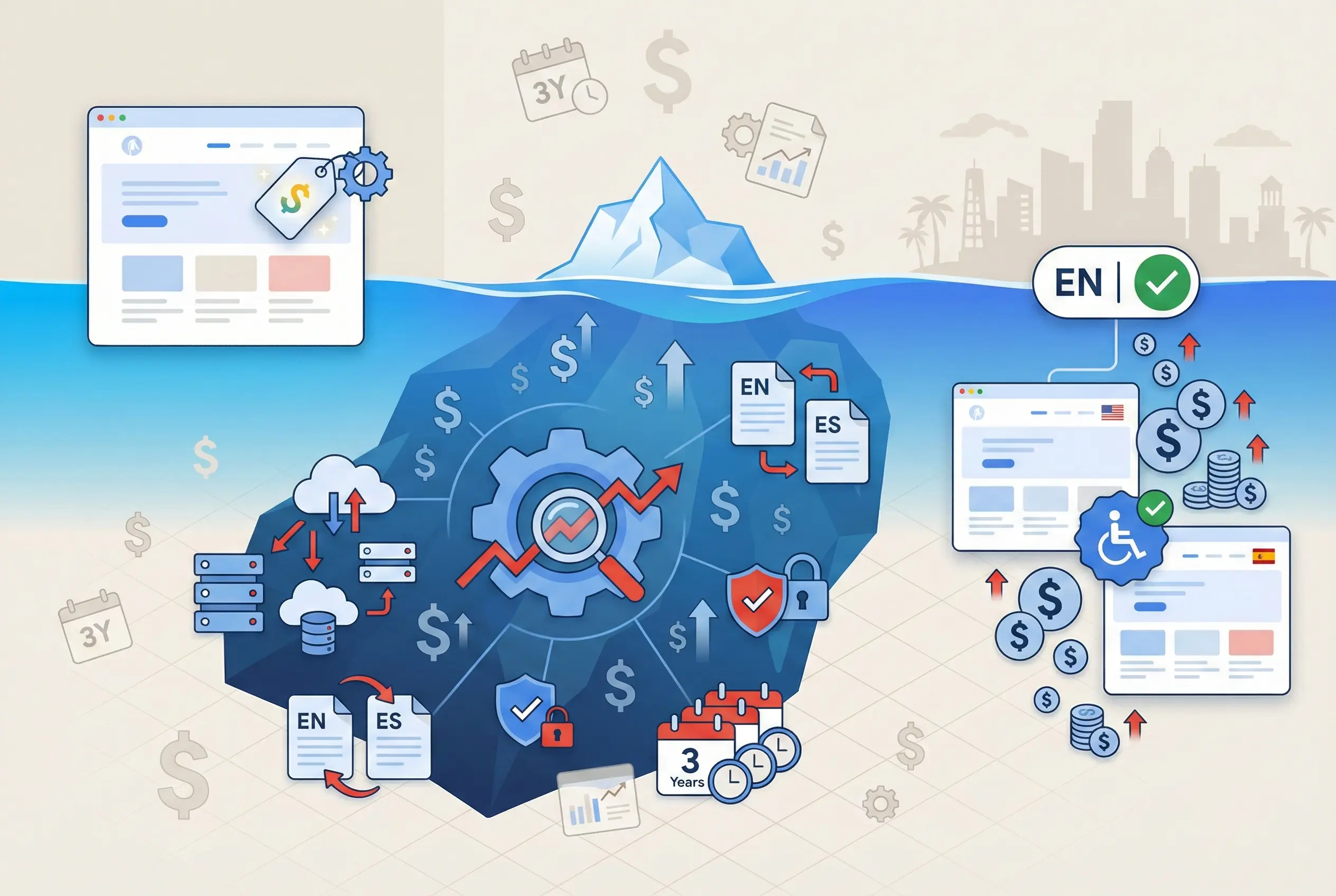
The quote you get for building a law firm website is maybe half of what you’re actually going to spend over the first three years, and that’s the part nobody explains until you’re already in it. There’s hosting, there’s maintenance, there’s the SEO that the site was supposedly “built for” but doesn’t actually do anything without ongoing work, and in Miami specifically there’s a cost that doesn’t exist in most other markets because you need the site in both English and Spanish and not the Google Translate version, the real version, because the population here can tell the difference in about two seconds and they’ll leave.
I’ve seen this play out enough times that the pattern is predictable. A firm gets a $5,000 build quote and thinks that’s the budget, and then six months in they’re paying $2,000 a month for SEO nobody mentioned during the sales call, plus maintenance fees for updates that should’ve been included, plus they find out their Spanish pages read like a robot wrote them and the bilingual clients they were trying to reach are bouncing before they even scroll.
And the other thing is that a law firm website isn’t a one time project. The site I worked on longest got rebuilt twice over about ten years because what it takes to compete keeps changing; what ranked in 2016 looked amateur by 2020 and what worked in 2020 needed a full structural overhaul by 2024. So the real question isn’t “how much does a website cost,” it’s “what am I going to spend over three years and what should I actually be getting for that money,” which is what I want to walk through here.
The Three Pricing Tiers
What are the pricing tiers for law firm websites in Miami? Tier 1 Basic ($3,000-$10,000): Template-based, 5-15 pages, solo practitioners, no custom design, limited SEO, difficult to scale beyond 20 pages. Tier 2 Mid-Range ($10,000-$25,000): Semi-custom, 15-50 pages, small firms, CRM integration (Clio, MyCase), basic bilingual support, professional copywriting included. Tier 3 Premium ($25,000-$100,000+): Fully custom coded, 50+ pages, unique design, custom photography/video, full bilingual architecture with manual translations, ADA compliance audits, conversion optimization testing.
Tier 1: Basic / Template-Based ($3,000 – $10,000)
This is your digital business card. Good for solo practitioners or attorneys who get all their work from referrals and just need something that exists when people Google their name.
You get 5-15 pages (Home, About, Practice Areas, Contact), built on a pre-existing WordPress theme or Squarespace. It’ll look professional but identical to hundreds of other lawyer sites. No custom design, basic on-page SEO only, difficult to scale beyond 20 pages without performance issues.
If you’re expecting to generate leads from this, you’ll probably be disappointed. But if you just need a credibility checkpoint for referrals, it works.
Tier 2: Mid-Range / Semi-Custom ($10,000 – $25,000)
This is where most small to mid-sized firms should be looking. You get 15-50 pages including individual attorney bios, detailed practice area sub-pages, and a blog.
The difference from Tier 1: custom homepage design (internal pages still use templates to manage cost), integration with practice management software like Clio or MyCase for automated lead intake, basic bilingual support, and professional copywriting for your core pages.
This is a growth engine, not a business card. You can actually generate leads from this if you pair it with SEO or PPC.
Tier 3: Premium / Fully Custom ($25,000 – $100,000+)
This is for large firms, high-stakes boutique litigation practices, or mass tort operations where a single case can pay for the entire website.
You get 50+ pages, fully custom coded (no heavy page builders slowing things down), unique visual identity, custom photography and videography, fully architected bilingual sub-directories with manual legally verified translations, rigorous ADA defense audits, and conversion rate optimization testing baked into the launch.
At Percy we eventually landed in this tier because the competitive landscape demanded it. When you’re trying to rank against Morgan & Morgan and the billboard firms, a template site doesn’t cut it.
PRICING SUMMARY
| Tier | Price | Best For |
|---|---|---|
| Basic Template | $3,000 – $10,000 | Solo practitioners, referral-only practices |
| Mid-Range Semi-Custom | $10,000 – $25,000 | Small firms (2-15 attorneys) seeking leads |
| Premium Fully Custom | $25,000 – $100,000+ | Large firms, high-stakes litigation, mass tort |
The Costs Nobody Mentions
What are hidden costs of law firm website development? Maintenance: $500-$6,000/year for hosting, security, plugin updates. SEO: $1,000-$20,000/month (website without SEO is “billboard in the desert”). Compliance audits: $1,000-$5,000/year for ADA and Florida Bar checks. Translation: $0.10-$0.25 per word, adds $2,000-$3,000 for 20-page site. Total Cost of Ownership over 3 years often equals or exceeds initial build cost. Miami-specific: competitor negative SEO attacks and bot traffic require robust firewall protection.
The quote you get for the build is the down payment. Here’s what else you’re going to spend:
Maintenance & Security: $500 – $6,000/year
Websites are living software. WordPress plugins need weekly updates to patch security vulnerabilities. Hosting on high-speed secure servers (WP Engine, Kinsta) costs more than shared hosting on GoDaddy. Neglecting this leads to site crashes, slow performance, or hacks.
In Miami specifically, competitor negative SEO attacks and bot traffic are real risks given how valuable legal leads are here. You need robust firewall protection, not the cheapest hosting you can find.
SEO & Content Operations: $1,000 – $20,000+/month
A website without SEO is a billboard in the desert. Nobody sees it. In Miami’s competitive market, ranking requires continuous new content and backlink acquisition. This is almost always a separate budget from the design fee.
Miami agencies typically charge $85-$150/hour for ongoing optimization. Senior consultants can hit $200/hour.
Compliance Audits: $1,000 – $5,000/year
Regular audits for ADA compliance and Florida Bar advertising rule checks. Especially important as you add new content that might accidentally violate ethical guidelines like “expert” claims or improper testimonial formatting.
Professional Translation: $0.10 – $0.25/word
Google Translate is a false economy that alienates the exact demographic you’re trying to reach. Professional translation for a 20-page site adds $2,000 – $3,000 to the project. For a 50-page site, you’re looking at $5,000+.
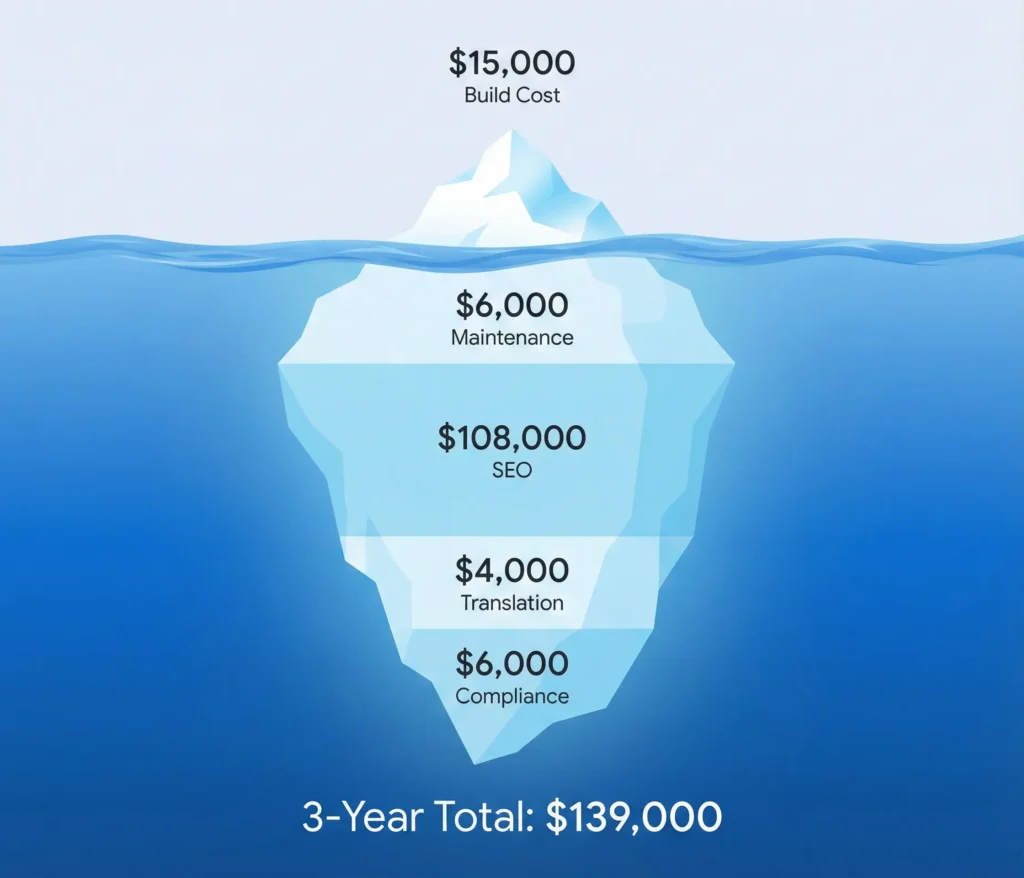
THE REAL COST: 3-YEAR TOTAL COST OF OWNERSHIP
| Category | Year 1 | Year 2 | Year 3 | Total |
|---|---|---|---|---|
| Website Build (Mid-Range) | $15,000 | — | — | $15,000 |
| Hosting & Maintenance | $2,000 | $2,000 | $2,000 | $6,000 |
| SEO (Moderate) | $36,000 | $36,000 | $36,000 | $108,000 |
| Translation (Bilingual) | $3,000 | $500 | $500 | $4,000 |
| Compliance Audits | $2,000 | $2,000 | $2,000 | $6,000 |
| TOTAL | $58,000 | $40,500 | $40,500 | $139,000 |
Translation: That “$15,000 website” actually costs $139,000 over 3 years when you include everything you need to make it work.
What Should an Attorney Website Include
What should a law firm website include? Essential pages: Home (answers what/where/how in 3 seconds), Practice Areas (detailed sub-pages, not just a list), Attorney Bios (credentials, bar admissions, photo), Contact (multiple methods, embedded map), Case Results (with required disclaimers). Trust signals: badges (Super Lawyers, AV Preeminent), testimonials (compliant with Florida Bar 4-7), custom photography (no stock gavels). Technical: mobile-first design, page speed under 2.5 seconds, ADA WCAG 2.1 AA compliance, schema markup, bilingual architecture with hreflang tags. Miami-specific: Spanish language toggle, culturally adapted content (not just translation).
Essential Pages:
Homepage needs to answer three questions in 3 seconds: What do you do? Where are you? How do I contact you? A clear call-to-action button, not buried in text.
Practice Areas with detailed sub-pages, not just a bulleted list. Each practice area should have its own page with enough depth to actually rank for those terms.
Attorney Bios with real credentials, bar admissions, education, case experience, and professional photos. Google reads these pages to establish E-E-A-T (Experience, Expertise, Authoritativeness, Trustworthiness).
Contact with multiple methods (phone, form, email), office address, and embedded Google Map. The map reinforces local relevance to search algorithms.
Case Results if you have them, but with required Florida Bar disclaimers that past results don’t guarantee future outcomes.
Trust Signals:
Badges from Super Lawyers, AV Preeminent, Million Dollar Advocates Forum, Best Lawyers. These need to be visible above the fold, not buried at the bottom.
Testimonials that comply with Florida Bar Rule 4-7 (not written or edited by the lawyer, not paid for, not actors).
Custom photography. Stock photos of gavels and scales are trust eroders. They look generic and cheap. Real photos of your actual attorneys and office matter.
Technical Requirements:
Mobile-first design because over 60% of legal searches happen on phones. Not just “responsive” (squishes to fit) but actually designed for mobile as the primary experience.
Page speed under 2.5 seconds on 4G networks. Every second of delay tanks your conversion rate.
ADA compliance at WCAG 2.1 Level AA. Florida is a hotspot for ADA website lawsuits and law firms are high-profile targets.
Schema markup telling Google “this is a LegalService, this is an Attorney, this is a Review.”
Miami-Specific:
Spanish language toggle that’s prominent in the header, not hidden.
Bilingual architecture with proper hreflang tags so Google serves the right language to the right users.
Culturally adapted content, not just word-for-word translation. Marketing messages that emphasize “protection and family security” often resonate differently than “aggressive litigation” across cultural groups.
How Long Does It Take to Build
How long does it take to build a law firm website? Template/basic site: 4-8 weeks. Custom mid-range: 3-5 months. Complex/enterprise: 6-12 months. Primary bottleneck: content collection from attorneys. Design approval is a major gate; changes after development starts become expensive. Multi-partner firms add weeks for committee approval. Recommendation: hire legal copywriter as part of project scope rather than relying on internal drafting.
Template / Basic Site: 4-8 Weeks
Select a theme, minor customization, upload content. The bottleneck is almost always content collection from the attorneys. Even for small sites, getting bios and practice descriptions can take weeks because attorneys are busy and this falls to the bottom of priorities.
Custom Design / Mid-Range: 3-5 Months
Strategy phase, wireframing, custom design of key pages, development, content migration, quality assurance. Design approval is a major gate. Once development starts, changes become expensive.
For bilingual sites, add time for translation review. You’re essentially building two sites with parallel content that needs to stay synchronized.
Complex / Enterprise Build: 6-12 Months
Extensive stakeholder interviews, complex data migration (moving thousands of blog posts from an old site), integration with third-party systems, rigorous security testing.
Large firms often require multiple rounds of committee approval, which can add months to the timeline.
WHERE PROJECTS STALL:
Content delays are the #1 killer. Attorneys don’t have time to write 50 pages of legal copy. Hire a legal copywriter as part of the project scope. Don’t rely on internal drafting unless you have a dedicated marketing resource.
Scope creep destroys timelines and budgets. Adding “just one more feature” mid-development can derail everything by weeks. Strict change control is necessary.
Approval latency in multi-partner firms. Establish a decision committee with actual authority to approve designs instead of requiring consensus from 12 partners.
WordPress vs Custom vs Proprietary
What is the best platform for law firm websites? WordPress recommended for 95% of firms: full ownership of code and data, best SEO tools (Yoast, RankMath), unlimited flexibility, but requires maintenance. Proprietary platforms (Scorpion, FindLaw): simple, vendor handles everything, but critical risk of vendor lock-in (if you cancel, you cannot take your website, must rebuild from scratch). DIY platforms (Wix, Squarespace): cheapest upfront, limited SEO flexibility, poor scalability. Strategic recommendation: WordPress with professional hosting (WP Engine, Kinsta). Own your platform to maintain business agility.
This is the most irreversible decision in the whole process. Get it wrong and you’re stuck.
WordPress (Open Source) — Recommended for 95% of Firms
| Pros | Cons |
|---|---|
| Full ownership — you own the code and data. If agency relationship sours, you can move the site. | Requires maintenance — weekly plugin updates, security patches |
| Best SEO ecosystem — Yoast, RankMath, granular control | Too many plugins can slow performance |
| Unlimited flexibility — thousands of plugins for any feature |
WordPress powers 43% of the web for a reason. The ability to switch agencies while keeping your website is a fundamental business safeguard.
Proprietary Platforms (Scorpion, FindLaw)
| Pros | Cons |
|---|---|
| Simplicity — vendor handles hosting, security, updates | VENDOR LOCK-IN — if you cancel, you cannot take your website |
| Built-in legal marketing tools | Must rebuild from scratch if you leave (costs $20,000+) |
| Limited to vendor’s SEO tools | |
| Monthly fees scale with traffic ($500 – $5,000+/month) |
WARNING: THE “GOLDEN HANDCUFFS” CLAUSE
If you build on a proprietary platform, you are renting your website, not owning it.
When you sign that contract, read the exit clause carefully. Here’s what typically happens if you ever leave:
- They keep the code. You cannot take it with you.
- They keep the design. Even if you paid $20,000 for it.
- They keep the structure. All those practice area pages, gone.
- You rebuild from zero. Another $15,000 – $25,000 and 3-6 months.
I’ve seen firms trapped for years paying $3,000/month for mediocre results because the cost of leaving was too high. They signed without reading the exit clause, and now they’re stuck.
Do not sign a proprietary platform contract until you see the Exit Clause in writing.
TRAPPED IN A PROPRIETARY CONTRACT?
If you’re currently with Scorpion, FindLaw, or similar and thinking about leaving, here’s what you need to request before you cancel:
The Proprietary Escape Checklist:
- Content export — Request all written content in Word/text format (you own the words)
- Image files — Request original resolution images (you may own these)
- Analytics data — Export Google Analytics history before domain transfer
- 301 redirect list — Document all current URLs for SEO preservation
- Review backup — Screenshot all reviews, they don’t transfer
- Contract termination clause — Check notice period (often 30-90 days)
What you usually CAN’T take: The code, the design, the CMS, any proprietary integrations. You’re rebuilding from scratch, but at least you keep your content and your data.
DIY Platforms (Wix, Squarespace)
| Pros | Cons |
|---|---|
| Cheapest upfront ($0-$3,000) | Limited SEO flexibility |
| Easy to use | Poor scalability (struggles past 20 pages) |
| You own content but not code |
Fine for a solo practitioner who needs something basic. Not viable for a firm trying to compete for leads in Miami.
STRATEGIC RECOMMENDATION:
WordPress with professional managed hosting (WP Engine or Kinsta). Own your platform. The long-term risk of proprietary vendor lock-in outweighs any short-term convenience.
Redesign vs New Build
How much does it cost to redesign a law firm website? Redesign (visual overhaul of existing site): generally lower cost, preserves existing SEO equity if done correctly. New build (from scratch): higher cost due to fresh content strategy and domain setup. Critical: redesign without proper 301 redirect mapping can destroy years of SEO equity overnight. Triggers for redesign: high bounce rate, mobile failure, Core Web Vitals issues, rebranding. Percy Martinez rebuilt twice (2016, 2022, 2025) with zero traffic loss through careful URL migration.
Redesign means overhauling the visual layer of an existing site. New build means architecting from scratch. The costs are different and the risks are different.
When to Refresh (Lower Risk, Lower Cost):
- Visuals feel dated but underlying code is clean
- Content needs updating but site structure works
- Budget is constrained
When to Redesign (Higher Risk, Higher Reward):
- High bounce rate — visitors leave immediately, UX is broken
- Mobile failure — site isn’t responsive or fails Core Web Vitals
- Rebranding — name change, merger, new identity needed
- Platform obsolescence — old proprietary CMS can’t support modern SEO
THE SEO MIGRATION RISK
A redesign is a high-risk event for SEO. Without a proper 301 redirect map telling Google where old pages moved, you can lose years of SEO equity overnight.
Every page that had rankings or backlinks needs a redirect to its new location. Breaking those URLs is like burning money.
At Percy we rebuilt twice and never lost traffic because we migrated URL by URL, preserving everything we’d built. This technical migration step is critical and many agencies skip it or do it poorly.
Florida Bar and ADA Compliance
Do law firm websites need to comply with Florida Bar rules? Yes, websites are considered “advertising” under Rule 4-7. Prohibited: guarantees (“We will win”), unverifiable comparisons (“Best lawyer in Miami”), paid testimonials, past results without disclaimer. Testimonials allowed but cannot be written/edited by lawyer. Filing fee for safe harbor opinion: $150. ADA compliance: WCAG 2.1 Level AA standard. Florida is national hotspot for ADA website lawsuits. Required: alt text on images, keyboard navigation, 4.5:1 color contrast, video captions. Automated accessibility widgets (UserWay, AccessiBe) help but don’t replace fixing underlying code.
Florida Bar Rule 4-7 (Advertising)
Your website is advertising. It’s subject to Bar scrutiny.
Prohibited:
- Guarantees: “We will win your case” or “Guaranteed results”
- Unverifiable comparisons: “The best lawyer in Miami” or “Most aggressive representation”
- Paid testimonials or testimonials written/edited by the lawyer
- Past results without disclaimer that results depend on specific facts
Allowed but regulated:
- Testimonials that are authentic and unedited
- Past verdicts/settlements with prominent disclaimer
- Board certification claims (but only if actually certified)
If you want a “safe harbor” opinion from the Bar to ensure compliance, the filing fee is $150 per filing. Recommended for firms launching aggressive new campaigns.
ADA Compliance (Title III)
Florida is a national epicenter for ADA website accessibility lawsuits. Law firms are high-profile targets because of perceived deep pockets and reputational damage from non-compliance.
The Numbers Are Brutal:
Florida consistently ranks in the top 3 states for ADA website lawsuits. Plaintiffs’ firms use automated bots to scan thousands of websites daily for technical violations. A single missing alt tag or improper contrast ratio can trigger a demand letter seeking $10,000+ in settlement.
Law firms are particularly vulnerable because the optics are terrible. A firm that can’t make its own website accessible looks incompetent, and plaintiffs’ attorneys know this creates settlement pressure.
WCAG 2.1 Level AA is the standard. This means:
- Alt text on all images for screen readers
- Keyboard navigation — entire site navigable via Tab key
- Color contrast — 4.5:1 ratio minimum for text
- Video captions — all attorney videos need transcripts and closed captioning
- Form labels — every input field must be properly labeled for screen readers
- Focus indicators — visible outline when tabbing through interactive elements
Accessibility widgets (UserWay, AccessiBe) demonstrate good faith effort but don’t replace fixing the underlying code. Courts have increasingly ruled that overlay widgets alone don’t constitute compliance. Your site is effectively under constant automated surveillance, and “we have a widget” isn’t a defense when the underlying HTML is broken.
The Cost of Non-Compliance:
| Scenario | Cost |
|---|---|
| Proactive ADA audit + fixes during build | $2,000 – $5,000 |
| Demand letter settlement (typical) | $8,000 – $15,000 |
| Litigation through discovery | $25,000 – $50,000+ |
| Reputation damage | Incalculable |
Pay for compliance upfront or pay lawyers later. The math is obvious.
Why Miami Is Different
Why does Miami law firm website development cost more? Bilingual requirement: 70%+ of Miami-Dade speaks language other than English at home. Site needs full content mirroring (/en/ and /es/ directories), doubling content management. Requires hreflang tags, native Spanish copywriting (not Google Translate), culturally adapted messaging. Hyper-local competition: must rank for micro-geographies (Coral Gables, Brickell, Hialeah, Doral) not just “Miami.” ADA litigation hotspot: Florida 11th Circuit sees high volume of website accessibility lawsuits. These factors add 30-50% to development costs compared to other US markets.
Miami isn’t like other legal markets and the cost structure reflects that.
The Bilingual Reality
Over 70% of Miami-Dade residents speak a language other than English at home. Spanish is dominant. A monolingual website effectively alienates the majority of potential clients.
This isn’t about adding a Google Translate plugin. Automated translation produces legally inaccurate phrasing. Terms like “retainer,” “liability,” and “damages” have specific meanings that machine translation butchers.
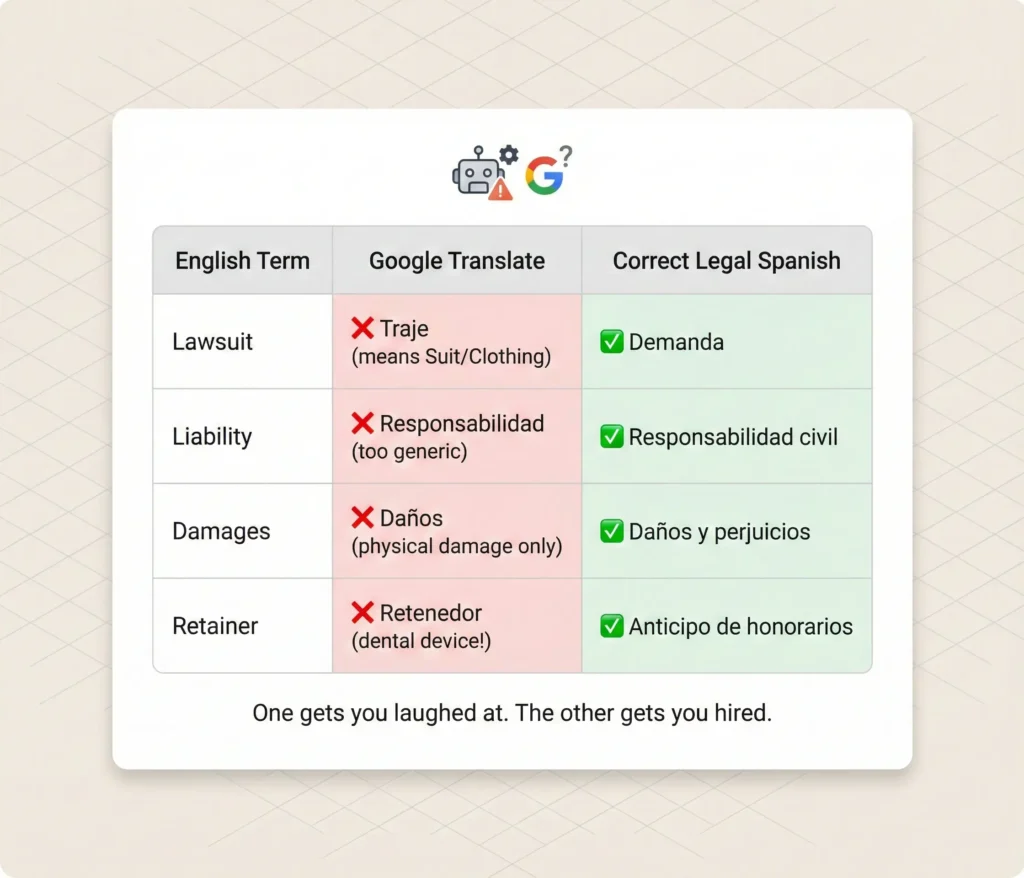
I’ve seen firms lose clients because their Spanish pages read like a robot wrote them, and Hispanic clients in Miami can tell immediately. They click away and call someone whose site actually speaks their language.
You need:
- Full content mirroring — every English page needs a Spanish counterpart
- Proper hreflang tags — so Google serves the right language version
- Native Spanish copywriting — not translation, adaptation
- Cultural UX — different messaging resonates differently across cultural groups
This effectively doubles your content management workload and requires a CMS configured for internationalization.
The Hyper-Local Competition
Ranking for “Miami lawyer” isn’t enough anymore. Successful firms target micro-geographies: “Coral Gables estate planning,” “Brickell business litigation,” “Hialeah traffic attorney,” “Doral immigration lawyer.”
This requires website architecture capable of supporting hundreds of location-specific landing pages without diluting domain authority or triggering spam filters.
The ADA Hotspot
Florida’s 11th Circuit sees massive volume of website accessibility lawsuits. Law firms are targets. Your site needs to be built for compliance from day one, not retrofitted after a demand letter arrives.
The Cost Premium
These factors combined add 30-50% to development costs compared to building the same site for a firm in Chicago or Boston. It’s not that Miami agencies charge more for the same work. It’s that Miami requires more work.
Want to Know What a Website Should Actually Cost for Your Firm?
I’ll look at your firm size, your practice areas, your competitive landscape, and tell you what tier makes sense and what the real 3-year budget should be. Sometimes the answer is a $10,000 site with $3,000/month SEO. Sometimes it’s a $50,000 build with minimal ongoing spend. Depends on your situation and your goals.
See Miami web design services | Compare with SEO costs | See PPC costs