

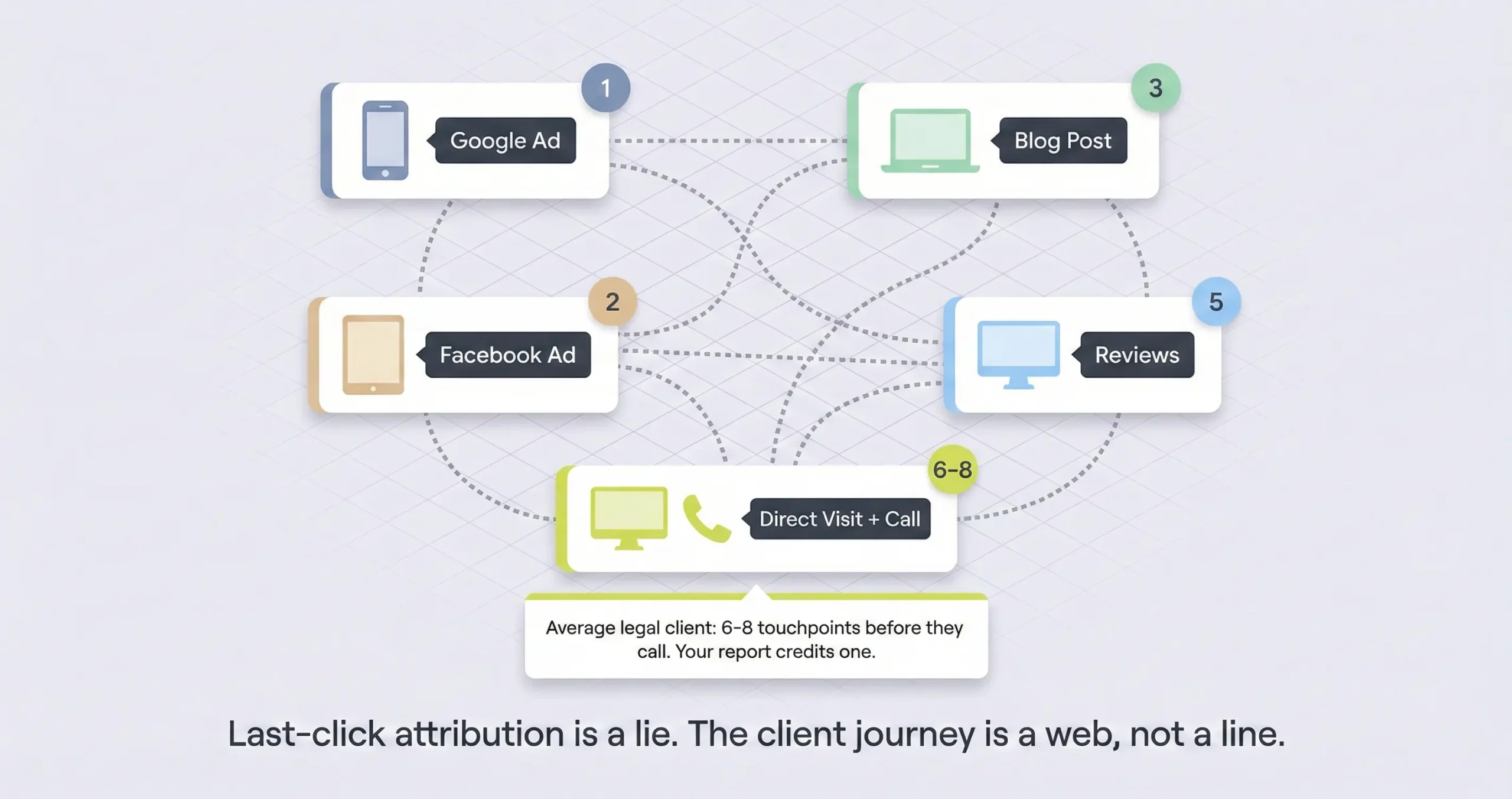
Why is conversion tracking important for law firms? Because 82% of law firms are making budget decisions based on data that credits the wrong marketing channel. The average legal client touches 6 to 8 marketing interactions across multiple devices before they ever call, but most agency reports only credit the last thing the person clicked. That means the Google Ad that started the whole journey shows zero leads in the report, the Facebook ad that built trust shows nothing, and Direct Traffic gets all the credit. Only 18% of firms use multi-touch attribution to see the full picture, and the rest are cutting channels that actually work because the data doesn’t prove it.
Look, ask your agency this question and see what happens; “of the leads you reported last month, which ones actually hired us and which ad produced them?” If they can answer that, you’re in better shape than 82% of law firms. If they can’t, then the report they send you every month is basically a fiction that contains real numbers, because knowing you got 100 calls doesn’t tell you anything useful if you can’t connect those calls to signed cases and trace them back to what actually caused the person to pick up the phone.
And it gets worse than just not knowing. Legal clients don’t see one ad and call; the research shows an average of 6 to 8 interactions across multiple devices before someone contacts a firm. The way most tracking is set up, only the last interaction gets credit.
So someone clicks your Google Ad on Monday, reads your blog on Tuesday, checks your reviews on Wednesday, and types your URL directly on Thursday when they finally call; your report says “direct traffic” and the ad that started everything shows zero leads, and you cut the ad budget because the data says it’s not working.
I covered how we built our tracking system in a separate post. What I want to walk through here is the infrastructure underneath; how call tracking, attribution models, CRM integration, and GA4 configuration either give you accurate data or give you an expensive guessing game, and honestly most firms are looking at the guessing game without realizing it.
What 6 to 8 Touchpoints Actually Looks Like for a Legal Client
How many touchpoints does it take before a legal client hires a lawyer? Research shows the average legal consumer engages with 6 to 8 marketing interactions across multiple devices before filling out a form or making a call. A PI client might click a Google Ad from the accident scene on their phone, see a Facebook retargeting ad that evening, read a blog post the next day, check attorney reviews on Google, and then call the firm directly a week later. Standard tracking credits only the final interaction, which means the five interactions that actually created the client are invisible in most agency reports.
So the thing that makes legal marketing tracking harder than ecommerce tracking is that nobody hires a lawyer the same way they buy shoes. Someone gets in a car accident and they’re at the hospital searching “car accident lawyer near me” on their phone and they click an ad and look at the homepage for maybe 30 seconds and then they close it because they’re dealing with police reports and insurance calls and they’re overwhelmed.
Then that night they’re at home and a Facebook ad shows up from the same firm with a client testimonial and they click it and read an article about insurance claim timelines. The next day they search the attorney’s name specifically to check reviews on Google and Avvo. And then maybe three days later they type the firm’s URL directly into their browser and call.
That’s five touchpoints across two devices over the course of a week. And in a standard tracking setup, which 82% of firms are using, that entire journey gets credited to “direct traffic” because that’s how the person arrived on the day they finally called. The Google Ad that started everything shows zero conversions in the report, the Facebook ad that built trust shows zero, and the only thing that gets credit is the thing that happened last, which is honestly the least interesting part of the whole journey.
Why Your Direct Traffic Number Is Probably a Lie
Why is high direct traffic a red flag in law firm analytics? When Google Analytics can’t identify the source of a visitor, it defaults to “direct.” In a healthy account, direct traffic should be 15 to 20% of total visits. If it’s above 40%, it usually means the tracking is broken. Common causes include links shared through WhatsApp or iMessage that strip referral data, site redirects that drop UTM parameters, landing pages missing the tracking tag, and email newsletters sent without UTM codes. A firm can check this by looking at which pages direct traffic is “landing on”; if people are supposedly typing deep blog post URLs directly into their browser, the tracking is obviously broken.
The audit for this is something you can do yourself in maybe ten minutes. Go into your GA4 account and look at the landing pages for direct traffic. If people are “directly” arriving at a page like /motorcycle-accident-guide-step-by-step or /what-to-do-after-slip-and-fall, nobody typed that URL from memory. That’s a tracking failure and the visit actually came from somewhere, probably an ad or an email or a social post that didn’t carry the right parameters.
And this matters for budget decisions because if your agency shows you that direct traffic is 50% of your leads, the natural reaction is to think your brand is strong and maybe you don’t need to spend as much on ads. But the reality is that most of that “direct” traffic was created by the ads and the content you’re paying for, and if you cut the budget the “direct” traffic disappears a few months later, which is what the research calls the lower funnel death spiral and it kills a lot of firms’ marketing programs.
How Call Tracking Works and How to Tell If Yours Is Set Up Right
How does call tracking work for law firms? Platforms like CallRail and WhatConverts use dynamic number insertion to swap the phone number on your website based on how each visitor arrived. A visitor from Google Ads sees one number, a visitor from organic search sees a different number, and when either calls, the platform knows which marketing channel produced the call and which keyword triggered it. The system relies on a cookie that persists across visits so if someone clicks an ad on Monday and calls from the same device on Thursday, the Thursday call still gets attributed to Monday’s ad.
So if your website shows one static phone number for everyone, attribution is basically impossible. You know the phone rang but you don’t know why, and your agency can tell you how many people visited the site but they can’t tell you which visits turned into calls because there’s no connection between the web session and the phone call.
Dynamic number insertion fixes that by maintaining a pool of tracking numbers and swapping them in real time based on the visitor’s source. The swap happens through a JavaScript snippet that runs when the page loads, and it’s fast enough that the visitor never notices. CallRail does this with deep keyword-level tracking and AI-powered call analysis that can flag spam automatically. WhatConverts does it with an emphasis on bringing forms and calls and chats into one unified dashboard so you can see all your lead types in one place.
And there’s a simple test you can run to check if it’s working. Open an incognito browser window and search for your firm’s name on Google and click the organic result and note the phone number. Close that window, open a new incognito window, and type your URL directly. If the phone number is the same both times, either DNI isn’t installed or it’s only tracking at the source level which is less precise than what you probably need.
Why Your CRM and Your Marketing Data Need to Talk to Each Other
Why do law firms need CRM integration with their marketing tracking? Because without it, your agency knows which ads produce calls and your firm knows which calls produce cases, but nobody connects the two. When CallRail or WhatConverts integrates with Clio or MyCase, the marketing source travels into the case management system with the lead. When that lead signs a retainer, the data can flow back to Google Ads through offline conversion imports, which trains the bidding algorithm to optimize for signed cases instead of just phone calls.
So the gap I see most often is that the agency reports 100 leads and the firm says “we only signed 5 cases” and both sides blame each other. The agency says the intake team is slow and the firm says the leads are garbage, and neither side has the data to prove who’s right because the marketing system and the case management system aren’t connected.
Clio is better set up for this because the integration with CallRail can automatically create a lead record with the marketing source populated, and when that lead gets marked as “Hired” the data can theoretically flow back to prove which ad produced the revenue. The audit point with Clio is checking whether your intake staff is overwriting the source field; if they’re changing “Google Ads” to “Internet” because it’s faster, that destroys the attribution chain.
MyCase has improved but historically it’s been more of a closed system where call details sync in one direction and the reporting focuses on case management rather than marketing attribution. The audit point with MyCase is checking whether all web leads are getting dumped into a generic “Website” bucket instead of being tagged as “PPC” or “Organic” or “LSA” specifically, because that distinction is what determines where the budget goes.
The Six Attribution Models and Which One Makes Sense for Legal
What attribution model should law firms use? Position-based attribution works best for most law firms. It gives 40% credit to the first interaction that introduced the client, 40% to the final interaction that produced the conversion, and 20% spread across the middle touchpoints. This balances the value of the awareness channels that fill the pipeline with the conversion channels that close the case. GA4 now defaults to data-driven attribution which uses machine learning, but small firms with low lead volume may not generate enough data for the algorithm to learn effectively.
So last-touch attribution is what most agencies report on because it’s the easiest, and it’s also the most dangerous for law firms because it tells you where the client converted but not how they found you. If you only look at last touch, branded search and direct traffic always look like the best channels, which leads you to cut the ads and content that were actually creating those branded searches in the first place.
First-touch is the opposite problem; it credits everything to the first interaction and ignores whether the person actually hired you. Linear gives equal credit to every touchpoint which sounds fair but treats a five-second blog bounce the same as a 20 minute deep-dive session. Time decay gives more credit to recent interactions which works for quick decisions like traffic tickets but punishes the early research that matters in med mal or mass tort cases where the client might be researching for weeks before they call.
The one I think makes sense for most firms is position-based because it respects both the channel that introduced the client and the channel that closed them while still acknowledging the nurturing in between. And if you have enough lead volume, data-driven in GA4 is even better because it learns from your actual conversion patterns, but it needs enough data to work properly and a lot of smaller firms don’t generate the volume for that.
GA4 Settings That Break Your Data If Nobody Checks Them
What GA4 settings do law firms need to fix? Three critical ones. First, GA4 defaults to keeping detailed user data for only 2 months; this must be manually changed to 14 months because legal buying cycles often exceed 60 days. Second, GA4 applies data thresholding that hides rows in reports when traffic is low, which makes it look like leads are missing when they’re actually hidden for privacy. Third, if your firm uses a separate payment portal like LawPay or a chat widget that redirects to another domain, GA4 breaks the session unless cross-domain tracking is configured, which means the conversion gets credited to “referral” instead of the original ad.
And the one that I think catches the most firms is the 2 month retention default because nobody checks it. Your agency sets up GA4, the default retention is 2 months, and six months later when you try to pull a year-over-year comparison or look at how long your average client takes from first visit to phone call, the detailed data is just gone. It takes maybe 30 seconds to change this in the admin settings and the fact that most agencies don’t do it tells you something about how closely they’re paying attention.
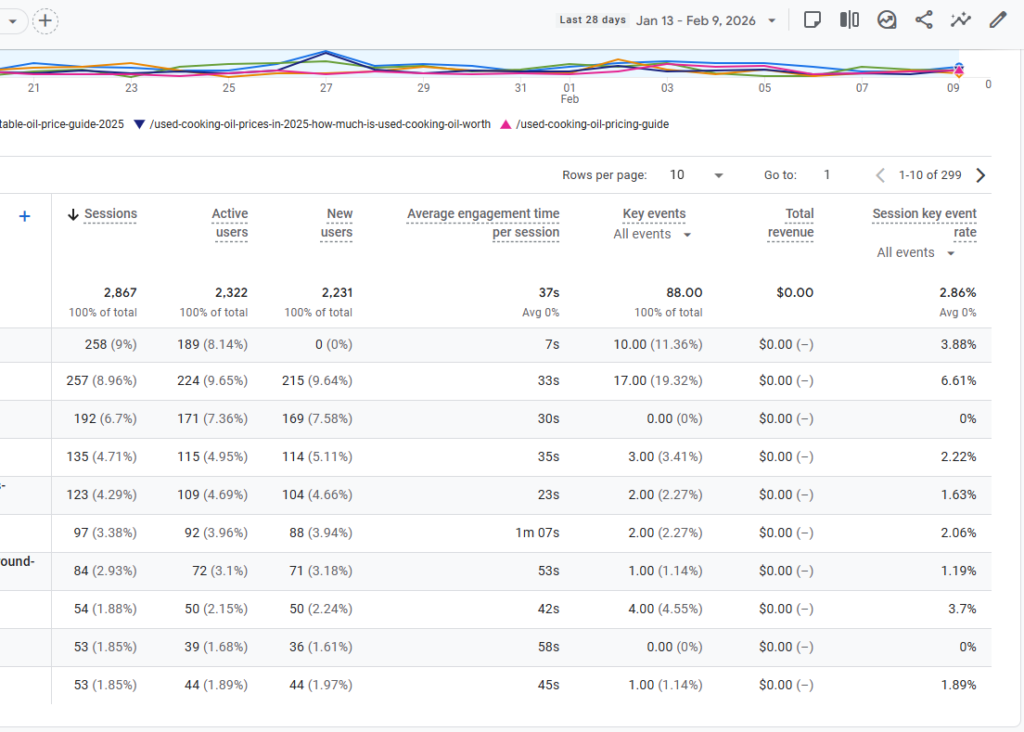
The other thing worth checking is what your agency defined as a “key event” in GA4, which is what used to be called a conversion. If they marked “viewed contact page” or “time on site over 30 seconds” as key events, the conversion rate in your report is going to look great but it’s measuring people who looked at your address, not people who actually called or filled out a form. The only key events that matter for a law firm are form submissions and phone calls, and everything else is just inflating the numbers.
Not sure if your tracking is set up right?
Send me a screenshot of your GA4 traffic sources and I’ll tell you in about ten minutes whether the data looks clean or whether you’ve got the direct traffic problem or the attribution problem or the retention problem. If everything looks right I’ll tell you that too and you don’t need to hire anyone, but if it’s broken I’d rather you know now than keep making budget decisions on bad numbers.