

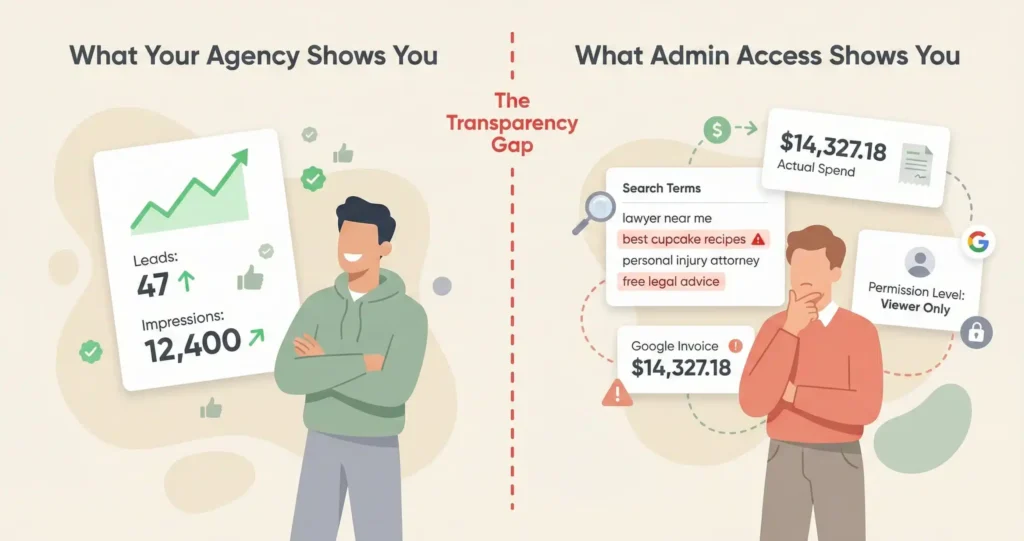





Why should a law firm have full analytics access to its own marketing accounts? Because the firm is legally liable for everything that happens in those accounts under ABA Model Rule 5.3, which requires attorneys to supervise nonlawyer assistance, and you cannot supervise what you cannot see. Beyond ethics, admin access is the only way to verify that ad spend is actually going to ads, that call recordings aren’t being shared with Google’s AI training under the 2025 LSA policy update, and that the agency isn’t inflating performance by reclassifying organic traffic as paid in the analytics settings. The difference between admin access and a dashboard login is the difference between owning your accounts and renting a view of them.
Log into your Google Ads account right now and click the “Admin” tab at the top, then “Access and security,” and look at what role appears next to your name. If it says “Admin” you own the account and can add or remove anyone including your agency, and if it says “Standard” or “Read-only” or if you don’t have a login at all, your agency controls the account and you’re seeing exactly what they want you to see and nothing more.
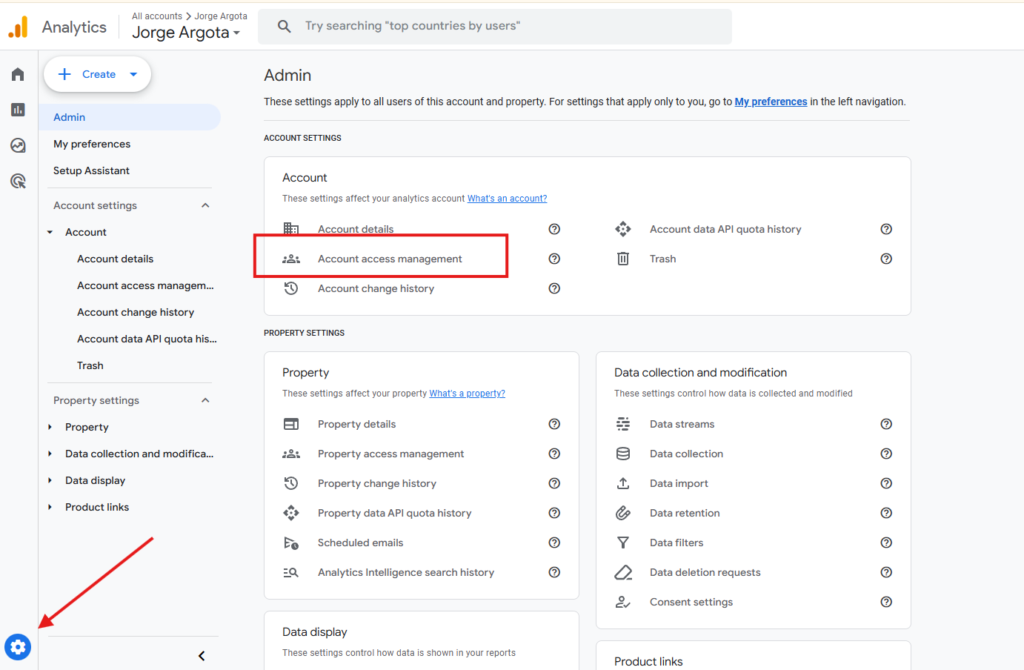
That distinction sounds like a technicality until the day you decide to switch agencies and discover that the account with two years of conversion data and quality score history was created inside the agency’s master account, which means they can revoke your access with one click and you start over from zero with a brand new account that has no algorithmic learning and no history, and every dollar you spent building that data up is gone.
Your Agency Created the Account Inside Their System and That Means They Own It Not You
Who owns a law firm’s Google Ads account? It depends on how the account was created. If the agency created the ad account inside their own MCC (My Client Center, which is Google’s manager hierarchy), the agency is the legal owner and the firm is a user granted permission. If the firm created the account or the account was created with the firm’s billing profile, the firm is the owner. The difference determines what happens when the relationship ends: owner keeps the account and its data, user loses access. The firm should always be the owner with the agency linked as a manager.
Google Ads accounts sit inside a hierarchy, and the firm that created the account at the top of that hierarchy is the owner in Google’s system regardless of who pays the invoices or who does the work. Agencies use something called an MCC, which stands for My Client Center, and it’s a management layer that lets them control dozens of client accounts from one login.
In the structure that protects you, your firm opens the Google Ads account directly and the agency’s MCC connects to it as a “manager,” which gives them full editing ability to run campaigns but zero ability to lock you out or take the account with them.
In the structure that doesn’t protect you, the agency created your account inside their MCC as a sub-account, and in Google’s system the agency is the owner and you’re a guest, and if you leave they can unlink you and keep every keyword, every quality score, and every conversion data point you paid to generate.
Same ownership problem exists in GA4, which is Google’s analytics platform that tracks what happens after someone clicks your ad. If the agency created your GA4 property inside their master analytics account, they can’t give you full admin access without exposing other clients’ data, so they give you “Editor” access instead and tell you it’s the same thing, but Editor can’t manage users and can’t remove the agency, and the data stays with them when you leave.
Take Your Agency Invoice for Last Month and Compare It to What Google Actually Charged
How can a law firm verify that ad spend is going to ads? By comparing the agency’s invoice to the actual cost shown in the Google Ads platform. If the agency charges $20,000 for “Google Ads spend” and the platform shows $14,500 in actual media cost, the $5,500 gap is undisclosed margin. The fix is direct billing, where Google charges the firm’s credit card directly and the agency invoices their management fee separately. With direct billing, the firm receives an official Google invoice showing exact spend to the cent, and the agency is compensated for expertise not for arbitrage on media dollars.
Pull your agency’s invoice from last month and find the line item for Google Ads spend, then log into the Google Ads account and pull the “Cost” column for the exact same date range, and if those two numbers don’t match you just found the gap that most firms never look for.
Nobody writes “$5,500 undisclosed margin” on an invoice, it shows up as a line that says “platform fee” or gets buried inside the media number so the invoice reads “$20,000 Google Ads” when Google only received $14,500, and the gap is sitting in the agency’s account as profit that was never negotiated or disclosed. I’ve audited accounts where the spread ran as low as 10% and as high as 40%, and every time the firm had no idea because they’d never compared the two numbers.
Direct billing eliminates the entire problem because your credit card goes on the Google Ads account, Google invoices you directly for media cost to the penny, and the agency sends a separate invoice for their management fee, and now you know exactly how much of your marketing budget is buying clicks and how much is buying the agency’s time, which is a basic transparency question that shouldn’t require a forensic audit to answer.
Google Updated the LSA Policy in 2025 and Your Agency May Have Opted You Into Something You Haven’t Read
What changed with Local Services Ads data in 2025? In April 2025, Google updated its LSA policies to claim broad ownership rights over all data generated through the platform, including call recordings and intake messages. Google now asserts the right to use these recordings to train AI models and analyze user intent. The policy allows agencies to accept these terms on behalf of their clients, meaning a firm may be bound to intrusive data terms without the partners ever reviewing the agreement. For law firms where intake calls contain privileged or confidential information, this creates a direct conflict with the duty of confidentiality.
Every call that comes through your Local Services Ads is recorded on Google’s servers, and as of the April 2025 policy update Google claims the right to use those recordings to train their AI models, which means your potential client describing their medical malpractice case or their DUI arrest is now training data for a company in Mountain View unless someone opted your firm out of that arrangement.
What makes this urgent is that the policy allows the agency managing your LSA account to accept these terms on behalf of the firm, so a managing partner might be bound to data sharing terms they’ve never read because the agency clicked “accept” during a routine platform update three months ago.
Independent call tracking through a platform like CallRail that the firm owns separately from the LSA account is the only way to guarantee that you have a copy of every intake recording stored on your own infrastructure regardless of what Google decides to do with theirs. Your CallRail account needs to be a standalone account that the firm opened directly, not a sub-account inside the agency’s master CallRail, because the same ownership problem that applies to Google Ads accounts applies to call tracking: whoever created the account at the top of the hierarchy controls the data.
Your Analytics Might Be Crediting Paid Ads for Traffic That Came From Organic Search
Can an agency manipulate analytics to inflate their results? Yes. GA4 allows custom channel groupings that determine how traffic sources are categorized in reports. An agency can configure settings to reclassify “Direct” or “Organic” traffic as “Paid Search” or “Display,” making it appear that their campaigns are producing more conversions than they actually are. Without admin access to the GA4 property’s “Data Display > Channel Groups” settings, the firm cannot verify if the source attribution is accurate. The fix is checking the raw “Source/Medium” data against what the agency’s reports claim.
Open your GA4 property and navigate to “Acquisition” and then “Traffic acquisition” and look at the source/medium breakdown, and then compare those numbers to whatever the agency reported for the same period, and if the agency’s report shows 300 leads from paid search but GA4 shows 180 from paid and 120 from organic, someone reconfigured the channel definitions to move credit from one column to another.
Agencies are incentivized to claim credit for as many conversions as possible, and the channel grouping settings in GA4 are editable by anyone with Editor access or higher, which means the line between “paid” and “organic” in the reporting is not fixed by Google, it’s defined by whoever configures the account, and if the agency configured it then the agency decided where the credit goes.
Checking takes ten minutes: go to Admin, then Data Display, then Channel Groups, and look at whether any custom rules are reclassifying traffic sources. If “direct” visits are being funneled into the “paid” category, or if organic traffic is being blended into campaign totals, the agency’s performance reports are built on reclassified data and the numbers aren’t what they claim to be.
You’re Ethically Liable for Every Keyword Your Agency Bids On and You’ve Never Seen the Search Terms Report
Are law firms ethically responsible for their agency’s marketing activities? Yes. ABA Model Rule 5.3 requires attorneys with managerial authority to make reasonable efforts to ensure that nonlawyer assistance, which includes outside marketing agencies, is compatible with the lawyer’s professional obligations. If an agency bids on a competitor’s brand name in a way that violates state bar advertising rules, or writes ad copy that guarantees results in violation of Rules 7.1 and 7.2, the ethics complaint is filed against the lawyer, not the agency. Without access to the Search Terms report and the Negative Keyword lists in Google Ads, the firm cannot audit what queries are triggering their ads.
Somewhere in your Google Ads account there’s a report called “Search Terms” that shows you the exact phrases people typed before your ad appeared, and I’d estimate that fewer than half the law firm partners I’ve worked with have ever seen it, and it’s the report that tells you whether the agency is bidding on your competitor’s name without your knowledge.
“Conquesting” is the industry term for bidding on another firm’s brand name, and while it’s generally legal under trademark law, plenty of state bars have rules against misleading advertising and some treat competitor brand bidding as a gray area that can trigger an ethics inquiry. Under ABA Model Rule 5.3 you have a duty to supervise nonlawyer assistance, and the bar will hold you responsible for what appears in your ads regardless of whether you personally wrote the copy or approved the keyword list.
Beyond conquesting, the Search Terms report is where you find out that your agency is spending budget on searches like “free legal advice” and “lawyer salary” and “how to become a paralegal,” and those irrelevant clicks cost the same per click as the ones from people who actually need a lawyer, and without access to the negative keyword list you can’t verify whether the agency is blocking them or just letting the budget drain.
The Contract Clause That Lets Your Agency Walk Away With Your Account Structure
What contract terms should a law firm require for marketing data ownership? The contract must explicitly state that all accounts, data, campaign structures, keyword lists, and creative assets generated during the engagement are the sole property of the client. Many agency contracts include an “intellectual property” clause claiming that optimization methodologies, account structures, and keyword lists are the agency’s pre-existing IP that they license to the client. Under such a clause, if the firm terminates the contract, the agency has the legal right to strip the account structure or refuse to transfer it. The firm should also require that all platform accounts are created under the firm’s ownership with the agency granted manager access, and that full administrative credentials are delivered within the first week of the engagement.
Read the intellectual property section of your agency contract and look for language that defines “optimization methodologies” or “proprietary account structures” or “keyword research” as the agency’s pre-existing intellectual property, because that clause is the legal mechanism that lets them refuse to hand over what you paid to build when you leave.
Standard expectation in legal marketing is that if the firm paid for the media spend and the management fee, the resulting campaign data, keyword performance history, and account structure are work product that belongs to the firm. But agencies insert IP clauses that redefine the work you funded as a “license” of their pre-existing methods, and under that framing the account structure isn’t yours, it’s theirs, and they’re just letting you use it for the duration of the contract.
What you want instead is one sentence in the first three pages: “all accounts, data, creative assets, and campaign structures generated during the term of this agreement are the sole property of the client.” If the agency won’t agree to that language, you need to understand what you’re actually hiring before you sign, because you’re agreeing to build an asset on land you don’t own.
Want to know what access level you actually have?
Send me the email addresses associated with your Google Ads, GA4, and CallRail accounts and I’ll check your permission levels across all three platforms in fifteen minutes. If you have admin access everywhere, I’ll confirm it. If you’re missing ownership in any of them, I’ll tell you exactly which accounts need to be restructured and what to say to the agency to get it done.