

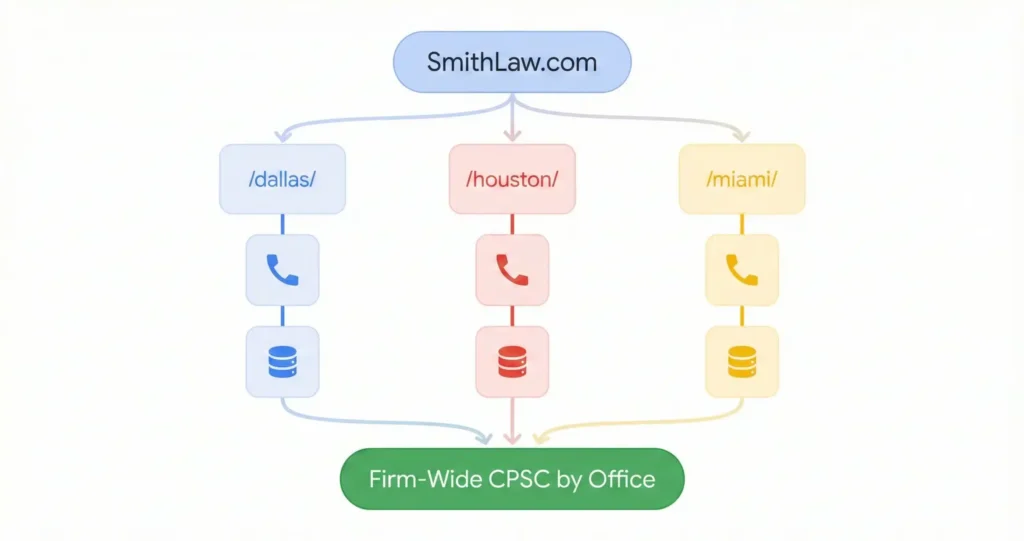

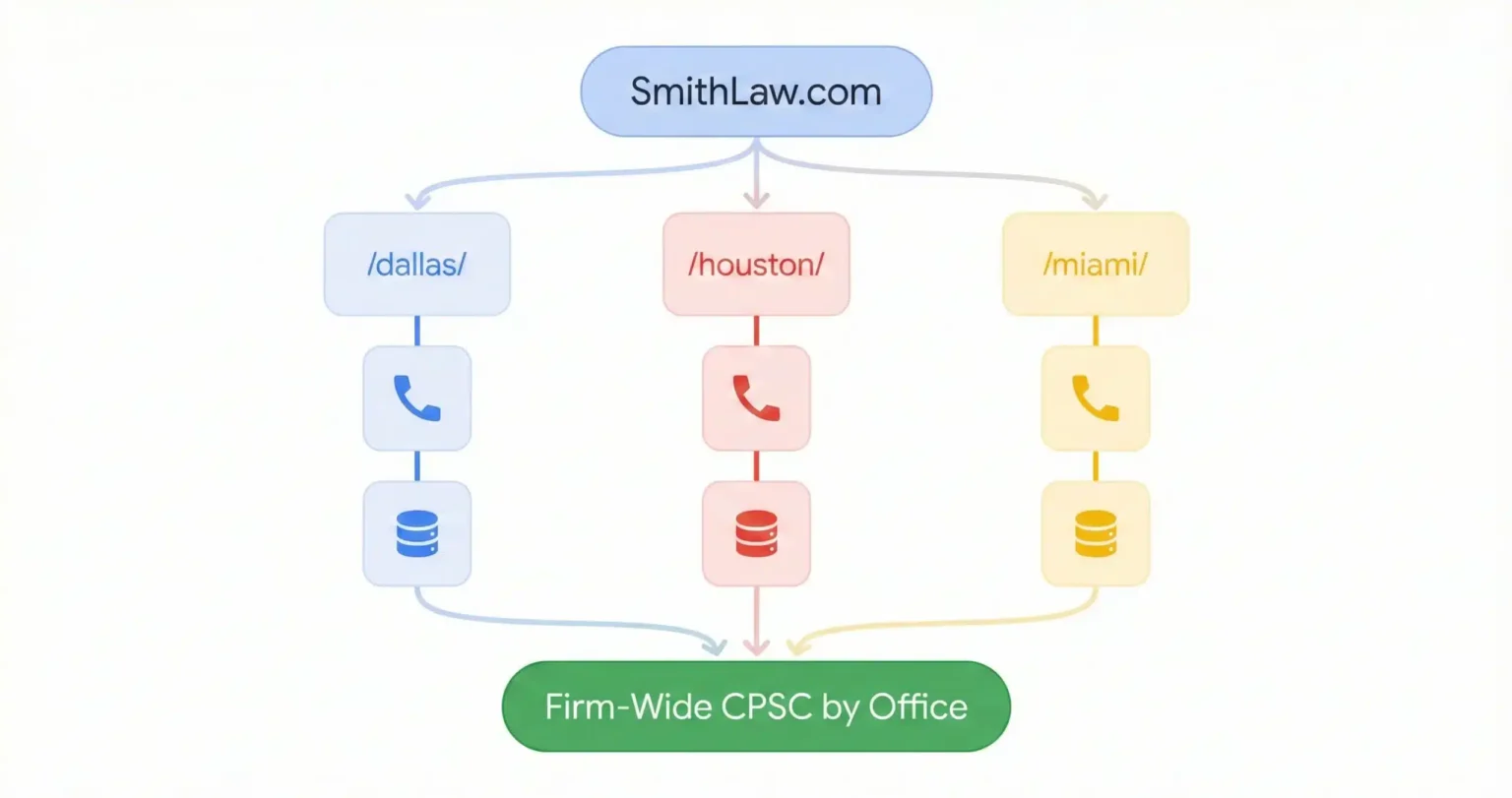




How do you set up marketing attribution for a multi-office law firm? Use a single root domain with sub-directory pages for each location, deploy one Google Tag Manager container with a pattern-matching lookup table that assigns an office ID based on the URL path, configure dynamic number insertion with local area code pools that route calls to the correct office, pass the office ID into the CRM, which is the case management system where leads become clients, through hidden form fields, and build a blended dashboard that joins ad spend data with CRM revenue data by office location so you can calculate cost per signed case for each market independently.
The tracking setup that works for a single office doesn’t scale to two offices, and I don’t mean it gets a little messy, I mean it breaks in ways that produce wrong numbers for months before anyone notices. The most common version is that the firm opens a new location, builds some pages, runs some ads, and every lead from the new market gets attributed to the original office because the tag management, the call tracking, and the CRM were all configured for one location and nobody went back to restructure them.
I wrote a technical walkthrough of how single-office tracking works from UTMs through hidden fields through CRM through offline conversion import, and everything in that post still applies here. The difference is that multi-office tracking adds an architectural layer on top of all of it, the layer that decides which office gets credit for which lead, which budget produced which case, and which market is actually profitable versus which one is being subsidized by the others without anyone knowing.
One Domain or Five and Why the Answer Determines Everything Else
Should a multi office law firm use one website or separate sites for each location? One website with sub-directory location pages. Separate domains for each office dilute your site’s credibility with search engines, force your team to earn links and trust from scratch in every market, create data silos that make unified reporting impossible, and multiply the maintenance work by the number of locations. A single domain with sub-directories like /locations/dallas/ and /locations/houston/ concentrates all the trust signals that search engines use to rank you onto one root, allows a single analytics property to track everything, and lets a press mention for one office lift search rankings for all of them.
Firms that launched separate domains for each office in 2015 or 2016 thought they were being strategic because exact-match local domains seemed like they’d rank better, and at the time there was some evidence for that. But what happened over the next few years is that each domain had to earn its own links from other websites and its own search engine trust from zero while competing against the firm’s own other domains, and the marketing team ended up fighting a war on four fronts instead of building one strong position.
The tracking problem with separate domains is worse than the SEO problem. If the Dallas office runs on DallasSmithLaw.com and the Houston office runs on HoustonSmithLaw.com, the analytics properties are separate, the tag management containers are separate, the conversion tracking configurations are separate, and building a single dashboard that compares office performance requires exporting CSVs from multiple accounts and manually reconciling data structures that inevitably drift apart over time, which means nobody actually does it.
How One Tag Management Container Handles Fifty Offices Without Fifty Configurations
How does Google Tag Manager work for a multi location law firm? Instead of creating separate tracking tags for each office, the system uses a single GTM container, which is the tool that manages all the tracking scripts on your site, with a pattern-matching lookup table that reads the URL path and assigns an office ID automatically. When someone submits a form on /locations/dallas/personal-injury/, the lookup table matches the URL pattern to “Office_001_Dallas” and attaches that ID to every tracking event. Adding a new office means adding one row to the lookup table, not building and testing new tags from scratch.
The naive version of multi-office tag management is to create a separate form submission trigger for Chicago and a separate one for Miami and a separate one for Dallas, and when the firm has 5 offices that’s annoying but manageable, and when it has 20 offices the container is bloated with hundreds of redundant tags that slow down the page and increase the odds of a configuration error that nobody catches for weeks.
The scalable version uses what’s called a regex table variable in GTM, and it works like a switchboard where one trigger fires for all form submissions on the entire site. A variable inspects the URL path and a lookup table matches the path to an office ID. The tracking tag references the variable and dynamically inserts the correct office ID into every event. If the firm opens a San Antonio office next quarter, someone adds one row to the table and the tracking is live, no new tags, no testing, no deployment risk.
And the piece that makes this matter for attribution specifically is that every event sent to GA4, which is Google’s analytics platform, now carries the office_location parameter, which means you can segment form fills, phone calls, chat initiations, and eventually signed cases by office without building separate reports for each one. The data is unified but the slicing is granular, which is the architecture that lets you answer “what did Dallas cost per case” without asking a separate question from “what did Houston cost per case.”
The Phone Number Problem That Breaks Local SEO If You Solve It Wrong
How does call tracking work for a multi office law firm without hurting local SEO? Dynamic number insertion shows the visitor a tracking phone number in their browser while keeping the real office number in the HTML source code where search engine bots read it. For multi-office firms, the system adds a geo-routing layer: it detects the visitor’s approximate location by IP address, pulls a tracking number from the local area code pool, and routes the call to the correct office. A visitor in Houston sees a 713 number that routes to Houston intake. A visitor in Dallas sees a 214 number that routes to Dallas. The firm’s local SEO stays consistent because the hard-coded number in the source never changes.
If you put tracking numbers on your website without understanding how search engines read phone numbers, you’ll wake up one morning with your Google Business Profile showing a number that doesn’t match the number on your site, and your local map ranking will drop because Google’s confidence in your business listing just eroded. I’ve seen this happen to a firm that installed call tracking on a Friday and lost their position in the local results by the following Wednesday, and nobody connected the two events for another month.
The way multi-office DNI is supposed to work is that the firm’s real local number for each office is hard-coded into the page HTML where bots crawl it, and a JavaScript snippet swaps in a tracking number only in the visitor’s browser session. Search engines see the real number and humans see the tracking number, and calls get attributed to the source without disrupting the NAP consistency, which is the name, address, and phone number match that search engines check across every directory listing, that local rankings depend on.
And for Google Business Profile specifically, the configuration that protects your rankings is to put the tracking number in the primary phone field where users see it, and put the real local number in the additional phone field where Google’s algorithm cross-references it against your other directory listings on Yelp and Avvo and the state bar directory. That additional field is the anchor that tells Google “yes, this is the same business you already trust,” even though the primary display number is different.
What Happens When the Lead Doesn’t Come Through Your Website at All
How do you track Local Services Ads leads for a multi-office law firm? Local Services Ads often generate calls directly from the Google Maps listing without the user ever visiting the firm’s website, which means UTM parameters and hidden form fields never fire. The tracking solution is to use the CRM’s lead capture token integration, which is a direct connection that pulls LSA leads into your case management system automatically, where LSA leads flow directly into the CRM with a source tag of “Google LSA” distinct from “Google Ads.” This distinction matters because LSA is charged per lead while Ads is charged per click, which requires different ROI math.
Most of the tracking infrastructure described in this post and in the single-office tracking guide assumes the lead touches the website before converting. The website is where the tracking script reads the UTM parameters, where the hidden fields capture the source data, where the DNI assigns the tracking number. But Local Services Ads increasingly bypass the website, and the lead enters the pipeline through a phone call or message that happens inside Google’s own interface.
If you don’t account for this, LSA leads show up in the CRM with no source data, which means they get dumped into the “direct” or “unknown” bucket and the LSA spend looks like it’s producing nothing. The fix is a direct integration between the LSA dashboard and the CRM, which platforms like Clio Grow handle through lead capture tokens that auto-tag the source on ingestion. The office location gets assigned based on which GBP listing generated the call, so the attribution chain stays intact even though the website was never involved.
Geo Fencing Sounds Exciting Until You Read Rule 7.3
Can law firms use geofencing for marketing, and how does it affect attribution? Geofencing lets firms define virtual perimeters around physical locations like courthouses and body shops and serve ads to devices that enter those zones. For attribution, the challenge is that the “trigger event” and the “conversion event” are separated by time and space, requiring view-through conversion tracking, which means the ad platform matches the device ID of someone who saw the ad against the device ID of someone who later visited the site and converted, even if they never clicked the ad itself. The ethical constraint is Rule 7.3 of the professional conduct rules, which restricts how lawyers can solicit clients: geofencing emergency rooms or hospitals to target accident victims immediately after trauma can be construed as digital ambulance chasing, and several state bars have issued opinions on it.
The marketing data suggests that the average person travels no more than 16 minutes to meet with a service provider, and that number should guide where you draw the fence. Fencing a body shop within a 16-minute drive of your office and serving ads to people whose cars just got hit is targeted and defensible. Fencing an emergency room and serving ads to someone whose phone was in the trauma ward 20 minutes ago is technically the same technology applied in a way that state bar ethics rules can reasonably classify as coercion or harassment.
For the attribution architecture, geo-fence campaigns need their own UTM structure. The utm_content parameter should carry the fence ID so that downstream reporting can show which physical location produced which leads. A conversion from utm_content=fence_mercy_hospital_dallas is a different data point than a conversion from utm_content=fence_collision_center_dallas, and being able to compare those in the office-level dashboard is what tells you whether the strategy is working or just spending.
The Dashboard That Shows You Which Office Is Making Money and Which One Is Hiding Behind the Average
How do you build an office-level ROI dashboard for a multi-office law firm? The dashboard blends two data sources that don’t natively talk to each other: the ad platform knows the cost but not the revenue, and the CRM knows the revenue but not the ad cost. Looker Studio, which is Google’s free dashboard tool, connects them using a join that matches rows from the ad platform to rows from the CRM based on the campaign name or office location field, which lets you calculate cost per signed case and return on ad spend for each office independently. This is how you discover that the Dallas office is acquiring cases for $800 each while the Miami office is spending $1,666 per case, a gap that’s invisible in the firm-wide average.
The firm-wide cost per signed case is $1,200 and everyone thinks that’s reasonable, and it is reasonable as an average, but the average is hiding the fact that Dallas is running at $800 and subsidizing Miami’s $1,666 and nobody made a conscious decision to allocate capital that way. That reallocation decision is the entire point of office-level tracking, because without it the firm scales its budget proportionally across all markets when it should be shifting money from the market that’s underperforming into the one that’s converting.
The join mechanism that makes this work is a shared key that exists in both the ad platform and the CRM. If the Google Ads campaign is named DAL_PI_Search_2025 and the CRM’s campaign source field contains the same string because the hidden field infrastructure passed it through at the point of conversion, then Looker Studio can match cost rows to revenue rows and calculate the real CPSC.
If those strings don’t match, which happens constantly when someone names the campaign one thing in Google and the CRM auto-assigns a different label, the join breaks and the dashboard shows spend with no corresponding revenue, which is maybe the most common reason firms think a market isn’t performing when it actually is.
Opening a new office and not sure if your tracking will survive the expansion?
Send me your current setup and where you’re expanding. I’ll map out what needs to change in the tag management, call tracking, and CRM integration before the new office launches so attribution stays intact from day one. If your current setup already handles multi-location, I’ll tell you that and save you the project.