

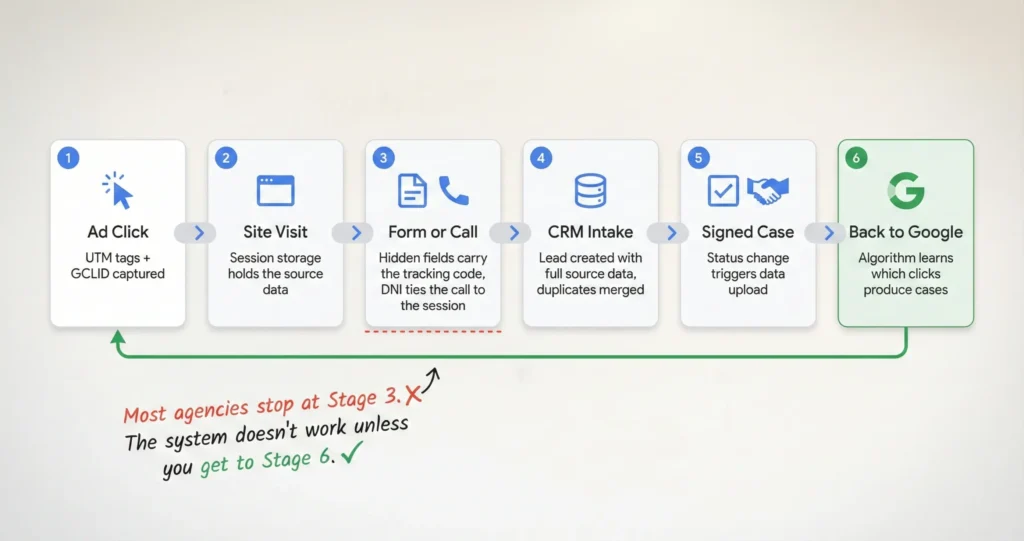





How does Argota track leads from click to signed case? Every inbound link is tagged with tracking parameters that identify the source, campaign, keyword, and ad creative. When someone lands on the site, a script saves that data to the browser and carries it through every page they visit. If they fill out a form, hidden fields inject the tracking code alongside their contact information. If they call, dynamic number insertion ties the phone call to their browsing session. The data flows into the CRM where intake moves the lead through qualification stages, and when a retainer gets signed, the conversion data uploads back to Google Ads so the algorithm learns which clicks produce actual cases instead of just calls.
“Tracking” doesn’t mean what most agencies mean when they use the word. When an agency says they track your marketing, they usually mean they installed a script that counts visitors and phone calls and generates a monthly report with line graphs.
What tracking means in this system is that three weeks after someone clicked a Google Ad for “birth injury lawyer Miami,” we can match the signed retainer back to that specific click, that specific keyword, that specific ad, and that specific landing page, and then we feed that match back to the ad platform so it gets smarter about who it shows the ad to next time.
I wrote a broader overview of what this system does and why it exists separately. This post goes deeper into how each piece works technically, because I’ve found that firms who understand the mechanics are better at spotting when something breaks, and something always breaks eventually.
How We Tag Every Link So Nothing Arrives Unidentified
What are UTM parameters and why do law firms need them? UTM parameters are tracking tags added to the end of every URL that tell the analytics system exactly where a visitor came from. Without them, traffic shows up as “direct” or “organic” with no way to distinguish which campaign, keyword, or ad creative produced the visit. The Argota system uses five standard tags on every link: source identifies the platform like Google or Facebook, medium identifies the channel type like paid click or email, campaign identifies the specific initiative like a birth injury awareness push, term captures the keyword, and content identifies which version of the ad was running.
Every link that doesn’t have tracking tags attached is money you can’t account for. If someone clicks a link in your email newsletter and there are no tags on that URL, the visit shows up in your analytics as “direct traffic,” which is the same bucket where someone who typed your URL from memory lands. You can’t tell them apart, which means you can’t prove the newsletter produced anything, which means when the budget gets tight the newsletter is the first thing that gets cut because nobody can defend it with data.
Here’s what happens right now when someone clicks one of our ads. They land on the site and the URL has five tracking tags on the end of it that identify where they came from, what campaign it was, which keyword triggered the ad, and which version of the ad creative they saw.
A small script reads those tags the moment the page loads and saves them to the browser’s session storage, which is like a temporary notepad that the browser holds onto while the person keeps browsing. So if they land on the birth injury page, then click over to the attorney bios, then navigate to the contact page, the original source data is still there when they finally fill out the form or call, even though the URL changed four times since they arrived.
How Phone Calls Get Connected to the Click That Produced Them
How does call tracking work in this system? The site maintains a pool of local phone numbers and a script that assigns a unique number to each visitor based on how they arrived. A visitor from Google Ads sees one number, a visitor from Facebook sees a different one, and a visitor from organic search sees a third. When any of them call, the system knows which marketing source produced that call because the number is tied to their browsing session. This goes beyond source-level tracking to keyword-level tracking, meaning we can see that a call came from someone who searched “surgical error attorney Tampa” specifically, not just “someone from Google Ads.”
“Install CallRail” is the advice most agencies give for call tracking and it’s not wrong but it’s about 20% of the actual work. The platform is the tool but the configuration is the strategy.
Most setups I’ve audited only track at the source level, which means they can tell you a call came from Google Ads but not which keyword or which campaign or which landing page the person was on when they decided to pick up the phone. That’s like knowing a case came from “the internet” without knowing anything more specific, which is barely useful.
The keyword-level setup uses a pool of numbers instead of one number per source. When a visitor arrives, the system assigns one number from the pool to that specific person’s session and locks it for the duration of their visit. If they browse three pages and then call, the call is tied to the exact session that started with the exact keyword that triggered the exact ad.
And because call tracking platforms also record and transcribe the call, we can see not just where the lead came from but what they said, which is how the system flags whether the call sounds like a real case or someone asking for free advice.
What the Contact Form Actually Captures Behind the Scenes
How do hidden form fields work for law firm tracking? When someone fills out a contact form, they see four or five fields: name, phone, email, message. Behind those visible fields, the tracking system injects additional data that the visitor never sees: the marketing source, the campaign name, the keyword, the Google Click ID, the landing page URL, and the device type. When they hit submit, all of that data travels to the CRM together, which means the intake team doesn’t just know who called but exactly how they found the firm and what they were searching for.
The contact form on your website captures maybe 4 fields that the person fills in. The form in our system captures 11, and the person only sees the same 4 they’d see anywhere else. The other 7 are hidden fields that get populated automatically by the tracking script that’s been holding onto the source data since the person first landed on the site.
So when someone submits a form after clicking a Google Ad for “failure to diagnose cancer attorney,” the form sends their name and phone number along with the campaign name, the keyword, the Google Click ID, the landing page they entered on, and the device they were using, and the person filling it out has no idea any of that is happening.
And the piece that most setups miss is what happens to junk submissions. If bots or competitors submit fake contact information, that garbage flows into the CRM and corrupts every metric downstream; the cost per lead drops because the lead count went up, but the cost per signed case climbs because none of the fake leads become cases.
We run real-time validation that checks whether the phone number and email are active before the form can submit, which keeps the data clean at the point of entry instead of trying to filter it out after it’s already in the system.
Why the CRM Is Where Most Tracking Systems Break
How does CRM integration work for law firm marketing attribution? The CRM receives lead data from both forms and calls with the full marketing source attached, creates a unified profile for each person even if they submitted a form and called separately, and moves them through intake stages from initial contact through qualification, consultation, and signed retainer. Each stage change is a trackable event, which means the system can calculate cost per lead, cost per qualified lead, and cost per signed case at every point in the funnel instead of just at the top.
The tracking system can be perfect from click to form submission and still produce useless data if the CRM isn’t set up to carry the source information through intake. And in most firms it isn’t, which is the frustrating part because the hardest technical work is already done by the time the lead reaches the CRM and then the data dies there because the system wasn’t configured to hold it or the intake team overwrites it.
Does your intake staff have a “source” dropdown in the CRM, and do they actually use it correctly? In most firms I’ve looked at, someone at some point typed “Internet” into the source field for a lead that came from a specific Google Ads campaign with a $200 click cost attached to it, and now that $200 click lives in the data as “Internet” and the attribution chain is broken.
The system we use creates the lead record automatically with the source already populated from the hidden fields, so intake never has to select a source manually, which removes the most common point of human error in the entire tracking chain.
And when someone both fills out a form and calls the firm, which happens more often than you’d think, the CRM merges those into a single profile instead of creating two separate leads. Without that merge, the data shows two leads from two different sources for one person, which inflates the lead count and distorts which channels are working.
How Signed Cases Train the Ad Platform to Find Better Clients
What is offline conversion import and why does it matter for law firms? When a lead signs a retainer, the system uploads the Google Click ID and an estimated case value back to Google Ads. This tells the algorithm that the original click didn’t just produce a call or a form fill, it produced an actual signed case. Google then adjusts its targeting to find more people who resemble the one who signed, rather than optimizing for people who just fill out forms. Over two to three weeks of consistent uploads, the campaign starts producing higher-quality leads because the algorithm has learned what a real case looks like in your specific practice area.
The last batch of conversion data we uploaded to Google Ads for a med mal campaign included 4 signed cases from the previous month with estimated case values attached. Within about three weeks the campaign’s lead quality shifted noticeably because Google stopped optimizing for “people who click ads and fill out forms” and started optimizing for “people who look like the 4 people who actually signed retainers,” and those are very different audiences even though they search for the same keywords.
After the upload, Google’s algorithm starts looking for patterns in the people who signed versus the people who didn’t; what time of day they searched, what device they used, what other searches they’d done recently, what zip code they were in. None of that is visible to us directly, but the algorithm uses it internally to adjust who sees the ad next.
The result is that the same budget starts producing leads that convert at a higher rate because the targeting is based on actual case outcomes instead of form submissions. And this only works if the tracking chain from click to signed case is intact, because if the Google Click ID gets lost anywhere along the way then the upload can’t connect the signed case back to the click that started it, which is why every piece of the infrastructure matters.
How the System Routes and Qualifies Leads Before Intake Picks Up the Phone
How does Argota’s system qualify and route leads automatically? When a lead enters the CRM, the system reads the campaign data and routes it accordingly. A lead from a Spanish-language birth injury campaign gets flagged for a Spanish-speaking intake specialist with experience in birth trauma cases. The intake script adjusts based on the campaign, showing relevant questions for the specific practice area or case type. And when leads get rejected, the rejection reason feeds back into the marketing data so the system can identify patterns like a campaign that keeps producing inquiries from people whose statute of limitations has expired.
A lead comes in from a Spanish-language campaign targeting birth injury cases in Miami and the system has already read the campaign tags before anyone picks up the phone. The intake screen shows that this person searched in Spanish, clicked a birth injury ad, and landed on the Spanish-language page.
The system routes it to the intake person who handles Spanish-speaking clients and birth trauma cases specifically. The conversation starts with context instead of starting from zero, and the person on the other end doesn’t have to repeat their situation to three different people before reaching someone who can help them.
And rejection reasons are data that most firms throw away, but in this system they’re some of the most valuable information we collect. If a specific campaign is producing 50 leads a month and 30 of them get rejected because the incident happened more than two years ago, that pattern tells us the targeting is pulling in people with old injuries and we need to adjust the campaign to filter them out before they click.
Without tracking the rejection reason back to the campaign that produced the lead, the campaign looks like it’s generating volume and nobody can explain why the cases aren’t signing, which is the situation where firms start blaming lead quality when the real problem is targeting.
Want to see how this would work for your firm?
Send me your current setup; what CRM you use, whether you have call tracking, and how your agency reports results. I’ll tell you where the tracking chain breaks and what it would take to connect the click to the signed case in your specific system. If the setup you have is working, I’ll tell you that too and you won’t need to change anything.