








Five things break law firm websites more than anything else and most of them are invisible unless you know where to look. The site loads in four seconds instead of two, the phone number is buried under a stock photo nobody clicks, the intake form asks for nine fields when it should ask for three, the Spanish pages read like a machine wrote them, or the mobile version looks like someone shrunk the desktop site and called it done. Any one of those will kill your conversion rate and your agency’s monthly report won’t mention any of them because the report tracks traffic, not what happens after someone lands on the page.
Is Your Site Too Slow?
How do I know if my law firm website is too slow? Check your Largest Contentful Paint in Google PageSpeed Insights; anything over 2.5 seconds means you’re bleeding leads, roughly 7% for every additional second. Usually it’s hero videos, bloated WordPress themes with too many plugins, or cheap shared hosting. Compress images to WebP, defer your JavaScript, get on managed hosting like WP Engine.
The first thing I check is speed, and you can do this yourself by going to Google PageSpeed Insights and running your URL, and if your Largest Contentful Paint is over 2.5 seconds then that’s probably your problem right there. I see Miami firms with 5, 6, 8 second load times because they have drone footage of Biscayne Bay autoplaying on the homepage and it looks gorgeous on desktop but it’s literally unwatchable on a phone and people bounce before they ever see your phone number, which apparently is a lot to ask.
The research on this is brutal; every additional second of load time costs you roughly 7% in conversions, and at $250 per click in Miami’s market that’s real money walking out the door. The usual culprits are WordPress themes with 47 plugins running in the background, hero images that are 4000 pixels wide when they only need to be 1200, and hosting plans that cost $8 a month and share a server with 500 other websites.
The fix is compressing images to WebP, deferring JavaScript so it doesn’t block the render, and getting real hosting like WP Engine instead of whatever cheap plan you’re on, but honestly if your theme is bloated enough sometimes you just need to start over.
Is Your Site Mobile-Broken?
How do I know if my law firm website is not mobile friendly? Open it on your phone and try to contact yourself with just your thumb. If you’re stretching to reach buttons or the form has 8 fields, that’s friction and friction kills conversions. Over 60% of legal searches happen on mobile. Put a sticky call button in the thumb zone at the bottom of the screen, simplify forms to 3 or 4 fields.
The second thing is mobile and you can test this yourself too, just open your site on your phone and try to contact yourself using only your thumb. If you have to stretch to reach the menu or the call button, that’s friction, and friction kills conversions and I still don’t understand why designers put contact buttons at the top of the screen when nobody can reach them without using two hands.
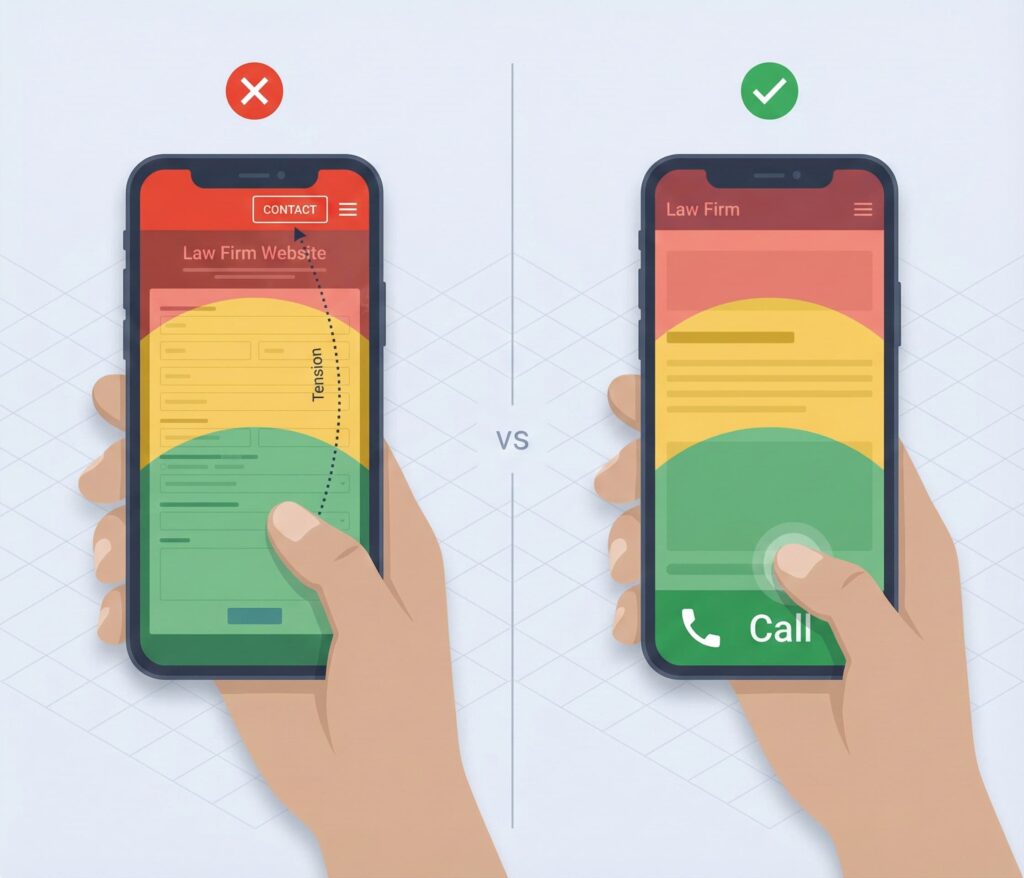
The research calls this the “Thumb Zone” problem; on modern smartphones, the bottom third of the screen is where your thumb naturally rests, and critical calls-to-action need to live there. But most law firm sites put the hamburger menu and contact button at the very top, which requires users to awkwardly stretch their hand or use two hands, creating physical friction that kills conversions.
Over 60% of legal searches happen on phones and if your forms have 8 fields and your phone number scrolls away and you’ve got pop-ups covering the screen, people just leave and call whoever comes up next, which is usually your competitor. The fix is a sticky bar at the bottom of every mobile page with a phone icon and “Free Consultation” button, permanently visible, one tap to call.
Does Your Site Look Outdated?
How do I know if my attorney website looks unprofessional? Stock photos are the giveaway; gavels, handshakes, scales of justice. If you don’t have video of the actual attorneys and your Google reviews are buried instead of on the homepage, you look like every other lawyer site from 2018. Custom photography, a 60 second attorney video in English and Spanish, embedded Google reviews people can verify.
The third thing is trust and I can usually spot this in about three seconds. If your homepage has a stock photo of a gavel or two people shaking hands, your site looks like every other lawyer site from 2018 and that’s not a compliment. The research calls these “visual clichés” that signal “generic lawyer”; the gavel, the handshake, the scales of justice; and they’re trust eroders because users have seen them on 50 other sites and they feel staged and inauthentic.
If you don’t have video of the actual attorneys speaking, you’re losing to competitors who do. The research is clear that a 60-second video of the attorney speaking directly to camera is the most powerful trust signal available because it lets users “meet” the lawyer, hear their voice, and gauge their empathy before risking a phone call. If your Google reviews are buried on a subpage instead of visible on the homepage, you’re hiding your best sales tool for some reason I’ve never understood.
The fix is custom photography of your actual team in recognizable Miami locations, a 60 second attorney video in English and Spanish if you’re serious about this market, and embedded Google reviews that people can click through and verify, not text testimonials that look like you wrote them yourself.
Is Your Intake Broken?
Why is my law firm website not generating leads? Your site might be generating leads that disappear because nobody responds fast enough. If forms go to an inbox three people can access but nobody owns, leads sit for hours and by then they’ve called someone else. The data is clear; firms responding within 5 minutes see 400% higher conversion than those waiting 30 minutes. You need live chat, instant SMS alerts, and a 5 minute response target.
The fourth thing is intake and this one drives me crazy because your site might actually be generating leads that you’re losing because nobody responds fast enough. If form submissions go to “info@lawfirm.com” and three people have access but nobody owns it, leads sit for hours or days and by then they’ve hired someone else.
The data on “Speed to Lead” is the most important thing in this entire piece: law firms responding within 5 minutes see 400% higher conversion than those waiting 30 minutes. That’s not a typo, it’s just how it works. And 67% of legal clients base their hiring decision on how fast a firm responds, which means if your form submission sits in a general inbox for 24 hours, that lead is dead.
The research describes this as the “Intake Waterfall” where leads leak at every stage, and most firms are leaky at the very first step. You need live chat with 24/7 coverage or an AI intake bot that can engage visitors immediately, instant SMS notification when a lead comes in so attorneys get a push notification on their phone, and a response time target of under 5 minutes. At Percy we treated intake like an emergency room because that’s what it is.
Are Your Spanish Pages Garbage?
Why don’t my Spanish website pages convert in Miami? Because 70% of Miami-Dade speaks a language other than English at home and they can spot Google Translate immediately. Legal terms get butchered; “retainer” becomes a dental device. Native speakers see robotic translation and click away. You need actual transcreation, not translation. Native Spanish legal copywriting, attorney video in Spanish, messaging adapted for the culture not just the language.
The fifth thing is Spanish pages and this one is Miami-specific but I see firms get it wrong constantly. Over 70% of Miami-Dade speaks a language other than English at home, and if your Spanish pages are Google Translate garbage, native speakers can tell immediately and they click away.
The research explains why automated translation fails: legal terms like “retainer,” “liability,” and “damages” have specific juridical meanings that machines butcher. “Retainer” doesn’t translate to “retenedor” which is a dental device or something, and “damages” becomes physical harm to objects instead of monetary compensation. But beyond the terminology, the cultural nuance is gone; Hispanic clients in Miami look for “confianza” (trust) and personal connection, not the aggressive “We fight, you win” transactional messaging that might work for English-dominant audiences.
The research calls this “transcreation” versus translation; adapting the message for the culture, not just the language. You need native Spanish copywriting by someone who understands both legal terminology and Miami Spanish specifically, an attorney video in Spanish that proves you can actually communicate with them, and seamless navigation so clicking “En Español” on a practice area page keeps them on that practice area in Spanish instead of dumping them back to the homepage. If your Spanish content reads like a robot wrote it, you’re better off having no Spanish pages at all, which is sad but true.
Do You Need a Redesign?
When does a Miami law firm website need a redesign vs just fixes? Redesign if your conversion rate is under 3%, your site hasn’t been touched in 3 or more years, or you’re trapped on Scorpion or FindLaw and want out. If it’s one or two isolated issues with a solid foundation, just fix those. But if you do redesign, proper 301 redirects are non-negotiable; skip that step and you’ll destroy years of SEO equity overnight.
And the last question everyone asks is whether they need a full redesign or just some fixes, and the honest answer is it depends. Not every problem requires a rebuild — if your site structure is sound but it’s slow, fix the speed; if mobile is broken but desktop converts fine, fix mobile; if intake is the problem, that’s an operations fix not a website fix.
You probably need a redesign if your conversion rate is under 3% when industry average is 5-7%, or your site hasn’t been touched in 3+ years and the technology has moved on, or you’re trapped on Scorpion or FindLaw and want to leave (you’re rebuilding anyway because you can’t take the code with you), or your Core Web Vitals are failing across the board and the theme is too bloated to salvage.
But the thing I’d warn you about is that a redesign without proper 301 redirects will destroy your SEO equity overnight, which I’ve seen happen to firms who didn’t know any better. At Percy we rebuilt twice; 2016 to 2022 to 2025; and never lost traffic because we migrated every URL carefully, but most agencies skip that step or do it wrong and firms lose years of rankings in a single launch.
Not Sure Which Problem You Have?
I’ll look at your site and tell you exactly what’s broken and whether it’s a quick fix or a rebuild, and if you don’t need my help I’ll tell you that too.
See website cost guide | See SEO services | See Google Ads services