







Law Firm Website Design

Web design for law firms. Own your site. Score 100. Convert the call.

WordPress sites for law firms on hosting in your name. Sub-second load, HIPAA-secure intake, zero release fees.

5.0 rating 25+ Google reviews Florida Bar 4-7 reviewed
Built on the stack law firms should be on · certifications and ownership, no lock-in
SOC 2 Type II Kinsta HIPAA-secure WordPress Clio Grow Core Web Vitals green FL Bar Rule 4-7
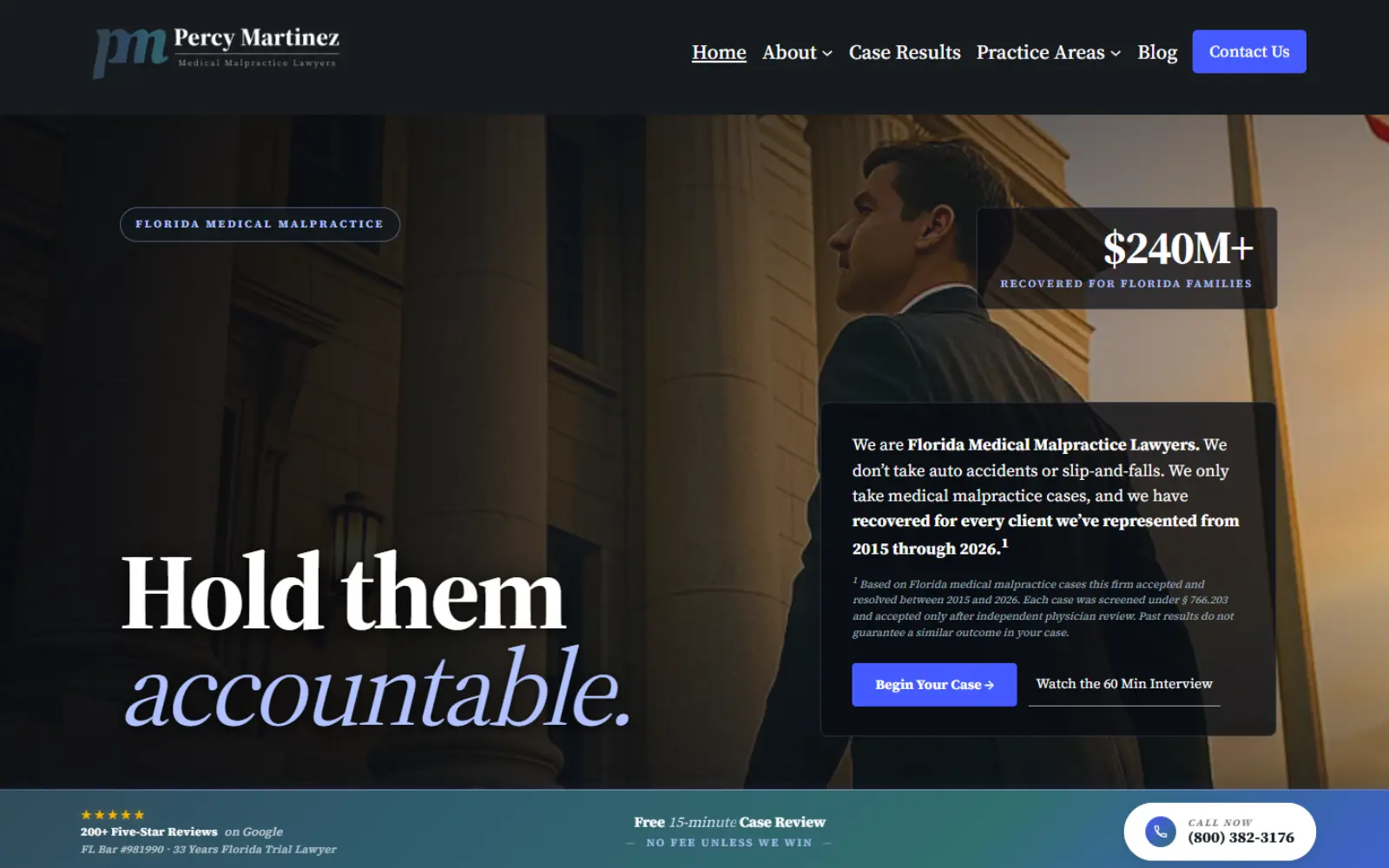
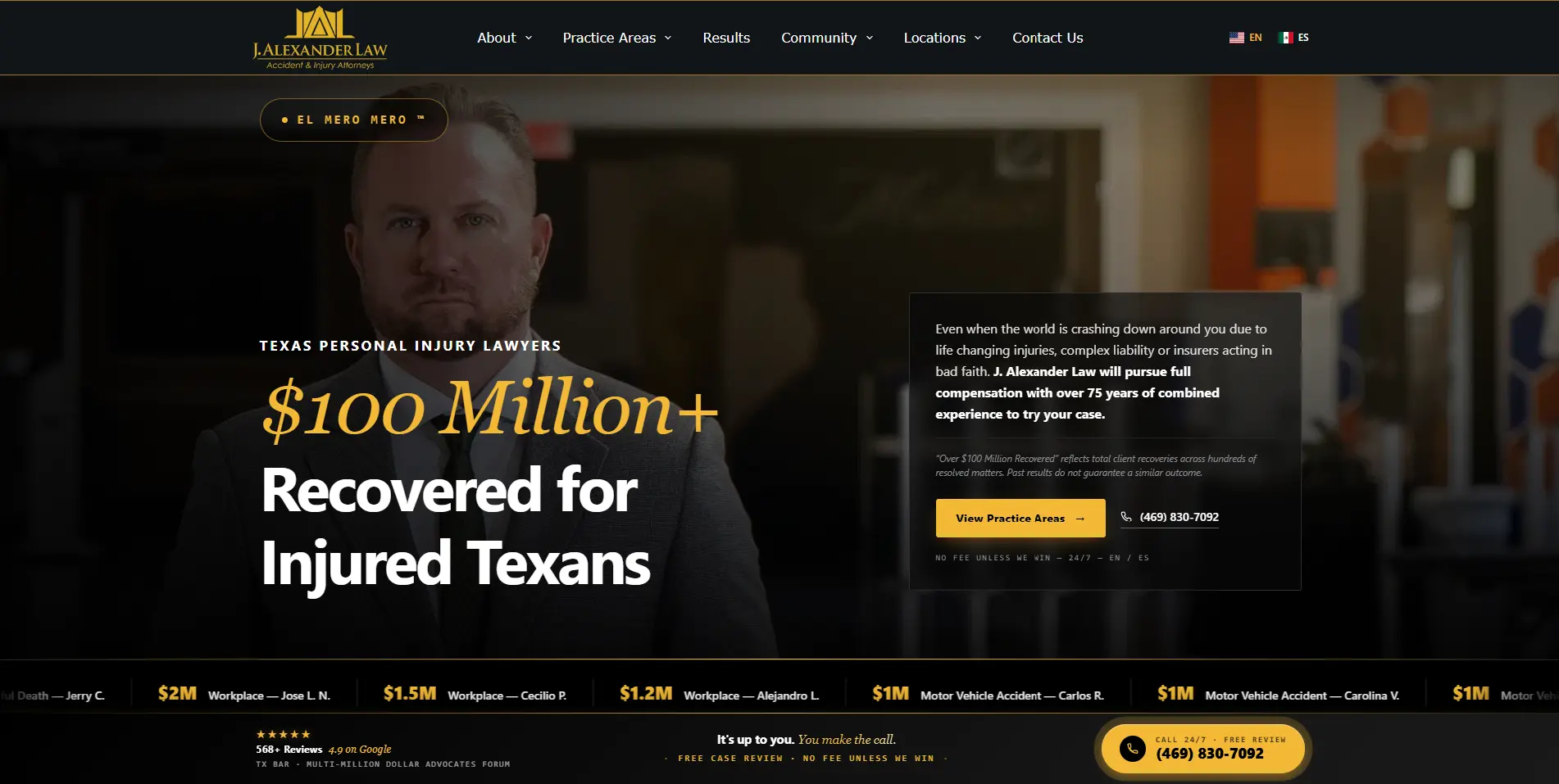
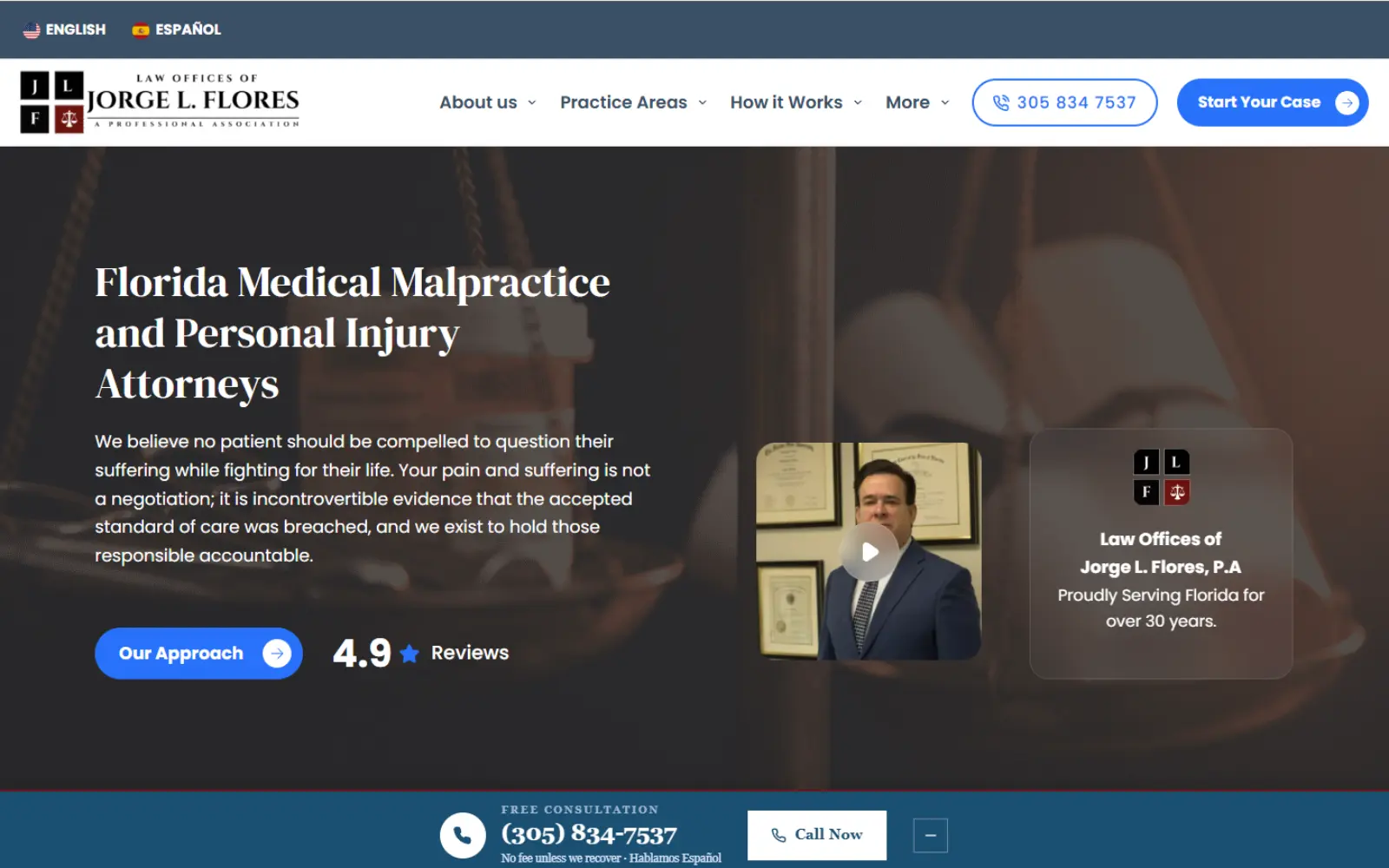
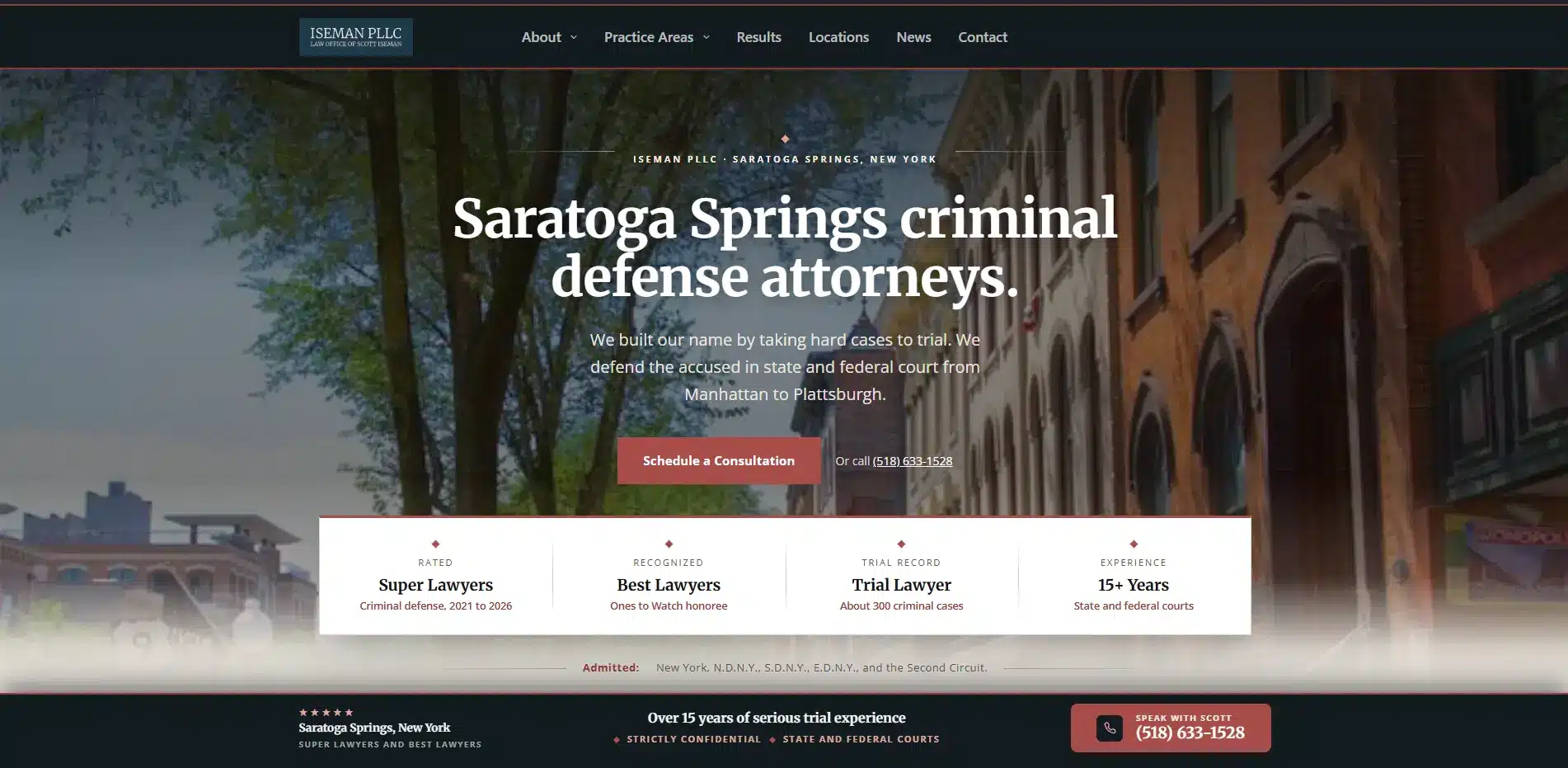
· Selected work · Florida law firm websites

See the work. Click any site to view full size.

4 firms shown
Each site is hosted on the firm’s own Kinsta account. Code in their GitHub. Domain in their registrar. See full case studies
What actually gets built

Five things most agencies skip.

A $15,000 site from a national agency usually delivers a theme, a logo swap, and a dashboard. These five things are where the cases actually come from.

01

Sub-second load. 100 PageSpeed.

53% of mobile visitors abandon a site that takes longer than three seconds to load. Industry average for law firm sites is a PageSpeed score of 34. Every build here targets 100, on the actual device your clients use.

  • LCP under 1.5s, INP under 100ms, CLS under 0.1
  • WebP images, deferred JS, lazy-loaded video
  • Kinsta managed hosting on enterprise infrastructure
  • Real-world Core Web Vitals monitored monthly
Industry avg 8.0s
This build 0.8s
Test your current speed
02

You own the site. All of it.

Hosting in your name. Domain in your name. Code in your repository. If you leave, you change the password and take everything. No release fees, no hostage files.

See ownership checklist
03

Intake that’s actually privileged.

Form data never sits in your WordPress database. Tunneled directly to Clio Grow or LawPay over encrypted transmission. Zero retention on the website. Attorney-client privilege starts on the contact form.

HIPAA intake spec
04

Thumb-zone mobile design.

60-70% of legal searches happen on phones. Sticky bottom bar with Call and Text buttons that never scroll away. Menu and CTA stay in the thumb reach, not the top corners.

See mobile examples
05

SEO equity stays intact.

Every URL matched. Every 301 redirect mapped. Staging server until the day of flip. Percy Martinez rebuilt three times without losing a ranking. Your authority goes with you.

Migration process
Case studies · Florida firms

Two Florida firms. Same build.

One started from nothing. One started trapped on a rented platform. Both now own every asset that produces their signed cases.

The numbers that matter

Speed. Mobile. Ownership.

Not vanity metrics. These are the numbers that decide whether your site produces signed cases or sits invisible on page three of Google.

PageSpeed target
100
Mobile, on every build. Industry average is 34.
Typical load time
0.8s
Google benchmark for mobile is under 2.5s.
Legal call conversions
66%
Come from organic search. Source: Ruler Analytics.
Mobile abandonment
53%
When load is over 3s. Your competitors’ problem.
How it works

The four-phase build.

Same four phases on every tier. Staging server first. Every URL matched. The domain only flips when there is zero risk of losing what you have already built. No downtime, no ranking drops.

01

Audit and migration plan

Full PageSpeed report, security scan, and URL inventory. Every existing page mapped to its new home before a line of code gets written. 301 redirect schedule locked in.

Phase 1
02

Build on staging

WordPress on Kinsta, hosting account in your name. Mobile-first thumb-zone design. Practice-area pages written for client problems, not legal jargon. HIPAA intake wired to Clio Grow or LawPay.

Phase 2
03

Test, measure, comply

PageSpeed hits 100 on mobile before anything ships. Florida Bar Rule 4-7 disclaimers on every page. Every form tested end to end. Staging site reviewed by you, page by page.

Phase 3
04

Flip the domain. Own everything.

DNS updated. 301s fire. Search Console and Analytics transferred to your accounts. Kinsta login, domain registrar, and WordPress admin all handed over. If you leave tomorrow, you take every asset.

Phase 4
Ownership check

Renting your website versus owning it.

Most firms do not realize they are tenants until they try to leave. Here’s the difference on paper.

Renting · their model

You pay monthly to rent what they own.

When you leave, they keep the assets.

  • Hosting in their name · their account, their control
  • Domain in their registrar · they can hold it hostage
  • Code is locked · “that will break the theme”
  • Data and leads gated behind their dashboard
  • Release fee to leave · up to $5,000 in some cases
Owning · this model

You own the site. Everything goes with you.

Built on accounts in your firm’s name from day one.

  • Hosting on Kinsta in your firm’s name
  • Domain in your registrar · you control DNS
  • Code in your GitHub repository · editable
  • Data flows to your Clio Grow · never gated
  • Release fee to leave · change the password
What clients say

Not marketing copy. Their words.

Three Florida attorneys who came from rented platforms or no website at all. Each describes the same outcome: the site finally produces cases instead of just sitting there.

★★★★★

“We rebuilt our site three times in ten years and rankings improved every time because Jorge maps every URL before a line of code ships. We now outrank Morgan and Morgan in Miami Local Service Ads on a site that loads in under a second.”

Percy Martinez, Esq.
Managing Partner · Percy Martinez P.A.
★★★★★

“I was stuck on a FindLaw site I couldn’t edit for eight years. Migrated to WordPress on my own Kinsta account in 30 days and hit number one in the Kendall Map Pack five months later. First time I’ve actually owned my website.”

Jorge L. Flores, Esq.
Founder · Jorge L. Flores P.A. · Kendall
★★★★★

“Our old site was $2,500 a month and scored 31 on mobile PageSpeed. The agency quoted us $5,000 to release the files. Jorge rebuilt it in four weeks, hit 100 on mobile, and handed me the logins. I control every asset now.”

Roberto Vasquez, Esq.
Partner · Vasquez Law Group · Fort Lauderdale
Transparent pricing · 3 tiers

Clear pricing. Clear timeline.

Three tiers, each with the price range and timeline visible on the page. No contact-for-quote barrier, no add-ons appearing mid-build. Care plans and ongoing SEO are priced as separate engagements.

Tier 01 · Essentials
$5K – $8K
One-time project fee · 50% to start
  • 8 to 12 page website
  • English-only content
  • 1 to 2 practice areas
  • Basic schema and SEO foundation
  • WordPress on your Kinsta hosting
  • FL Bar Rule 4-7 disclaimers

Best for: Solo attorneys and single-practice firms running PI, criminal defense, or family with English-led intake.

Launches in 4 to 6 weeks

Tier 03 · Custom
$15K – $25K
One-time project fee · 50% to start
  • 30 to 50 page website
  • 5 plus practice areas
  • Neighborhood and city landing pages
  • Full bilingual architecture
  • Custom design and branding
  • Programmatic page generation where it fits

Best for: Mid-size firms covering multi-county or multi-metro practice, often with verticals split across audience types.

Launches in 10 to 14 weeks

Care plans, optional, $150 to $500 monthly post-launch. Covers managed hosting, security monitoring, weekly backups, plugin updates, and minor content changes. Self-hosting and self-management remains a valid choice. The firm owns the site and the hosting account either way. Active ranking work is a separate $2,500+ monthly SEO engagement.

Before you pay anything, I’ll audit your current site and tell you whether you need a rebuild or just fixes. Sometimes the answer is you don’t need a new site.

Frequently asked

Website builds, answered.

The seven questions that come up on every discovery call. Pricing, ownership, SEO migration, timeline, intake compliance, and hosting.

How much does a law firm website actually cost?

Builds run $5,000 to $25,000 across three tiers. Essentials at $5K to $8K covers solo attorneys with 1 to 2 practice areas and an English-only site, launching in 4 to 6 weeks. Growth at $8K to $15K is the typical fit for firms running 3 to 4 practice areas with practice-specific funnels and bilingual options where the practice mix supports them, launching in 8 to 10 weeks.

Custom at $15K to $25K covers mid-size firms with 5 plus practice areas, neighborhood landing pages, and custom design, launching in 10 to 14 weeks.

Do I really own the website you build?

Yes, 100 percent. The Kinsta hosting account is in your firm’s name. The domain is in your registrar under your name. Every page, image, and line of code is in your GitHub repository.

If you decide to leave tomorrow, you change the password and everything goes with you. No release fees, no hostage files.

Will my SEO rankings drop during the redesign?

Not if it’s done right. The entire build happens on a staging server. Every URL gets matched and every 301 redirect mapped before the domain flips. Percy Martinez has been rebuilt three times and rankings improved each time.

The domain only flips when there’s zero risk of losing what you’ve already built.

How long does a complete build take?

Timeline tracks tier and practice area count. Essentials launches in 4 to 6 weeks. Growth in 8 to 10. Custom in 10 to 14.

The longest phase is content sign-off on the firm side, not the development side. Photos, case results, and compliance review on each page take longer than the build itself.

Is the intake form really HIPAA-secure?

Yes. Form data never sits in your WordPress database. It’s tunneled directly to Clio Grow or LawPay over encrypted transmission and never retained on the website.

If there’s ever a WordPress plugin vulnerability, your client intake data isn’t in the blast radius. Attorney-client privilege starts on the contact form, not in the courtroom.

What if I just need fixes, not a full rebuild?

Sometimes that’s the honest answer. After the audit, if your foundation is solid and one or two specific issues are dragging you down, I’ll tell you that and quote the fixes instead of pushing a rebuild.

Hourly optimization work runs $150 per hour. The audit is free either way.

Do you host the site or does it go on my own account?

Your own Kinsta account, in your firm’s name, from day one. I get administrative access during the build. On launch day, the admin credentials are transferred to you.

Kinsta is SOC 2 Type II certified, runs on Google Cloud enterprise infrastructure, and includes automatic daily backups.

Free website audit

Send me your URL. I’ll tell you what’s broken.

You’ll get a PageSpeed score on mobile, a Core Web Vitals report, an ownership check on your hosting and domain, and an honest assessment of whether you need a new site or just fixes. Sometimes the answer is you don’t need a rebuild, and that’s fine too.

Reply within 24 hours · No obligation · Confidential
Jorge Argota, founder of Argota Marketing

Jorge Argota · 10 years inside a Florida law firm. Built Percy Martinez from a $500 budget into one of Florida’s highest-ranking medical malpractice firms. Sites that score 100 on PageSpeed and convert because they were built by someone who understands cases, not just code. Read the full bio.